|
5.1
INTRODUCTION
Ethernet
has been a relatively inexpensive, reasonably fast, and very popular LAN
technology for several decades. Two individuals at Xerox PARC -- Bob
Metcalfe and D.R. Boggs -- developed Ethernet beginning in 1972 and
specifications based on this work appeared in IEEE 802.3 in 1980. Ethernet
specifications define low-level data transmission protocols and the
technology needed to support them. In the OSI model,
Ethernet technology exists at the physical and data link layers (layers 1
and 2).
A
low-level network technology, Ethernet supports IP and most other
higher-level protocols. Traditional Ethernet supports
data transfers at the rate of 10 Megabits per second (Mbps). Over time, as
the performance needs of LANs have increased, related technologies like Fast
Ethernet and Gigabit Ethernet have been
developed that extend traditional Ethernet to 100 Mbps and 1000 Mbps
speeds, respectively.
Traditional
Ethernet
Often
referred to as "Thicknet," 10Base5
technology was the first incarnation of Ethernet. It was used in the 1980s
until 10Base2 "Thinnet" with more
flexible cabling appeared. (At five millimeters, Thinnet
is one-half the thickness of Thicknet.) The most
common form of traditional Ethernet, however, is 10Base-T due to span
style='color:white'>the inherent advantages of unshielded twisted pair (UTP) over coaxial cabling and its low
cost compared to alternatives like fiber.
The
following table lists these well-known forms of Ethernet technology.
Besides the type of cable involved, another important factor in Ethernet
networking is the segment length.
A single uninterrupted network cable can only span a certain physical
distance before its electrical characteristics are critically affected by
factors such as line noise or reduced signal strength.
|
Name
|
Segment Length
(Max.)
|
Cable
|
|
10Base5
|
500m /
1640ft.
|
RG-8 or
RG-11 coaxial
|
|
10Base2
|
185m /
606ft.
|
RG 58
A/U or RG 58 C/U coaxial
|
|
10Base-T
|
100m /
328ft.
|
Category
3 or better unshielded twisted pair
|
Several other less well-known Ethernet standards exist,
including 10Base-FL, 10Base-FB, and 10Base-FP for fiber optic networks and
10Broad36 for broadband (CATV) cabling.
Fast
Ethernet
In the
mid-1990s, Fast Ethernet achieved its design goal of increasing the
performance of traditional Ethernet while avoiding the need to completely
re-cable existing networks. Fast Ethernet Ethernet
comes in two major varieties:
·
100Base-T (using unshielded twisted pair cable)
·
100Base-FX (using fiber optic cable)
By far
the most popular of these is 100Base-T, a standard that includes 100Base-TX (Category 5 UTP), 100Base-T2 (Category 3 or better
UTP), and 100Base-T4 (100Base-T2
cabling modified to include two additional wire pairs).
Gigabit
Ethernet
Whereas
Fast Ethernet improved traditional Ethernet from 10 Megabit to 100-Megabit
speed, Gigabit Ethernet offers the same order-of-magnitude improvement over
Fast Ethernet by offering speeds of 1000 Megabits (1 Gigabit). Gigabit
Ethernet was first made to travel over optical and copper cabling, but the
1000Base-T standard successfully supports it as well. 1000Base-T uses
Category 5 cabling similar to 100 Mbps Ethernet, although achieving gigabit
speed requires the use of additional wire pairs.
5.2
TERMINOLOGY
Ethernet
follows a simple set of rules that govern its basic operation. To better
understand these rules, it is important to understand the basics of
Ethernet terminology. Ethernet devices attach to a common medium that
provides a path along which the electronic signals will travel.
Historically this medium has been coaxial copper cable, but today it is
more commonly twisted pair or fiber optic cabling. In any case, we refer to
a single shared medium as an Ethernet segment, and devices that attach to
that segment are stations or nodes. The nodes communicate in short messages
called frames, which are variable-sized chunks of information. Frames are
analogous to sentences in human language. In English, we have rules for
constructing our sentences. We know that each sentence must contain a
subject and a predicate. The Ethernet protocol specifies a set of rules for
constructing frames. There are explicit minimum and maximum lengths for
frames, and a set of required pieces of information that must appear in the
frame. Each frame must include, for example, both a destination address and
a source address, which identify the recipient and the sender of the
message. The address uniquely identifies the node, just as a name
identifies a particular person. No two Ethernet devices should ever have
the same address.
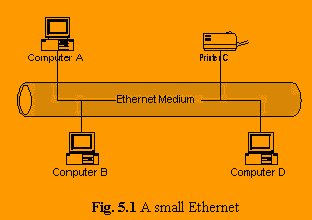
Since a
signal on the Ethernet medium reaches every attached node, the destination
address is critical to identify the intended recipient of the frame. For
example, in the figure below, when computer B transmits to printer C,
computers A and D will still receive and examine the frame.
However,
when a station first receives a frame, it checks the destination address to
see if the frame is intended for itself. If it is not (e.g. computers A and
D), the station discards the frame without even examining its contents. One
interesting thing about Ethernet addressing is the implementation of a broadcast address. A frame with a
destination address equal to the broadcast address (simply called a
broadcast, for short) is intended for every node on the network, and every
node will both receive and process this type of frame.
5.3
ETHERNET AND ITS COMPONENTS
CAT5 Cable
This is
inexpensive unshielded twisted pair (UTP) data grade cable. It is very
similar to ubiquitous telephone cable but the pairs are more tightly
twisted. Fast Ethernet carried over CAT5 cable is known as 100BASE-TX. A
CAT5 cable usually contains four twisted data pairs of which two are
actually used by Ethernet; one pair for transmit and one for receive. The
cost of this 4-pair cable is about $0.30/meter.
Newer
"class 6 or 7" cables such as Belden MediaTwist
1872A have even better performance that CAT5 cable. These newer cable types
have less loss and crosstalk within the cable and are more immune to
interference from outside sources.
Fiber Optic Cable
Installation
of fiber optic cabling is not the rocket science it once was. Great strides
have been made in the durability cost and ease of termination of this
media. Fiber optic cable offers two main advantages over twisted pair
cable. First, data may be carried much further over fiber. Second, fiber is
immune to electromagnetic interference.
There
are two basic types of fiber in use today: Multimode and Single Mode.
Multimode fiber is used extensively in the data communications industry.
Fast Ethernet carried over multimode fiber is known as 100BASE-FX. Ethernet
may be carried up to 2 kilometers on this fiber. Single mode fiber is used
extensively in the telecom industry. Single mode fiber allows much greater
run lengths than multimode fiber. Although there is no official standard
for carrying Ethernet over single mode fiber, numerous datacom
products offer this capability.
Two
strands are required for each Ethernet link; one for transmit and one for
receive. Both multimode and single mode fiber cables are available with
varying numbers of strands. 4-strand cable costs about $0.80/meter.
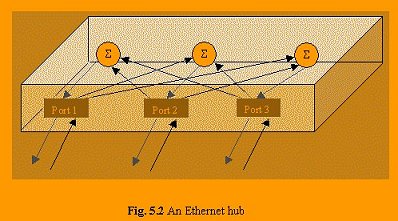
Hub
Also
known as a concentrator or repeater, this device accepts numerous Ethernet
connections from network devices and cross connects them. A hub works
similar to a mix-minus audio system. Data arriving via the receive pair of
one connection is regenerated and sent out on the transmit pair to all
connected devices except for the device who originated the transmission.
An
Ethernet network is typically wired in a star configuration and the hub is at the
center. Hubs are available with port counts from 8 to 24. Some hubs have a
stacking capability allowing multiple hubs to be chained together and act
as if they were a single unit with greater port count.
There
are two grades of Fast Ethernet hubs: Class I and Class II. Class II hubs
deliver higher performance than the Class I hubs. Most hubs shipping today
are of the Class II variety.
Switch
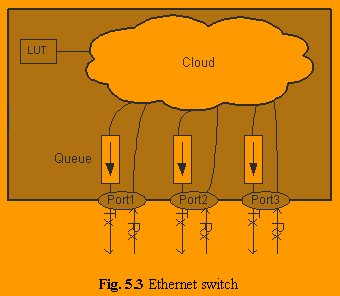
A switch
is a multi-port device that filters and forwards data packets between
devices on a network. Unlike a standard repeater hub, a switch is able to
read the destination address of each data packet and then forward the
packet to the correct port. This intelligence in the switch means that a
given device receives only those packets addressed to it.
Another
difference between hubs and switches is the inherent ability of a switch to
avoid data collisions. Should two switch ports attempt to transmit to the
same port, the data enters a queue and is then transmitted serially.
While
each link between switches still has a bandwidth limit, the total bandwidth
available in the network is much larger in a switched network. Links
between switches, and between a switch and other full-duplex devices, will
run in full-duplex mode. Duplex raises the limitation of 100Mbit per link
to 100Mbit each direction or 200Mbit total.
With the
elimination of collisions in switched networks also comes the elimination
of the network diameter issue. Be aware that eliminating
network diameter limitations does not change the fact that signal
degradation with distance still limits a single Cat 5 cable run to 100
meters or multimode fiber run to 2 kilometers. Single mode fiber may be
used at distances up to 100 kilometers depending on the system used.
An
Ethernet network based around switches can be wired in a star
configuration with the switch at the center, or in a ring
configuration using many switches. Like hubs, switches are available in
varying port counts, and many offer stacking capability.
Switches
offer fault tolerance capabilities not provided with hubs. By using
techniques like spanning tree, trunking, and meshing,
switches are able to provide some amount of recovery from failed network
nodes or connections. Beware: not all of these techniques are standardized,
so it's safest to stick with a single switch vendor in your design.
Crossover Cable
A
crossover cable can be used to directly connect two network devices, hubs
or switches. A crossover cable is a CAT5 cable wired such that the transmit
data pair at one end is connected to the receive data pair at the other.
Media Converter
A Media
Converter is essentially a two port hub that accepts one type of media on
one port and a different media on the other. Common Ethernet media types
are twisted pair, multimode and single mode fiber. Some hubs include media
conversion via plug in module options for various media types.
Network Diameter
The
diameter of a network is defined by the longest cable distance between any
two network devices and is closely tied to network propagation time.
Ethernet requires that a specified maximum network diameter not be exceeded
in an installation to ensure that collisions are reliably detected and
resolved. Network diameter is a big issue for hub-based networks, but not
so for switched networks.
Propagation Time
Cable
distance is an issue on an Ethernet network because of the time required
for a packet to propagate from one end of a cable to the other. In order
for the network to operate properly, a packet sent by any device on the
network must reach all other devices within a certain time window.
To
compute the propagation time from one network device to another, one must
figure not only the propagation time through the intervening cables, but
also propagation delays through intervening network components (hubs and
media converters).
Propagation
times on Ethernet networks are measured as a round trip delay and
specified, for convenience, in bit period units. A bit period on Fast
Ethernet is 1/100MHz = 10 nano-seconds (10
billionths of a second).
|
Component
|
Round Trip Propagation Bit Periods
|
|
Optical
Fiber (Single mode and Multimode)
|
1.000
/ meter
|
|
CAT5
Cable
|
1.112
/ meter
|
|
Receiver
|
>=
100
|
|
Class
I Hub
|
>=
140
|
|
Class
II Hub
|
>=
92
|
|
Digi MIL-180 Media converter
|
48
|
|
Canary
CFT-2132 100BASE-FX / 100BASE-TX Media Converter
|
124
|
|
Transition
Networks E-100BTX-FRL-01 Media Converter
|
133
|
Table 5.1 Propagation times for network components
Example
1:
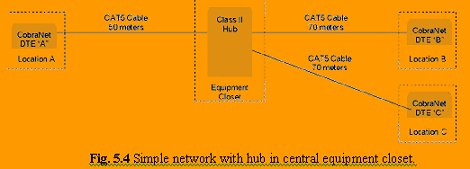
|
Component
|
Round Trip
Propagation Bit Periods
|
|
50 meter Cable between Location A and Hub
|
50 x 1.112 = 55.6
|
|
Class II Hub
|
92
|
|
70 meter Cable between Hub and Location B
|
70 x 1.112 = 77.8
|
|
Location B Receiver
|
100
|
|
Total
|
325.4
|
Table 5.2: Calculation of propagation distance between
Location A and Location B.
Round trip propagation times are symmetrical; the
propagation time from Location B to Location A back to B is the same as
Location A to Location B back to A.
Studying the diagram, it should also be apparent that
propagation time between Location A and Location C is the same as between
Location A and Location B.
Propagation time between Location B and Location C is
calculated as such:
|
Component
|
Round Trip Propagation Bit Periods
|
|
70 meter
Cable between Location B and Hub
|
70 x
1.112 = 77.8
|
|
Class
II Hub
|
92
|
|
70
meter Cable between Hub and Location C
|
70 x
1.112 = 77.8
|
|
Location
C Receiver
|
100
|
|
Total
|
347.6
|
Table 5.3: Calculation
of propagation distance between Location B and Location C.
The 347.6 bit propagation time between Location B and
Location C makes it the longest in the network. We can say that this
network has a diameter of 347.6 bit periods.
Diameter Limit
The
Ethernet standard calls for a maximum network diameter of 512 bit periods.
With allowances for propagation times through up to two hubs and the
receiver, Fast Ethernet typically supports a maximum diameter of just over
200 meters on a hub network.
By
extending some timing parameters, CobraNet running
on repeater hub networks can tolerate network diameters up to 2560 bit
periods. With allowances for propagation times through up to two hubs and
the receiver, a maximum diameter over 2 kilometers is supported.
Example
2:
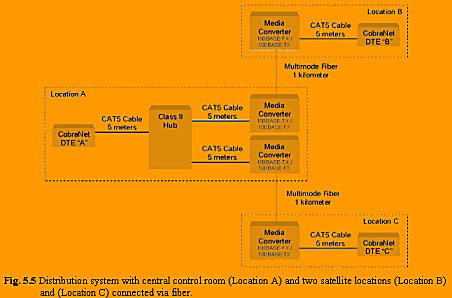
|
Component
|
Propagation Bit Periods
|
|
5-meter
CAT5 cable between CobraNet "B" and
Media Converter
|
5 x
1.112 = 5.6
|
|
100BASE-TX
/ 100BASE-FX media conversion at Location B
|
48
|
|
1K-meter
fiber between Location B and Location A
|
1000 x
1.0 = 1000
|
|
100BASE-FX
/ 100BASE-TX media conversion at Location A
|
48
|
|
5-meter
CAT5 cable between Media Converter and Hub
|
5 x
1.112 = 5.6
|
|
Class
II Hub
|
92
|
|
5-meter
CAT5 cable between Hub and Media Converter
|
5 x
1.112 = 5.6
|
|
100BASE-TX
/ 100BASE-FX media conversion at Location A
|
48
|
|
1K-meter
fiber between Location A and Location C
|
1000 x
1.0 = 1000
|
|
100BASE-FX
/ 100BASE-TX media conversion at Location C
|
48
|
|
5-meter
CAT5 cable between Media Converter and CobraNet
device "C"
|
5 x
1.112 = 5.6
|
|
CobraNet device "C" Receiver
|
100
|
|
Total
|
2406.4
|
|
Maximum
CobraNet Diameter
|
2560
|
|
Margin
|
153.6
|
Table 5.4: Propagation time from location B through location A to
location C.
5.4 ETHERNET TODAY
Modern
Ethernet implementations often look nothing like their historical
counterparts. Where long runs of coaxial cable provided attachments for
multiple stations in legacy Ethernet, modern Ethernet networks use twisted
pair wiring or fiber optics to connect stations in a radial pattern. Where
legacy Ethernet networks transmitted data at 10 Mbps (10 million bits per
second), modern networks can operate at 100 or even 1000 Mbps!
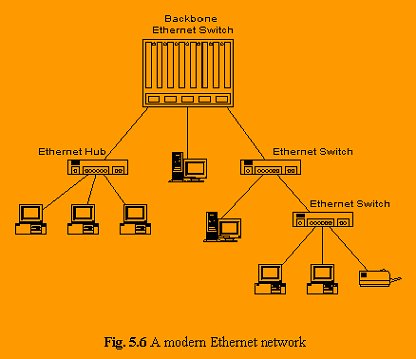
Perhaps
the most striking advancement in contemporary Ethernet networks is the use
of Switched Ethernet. Switched
networks replace the shared medium of legacy Ethernet with a dedicated
segment for each station. These segments connect to a switch, which acts
much like an Ethernet bridge, but can connect many of these single station
segments. Some switches today can support hundreds of dedicated segments.
Since the only devices on the segments are the switch and the end station,
the switch picks up every transmission before it reaches another node. The
switch then forwards the frame over the appropriate segment, just like a
bridge, but since any segment contains only a single node, the frame only
reaches the intended recipient. This allows many conversations to occur
simultaneously on a switched network.
Ethernet
switching gave rise to another advancement,
full-duplex Ethernet. Full-duplex
is a data communications term that refers to the ability to both send and
receive data at the same time. Legacy Ethernet is half-duplex, as only one
device on the network can transmit at any given time. In a totally switched
network, nodes only communicate with the switch and never directly with
each other. Switched networks also employ either twisted pair or fiber optic
cabling, both of which use separate conductors for sending and receiving
data. In this type of environment, Ethernet stations can forgo the
collision detection process and transmit at will, since they are the only
potential devices that can access the medium. This allows end stations to
transmit to the switch at the same time the switch transmits to them,
achieving a collision free environment.
5.5
WHY IS IT CALLED ETHERNET?
“In
late 1972, Metcalfe and his Xerox PARC colleagues developed the first
experimental Ethernet system to interconnect the Xerox Alto, a personal
workstation with a graphical user interface. The experimental Ethernet was
used to link Altos to one another, and to servers and laser printers. The
signal clock for the experimental Ethernet interface was derived from the
Alto's system clock, which resulted in a data transmission rate on the
experimental Ethernet of 2.94 Mbps.
Metcalfe's
first experimental network was called the Alto Aloha Network. In 1973
Metcalfe changed the name to "Ethernet," to make it clear that
the system could support any computer-not just Altos-and to point out that
his new network mechanisms had evolved well beyond the Aloha system. He
chose to base the name on the word "ether" as a way of describing
an essential feature of the system: the physical medium (i.e., a cable)
carries bits to all stations, much the same way that the old "luminiferous ether" was once thought to propagate
electromagnetic waves through space. Thus, Ethernet was born.”
5.6
LIMITATIONS OF ETHERNET
A single
shared cable can serve as the basis for a complete Ethernet network, which
is what we discussed above. However, there are practical limits to the size
of our Ethernet network in this case. A primary concern is the length of
the shared cable. Electrical signals propagate along a cable very quickly,
but they weaken as they travel, and electrical interference from
neighboring devices (fluorescent lights, for example) can scramble the
signal. A network cable must be short enough that devices at opposite ends
can receive each other's signals clearly and with minimal delay. This
places a distance limitation on the maximum separation between two devices
(called the network diameter) on
an Ethernet network. Additionally, since in CSMA/CD only a single device
can transmit at a given time, there are practical limits to the number of
devices that can coexist in a single network. Attach too many devices to
one shared segment and contention for the medium will increase. Every
device may have to wait an inordinately long time before getting a chance
to transmit.
Engineers
have developed a number of network devices that alleviate these
difficulties. Many of these devices are not specific to Ethernet, but play
roles in other network technologies as well.
5.7
INTRODUCTION TO GIGABIT ETHERNET
Since
its inception at Xerox Corporation in the early 1970s, Ethernet has been
the dominant networking protocol. Of all current networking protocols,
Ethernet has, by far, the highest number of installed ports and provides
the greatest cost performance relative to Token Ring, Fiber Distributed
Data Interface (FDDI), and ATM for desktop connectivity. Fast Ethernet,
which increased Ethernet speed from 10 to 100 megabits per second (Mbps),
provided a simple, cost-effective option for backbone and server
connectivity.
Gigabit
Ethernet builds on top of the Ethernet protocol, but increases speed
tenfold over Fast Ethernet to 1000 Mbps, or 1 gigabit per second (Gbps). This protocol, which was standardized in June
1998, promises to be a dominant player in high-speed local area network
backbones and server connectivity. Since Gigabit Ethernet significantly
leverages on Ethernet, customers will be able to leverage their existing
knowledge base to manage and maintain gigabit networks.
Gigabit Ethernet Protocol
Architecture
In order
to accelerate speeds from 100 Mbps Fast Ethernet up to 1 Gbps, several changes need to be made to the physical
interface. It has been decided that Gigabit Ethernet will look identical to
Ethernet from the data link layer upward. The challenges involved in
accelerating to 1 Gbps have been resolved by
merging two technologies together: IEEE 802.3 Ethernet and ANSI X3T11 FiberChannel. Fig. 5.7 shows how key components from
each technology have been leveraged to form Gigabit Ethernet.
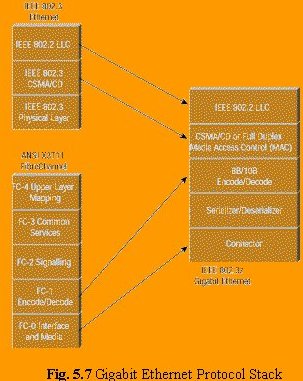
Leveraging
these two technologies means that the standard can take advantage of the
existing high-speed physical interface technology of FibreChannel
while maintaining the IEEE 802.3 Ethernet frame format, backward
compatibility for installed media, and use of full- or half-duplex carrier
sense multiple access collision detect (CSMA/CD). This scenario helps
minimize the technology complexity, resulting in a stable technology that
can be quickly developed.
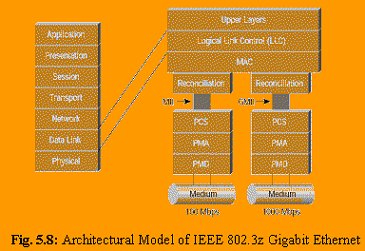
The
actual model of Gigabit Ethernet is shown in Fig. 5.8.
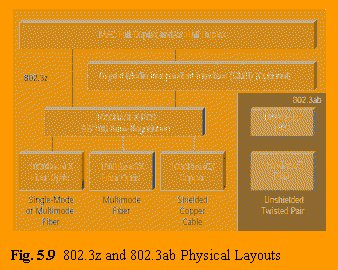
Physical Interface
See Fig. 5.9 for the physical diagram.
Gigabit Ethernet
Interface Carrier
The
Gigabit interface converter (GBIC) allows network managers to configure
each gigabit port on a port-by-port basis for short-wave (SX), long-wave
(LX), long-haul (LH), and copper physical interfaces (CX). LH GBICs extended the single-mode fiber distance from the
standard 5 km to 10 km. Cisco views LH as a value add, although it's not
part of the 802.3z standard, allowing switch vendors to build a single
physical switch or switch module that the customer can configure for the
required laser/fiber topology. As stated earlier, Gigabit Ethernet
initially supports three key media: short-wave laser, long-wave laser, and
short copper. In addition, fiber- optic cable comes in three types:
multimode (62.5 um), multimode (50 um), and single mode.
The FiberChannel physical medium dependent (PMD)
specification currently allows for 1.062-gigabaud signaling in full duplex.
Gigabit Ethernet will increase this signaling rate to 1.25 Gbps. The 8B/10B encoding (to be discussed later)
allows a data transmission rate of 1000 Mbps. The current connector type
for FiberChannel, and therefore for Gigabit
Ethernet, is the SC connector for both single-mode and multimode fiber. The
Gigabit Ethernet specification calls for media support for multimode
fiber-optic cable, single-mode fiber-optic cable, and a special balanced
shielded 150-ohm copper cable.
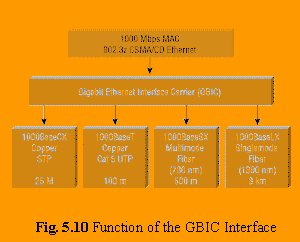
In
contrast, Gigabit Ethernet switches without GBICs
either cannot support other lasers or need to be ordered customized to the
laser types required.
Long-Wave
and Short-Wave Lasers over Fiber-Optic Media
Two
laser standards will be supported over fiber: 1000BaseSX (short-wave laser)
and 1000BaseLX (long-wave laser). Short- and long-wave lasers will be
supported over multimode fiber. Two types of multimode fiber are available:
62.5 and 50 micron-diameter fibers. Long-wave lasers will be used for
single-mode fiber, because this fiber is optimized for long-wave laser
transmission. There is no support for short-wave laser over single-mode
fiber.
The key
differences between the use of long- and short-wave
laser technologies are cost and distance. Lasers over fiber-optic cable
take advantage of variations in attenuation in a cable. At different
wavelengths, "dips" in attenuation are found over the cable.
Short- and long-wave lasers take advantage of those dips and illuminate the
cable at different wavelengths. Short-wave lasers are readily available
because variations of these lasers are used in compact-disc technology.
Long-wave lasers take advantage of attenuation dips at longer wavelengths
in the cable. The net result is that although short-wave lasers will cost
less, they transverse a shorter distance. In contrast, long-wave lasers are
more expensive but they transverse longer
distances.
Single-mode
fiber has been traditionally used in the networking cable plants to achieve
long distance. In Ethernet, for example, single-mode cable ranges reach up
to 10 km. Single-mode fiber, using a 9-micron core and 1300-nanometer
laser, demonstrate the highest-distance technology. The small core and
lower-energy laser elongate the wavelength of the laser and allow it to
transverse greater distances. This setup enables single-mode fiber to reach
the greatest distances of all media with the least reduction in noise.
Gigabit
Ethernet will be supported over two types of multimode fiber: 62.5 and 50
micron-diameter fibers. The 62.5-micron fiber is typically seen in vertical
campus and building cable plants and has been used for Ethernet, Fast
Ethernet, and FDDI backbone traffic. This type of fiber, however, has a lower
modal bandwidth (the ability of the cable to transmit light), especially
with short-wave lasers. In other words, short-wave lasers over 62.5-micron
fiber will be able to transverse shorter distances than long-wave lasers.
Relative to 62.5-micron fiber, the 50-micron fiber has significantly better
model bandwidth characteristics and will be able to transverse longer
distances with short wave lasers.
150-Ohm
Balanced Shielded Copper Cable (1000BaseCX)
For
shorter cable runs (of 25 meters or less), Gigabit Ethernet will allow
transmission over a special balanced 150-ohm cable. This is a new type of
shielded cable; it is not unshielded twisted-pair (UTP) or IBM Type 1 or
II. In order to minimize safety and interference concerns caused by voltage
differences, both transmitters and receivers will share a common ground.
The return loss for each connector is limited to 20 dB to minimize
transmission distortions. The connector type for 1000BaseCX will be a DB-9
connector. A new connector is being developed by AMP called the HSSDC,
which will be included in the next revision of the draft.
The
application for this type of cabling will be short-haul data-center
interconnections and inter- or intra-rack connections. Because of the
distance limitation of 25 meters, this cable will not work for
interconnecting data centers to riser closets.
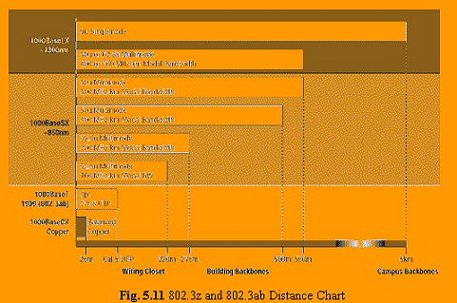
The
distances for the media supported under the IEEE 802.3z standard are shown
in Fig. 5.11
Serializer/Deserializer
The
physical media attachment (PMA) sublayer for
Gigabit Ethernet is identical to the PMA for FibreChannel.
The serializer/deserializer is responsible for
supporting multiple encoding schemes and allowing presentation of those
encoding schemes to the upper layers. Data entering the physical sublayer (PHY) will enter through the PMD and will need
to support the encoding scheme appropriate to that media. The encoding
scheme for FiberChannel is 8B/10B, designed
specifically for fiber-optic cable transmission. Gigabit Ethernet uses a
similar encoding scheme. The difference between FiberChannel
and Gigabit Ethernet, however, is that FiberChannel
utilizes 1.062-gigabaud signaling whereas Gigabit Ethernet utilizes
1.25-gigabaud signaling. A different encoding scheme will be required for
transmission over UTP. This encoding will be performed by the UTP or
1000BaseT PHY.
8B/10B Encoding
The FiberChannel FC-1 layer describes the synchronization
and the 8B/10B encoding scheme. FC-1 defines the transmission protocol,
including serial encoding and decoding to and from the physical layer,
special characters, and error control. Gigabit Ethernet utilizes the same
encoding/decoding as specified in the FC-1 layer of FiberChannel.
The scheme utilized is the 8B/10B encoding. This scheme is similar to the
4B/5B encoding used in FDDI; however, 4B/5B encoding was rejected for FibreChannel because of its lack of DC balance. The
lack of DC balance can potentially result in data-dependent heating of
lasers because a transmitter sends more 1s than 0s, resulting in higher
error rates.
Encoding
data transmitted at high speeds provides some advantages:
·
Encoding limits the effective transmission characteristics, such as
ratio of 1s to 0s, on the error rate
·
Bit-level clock recovery of the receiver can be greatly improved by
using data encoding
·
Encoding increases the possibility that the receiving station can
detect and correct
transmission or reception errors
·
Encoding can help distinguish data bits from control bits
All
these features have been incorporated into the FiberChannel
FC-1 specification.
In
Gigabit Ethernet, the FC-1 layer takes decoded data from the FC-2 layer 8
bits at a time from the reconciliation sublayer
(RS), which "bridges" the FiberChannel
physical interface to the IEEE 802.3 Ethernet upper layers. Encoding takes
place via an 8- to 10-bit character mapping. Decoded data comprises 8 bits
with a control variable. This information is, in turn, encoded into a
10-bit transmission character.
Encoding
is accomplished by providing each transmission character with a name,
denoted as Zxx.y. Z is the control variable that
can have two values: D for Data and K for Special Character. The xx
designation is the decimal value of the binary number composed of a subset
of the decoded bits. The y designation is the decimal value of the binary
number of remaining decoded bits. This scenario implies that there are 256
possibilities for Data (D designation) and 256 possibilities for Special
Characters (K designation). However, only 12 Kxx.y
values are valid transmission characters in FiberChannel.
When data is received, the transmission character is decoded into one of
the 256 8-bit combinations.
Media Access Control Layer
Logical Link Layer
Gigabit Ethernet has been designed to adhere to the
standard Ethernet frame format. This setup maintains compatibility with the
installed base of Ethernet and Fast Ethernet products, requiring no frame
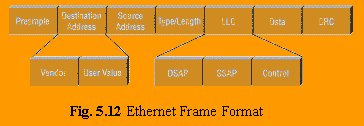
translation. Fig. 5.12 describes the IEEE 802.3/Ethernet frame format.
The
original Xerox specification identified a type field, which was utilized
for protocol identification. The IEEE 802.3 specification eliminated the
type field, replacing it with the length field. The length field is used to
identify the length in bytes of the data field. The protocol types in 802.3
frames are left to the data portion of the packet. The Logical Link Control
(LLC) is responsible for providing services to the network layer regardless
of media type, such as FDDI, Ethernet, Token Ring, and so on. The LLC layer
makes use of LLC protocol data units (PDUs) in
order to communicate between the Media Access Control (MAC) layer and the
upper layers of the protocol stack. The LLC layer uses three variables to
determine access into the upper layers via the LLC-PDU. Those addresses are
the destination service access point (DSAP), source service access point
(SSAP), and control variable. The DSAP address specifies a unique
identifier within the station providing protocol information for the upper
layer; the SSAP provides the same information for the source address.
The LLC
defines service access for protocols that conform to the Open System
Interconnection (OSI) model for network protocols. Unfortunately, many
protocols do not obey the rules for those layers. Therefore, additional
information must be added to the LLC in order to provide information
regarding those protocols. Protocols that fall into this category include
IP and IPX. The method used to provide this additional protocol information
is called a Subnetwork Access Protocol, or SNAP
frame. A SNAP encapsulation is indicated by the SSAP and DSAP addresses
being set to "0 x AA". When that address is seen, we know that a
SNAP header follows. The SNAP header is 5 bytes long: the first 3 bytes
consist of the organization code, which is assigned by the IEEE; the second
2 bytes use the type value set from the original Ethernet
specifications.
Gigabit
Ethernet Standards Process
The
IEEE 802.3z Task Force
In the
last several years, the demand on the network has increased drastically.
The old 10Base5 and 10Base2 Ethernet networks were replaced by 10BaseT
hubs, allowing for greater manageability of the network and the cable
plant. As applications increased the demand on the network, newer,
high-speed protocols such as FDDI and ATM became available. However, in the
last two years, Fast Ethernet has become the backbone of choice because its
simplicity and its reliance on Ethernet. The primary goal of Gigabit
Ethernet is to build on that topology and knowledge base to build a
higher-speed protocol without forcing customers to throw away existing
networking equipment.
The
standards body working on Gigabit Ethernet is the IEEE 803.2z Task Force,
which has established an aggressive timetable for development of the
Gigabit Ethernet standard. The possibility of a Gigabit Ethernet Standard
was raised in mid-1995 after the final ratification of the Fast Ethernet
Standard. By November 1995 there was enough interest to form a high-speed
study group. This group met at the end of 1995 and several times during
early 1996 to study the feasibility of Gigabit Ethernet. The meetings grew
in attendance, reaching 150 to 200 individuals. Numerous technical
contributions were offered and evaluated.
In July
1996, the 802.3z Task Force was established with the charter to develop a
standard for Gigabit Ethernet. Basic concept agreement on technical
contributions for the standard was achieved at the November 1996 IEEE
meeting. The first draft of the standard was produced and reviewed in
January 1997; the final standard was approved in June 1998.
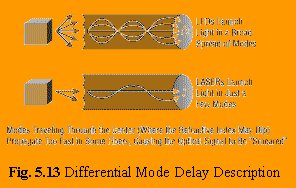
One of
the delays with 802.3z was with solving the problem of differential mode
delay (DMD). DMD affects only multimode fiber when using LX/LH lasers. The
problem is when one mode of light experience jitters (line distortion),
this could, in extreme cases, cause a single mode to be divided into two or
more modes of light (see Fig. 5.13). In other words, data would be lost.
Multimode fiber was designed for short-distance Light Emitting Diodes (LEDs), not lasers.
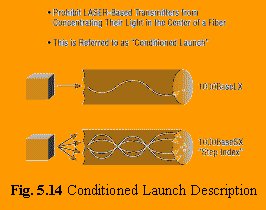
The fix
is what's referred to as a "conditioned launch" (see Fig. 5.14).
In other words, if the light that travels through the center of the
core---in a straight line--- is directed at a slight angle (or directed
just off the center of the core), then the modal
delay is corrected. To achieve a conditioned launch, a special
mode-conditioning patch cable must be installed.
Timeline
for Gigabit Ethernet
The
timing for Gigabit Ethernet products is related to the progress of the IEEE
standard activities. Any Gigabit Ethernet product design that was finalized
prior to the first draft of the standard is a "guess" and
potentially at risk for interoperability. Any products shipping in the
first half of 1997 will fall into this prestandard
category. This time frame should be a "red flag" to users who are
being sold "Gigabit Ethernet" products.
After
the first draft of the standard was completed, network equipment suppliers
were able to develop products compliant with the draft, enabling
interoperable products in the second half of 1997. Any products shipping
during this time frame may not be compliant to the final standard. This
time frame should be a "yellow flag" to users. The working group
ballot milestone for the IEEE 802.3z Task Force was completed in June 1998.
Completion
of this milestone indicates that the internal 802.3z review of the standard
is complete and only public review remains. This milestone indicates a high
degree of confidence in the draft standard. Network equipment vendors are
now able to implement product designs with high confidence that products
will be fully standards compliant. Because of the time required to develop
stable application-specific integrated circuits (ASICs)
and product, this timeline leads to production-worthy products in the first
half of 1998.
The
bottom line is that 1998 is the year for initial Gigabit Ethernet
production product deployment. Cisco is investing heavily in Gigabit
Ethernet technology and product development. Cisco is compliant with the
IEEE 802.3z standard and ensures interoperability through work done at the University
of New Hampshire (UNH) Gigabit Ethernet Consortium. UNH provides a venue
for vendors of Gigabit Ethernet or other networking technologies to test
their products and ensure interoperability.
Gigabit
Ethernet and ATM
A few
main factors drive network scalability on the campus. First, bandwidth and
latency performance become more important as existing and emerging
applications are and will be requiring higher bandwidth. The typical 80/20
rule (80 percent of the network traffic is local compared to 20 percent to
the backbone) is being reversed such that 80 percent of the traffic is now
destined for the backbone. This setup requires the backbone to have higher
bandwidth and switching capacity.
Both ATM
and Gigabit Ethernet solve the issue of bandwidth. ATM provides a migration
from 25 Mbps at the desktop, to 155 Mbps from the wiring closet to the
core, to 622 Mbps within the core. All this technology is available and
shipping today. ATM also promises 2.4 Gbps of
bandwidth via OC-48, which was available and standard at the end of 1997.
Ethernet currently provides 10 Mbps to the desktop, with 100 Mbps to the
core. Cisco has provided FastEtherChannel® as
a mechanism of scaling the core bandwidth and providing a migration to
Gigabit Ethernet.
Second,
a scalable campus networking architecture must account for existing
desktops and networking protocols. This scenario forces compatibility with
current desktop PCs, servers, mainframes, and cabling plants. Large
enterprise networks have invested millions of dollars into this
infrastructure. Also, in order to ensure a smooth migration, existing LAN
protocols must be supported in some way in order to assure a smooth
migration.
Quality
of service (QoS) has increased in visibility, as
network managers require some traffic to have higher-priority access to the
network relative to other traffic, particularly over the WAN. The options
for QoS include Guaranteed QoS,
where a particular user or "flow" is guaranteed performance, and class of service (CoS),
which provides best-effort QoS, and finally,
increased bandwidth such that contention for that bandwidth is no longer an
issue.
Ethernet
promises to provide CoS by mapping priority
within the network to mechanisms such as Resource Reservation Protocol
(RSVP) for IP as well as other mechanisms for Internetwork
Packet Exchange (IPX). ATM guarantees QoS within
the backbone and over the WAN by using such mechanisms as available bit
rate (ABR), constant bit rate (CBR), variable bit rate (VBR), and
unspecified bit rate (UBR).
Both ATM
and Ethernet attempt to solve similar application-type problems.
Traditionally, Ethernet and Fast Ethernet have been utilized for high-speed
backbone and riser connectivity. A common application, for example, is to
provide switched or group-switched 10 Mbps to each desktop, with Fast
Ethernet connectivity to and within the core. This scenario can be
accomplished at a relatively low cost. Gigabit Ethernet promises to
continue scaling that bandwidth further. Recently, ATM has also been
utilized to build campus-wide backbones at a moderate price range. However,
the key benefit of ATM has been seen in the metropolitan-area network and
in the wide-area network. WAN integration and compatibility has been a
significant driver in scaling campus networks. The importance of
integrating data types such as voice, video, and data over a WAN has been a
significant driver for service integration and will be key
in reducing the cost of WAN services and maintenance.
Migration
to Gigabit Ethernet
Related
Standards
The
following sections briefly summarize two ongoing efforts in the IEEE
standards committee.
IEEE
802.1p
Quality
of service has become increasingly important to network managers. In June
1998, the IEEE 802.1p committee standardized a means of individual end
station requesting a particular QoS of the
network and the network being able to respond accordingly. This standard
also specifies multicast group management.
A new
protocol is defined in 802.1p, Generic Attribute Registration Protocol
(GARP). GARP is a generic protocol that will be used by specific GARP
applications; for example, GARP Multicast Registration Protocol (GMRP), and
GARP VLAN Registration Protocol (GVRP). GMRP is defined in 802.1p; GMRP
provides registration services for multicast MAC address groups.
IEEE
802.1Q
The
introduction of Virtual LANs (VLANs) into
switched internetworks has created significant
advantages to networking vendors because they can offer value-added
features to their products such as VLAN trunking,
reduction in spanning-tree recalculations effects, and broadcast control.
However, with the exception of ATM LAN Emulation, there is no industry
standard means of creating VLANs.
The
802.1Q committee has worked to create standards-based VLANs.
This standard is based on a frame-tagging mechanism that will work over
Ethernet, Fast Ethernet, Token Ring, and FDDI. The standard will allow a
means of VLAN tagging over switches and routers and will allow vendor VLAN
interoperability. GVRP has been introduced in 802.1Q; this protocol provides
registration services for VLAN membership.
IEEE
802.3x
The IEEE
802.3x committee is examining a method of flow control for full-duplex
Ethernet. This mechanism is set up between the two stations on the
point-to-point link. If the receiving station at the end becomes congested,
it can send back a frame called a "pause frame" to the source at
the opposite end of the connection, instructing that station to stop
sending packets for a specific period of time. The sending station waits
the requested time before sending more data. The receiving station can also
send a frame back to the source with a time-to-wait of zero, instructing
the source to begin sending data again. (See Fig. 5.15.)
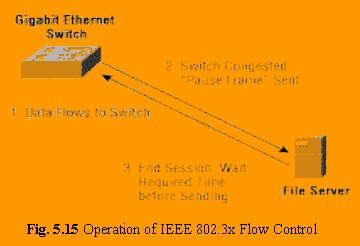
This
flow-control mechanism was developed to match the sending and receiving
device throughput. For example, a server can transmit to a client at a rate
of 3000 pps. The client, however, may not be able
to accept packets at that rate because of CPU interrupts, excessive network
broadcasts, or multitasking within the system. In this example, the client
sends out a pause frame and requests that the server delay transmission for
a certain period of time. This mechanism, though separate from the IEEE
802.3z work, complements Gigabit Ethernet by allowing gigabit devices to participate
in this flow-control mechanism.
IEEE
802.3ab
The IEEE
802.3ab committee is examining Gigabit Ethernet transmission over UTP
Category 5 cable (1000BaseT). This effort is in progress independently of
the 802.3z committee and will be completed sometime after the initial
version of the Gigabit Ethernet standard is complete.
Conclusion
Gigabit
Ethernet is a viable technology that allows Ethernet to scale from 10/100
Mbps at the desktop to 100 Mbps up the riser to 1000 Mbps in the data
center. By leveraging the current Ethernet standard as well as the
installed base of Ethernet and Fast Ethernet switches and routers, network
managers do not need to retrain and relearn a new technology in order to
provide support for Gigabit Ethernet. Cisco is leading the industry by
driving the standards for Gigabit Ethernet while investing in product
supporting Gigabit Ethernet, Gigabit Ethernet migration paths, and ATM.
back...
|