Home
Digital HiNote Ultra CT475
Resetting the Supervisor password
By mystic_whiskey, July 2003
This was inspired by this page. To the author, a big thank you!
If you destroy your notebook, don't blame me. If it doesn't work for you, also don't blame me. This might work for other HiNotes... but no guarantees.
Click on one either of the following thumbnails to view a larger image:
To reset the password, follow these steps:
- Power off the notebook!
- Remove the keyboard assembly (if you don't know how, see this page).
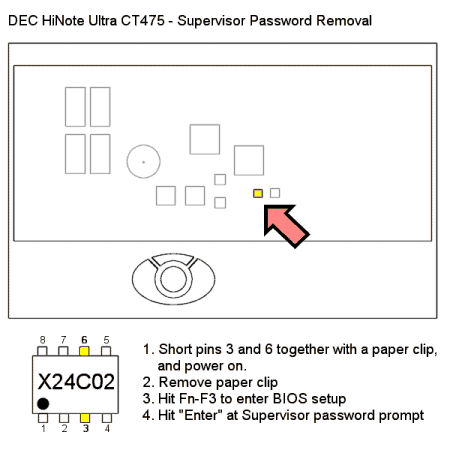
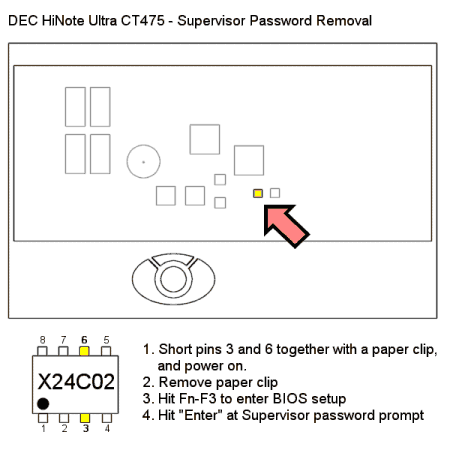
- Locate the chip marked "X24C02" as shown in the above diagram (just to the right of center, about 1 inch up from the bottom edge of where the keyboard assembly would lie) - this EEPROM holds the password data.
- Short pins 3 and 6 together with a bent paper clip or something. Whilst the pins are shorted, turn on the notebook.
- Remove the paperclip - the notebook should begin to boot.
- Hit Fn-F3 when prompted, and hit "Enter" at the Supervisor password prompt
- You should now be seeing the bios setup screen! Just make sure the passwords are set to blank under the "Security" menu.