
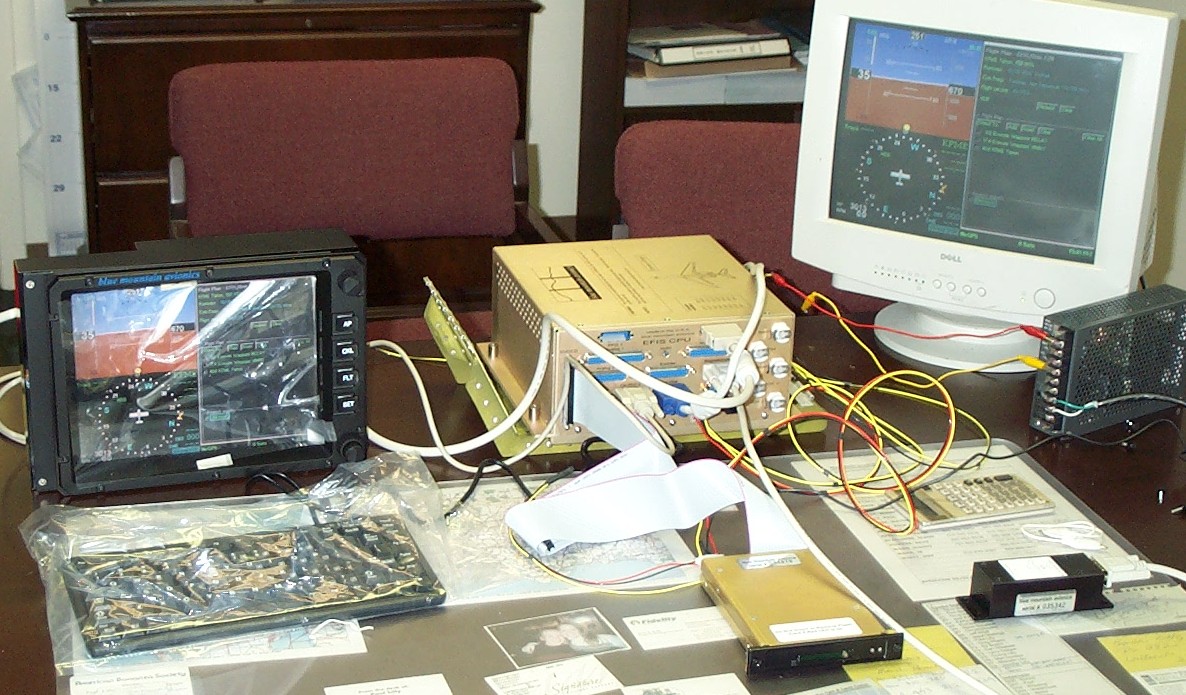
Here I have the unit on my desk with the display on, the card reader and magnetometer hooked up. I also had the GPS antenna hooked up and set it in a window. When I powered everything up the GPS located me in about 30 seconds. The display is fantastic, and you have a lot of control over how and what is presented.
I also have a PC monitor hooked up as there is an output for it on the CPU too. After I got use to the operation of the switches on the display, I disconnected it and used the keyboard keys to replace the switches on the panel, and the PC monitor for the display. Of course you do not install the keyboard in the plane, however I will make a jack for it so I can plug it in when I update the software and database.
The display panel I have taken to Penn Avionics to have installed in the panel along with the radios and transponder.
Then the fun began. BMA made a sensor chart for my engine, and I placed the appropriate jumpers in the CPU to match the input channels with the sensors I will be using. After that I simulated the sensors using resistor networks, low voltage inputs or a signal generator (depending on the input), to make sure I would get the expected results on the displays. I will post some pictures of the calibration screens soon to show them.
Once I read all their documentation, it is easy to understand and set up for your paticular situaltion, and in fact, it is a lot of fun to play with on the bench. I feel comfortable with it and feel I will have no trouble installing the system. And I am sure it is easier than installing all analog instruments and gauges.
BMA also will sell you a wiring harness with the CPU end already made, and 20 feet of cable so you can mount the CPU just about anywhere, and run the cable to just about anywhere. And they sell a power board to simplify hooking up your power and switches. I bought the harness and the power board. I'll take anything that will make my job easier.