“My Color” Quick Start - Users Guide
Introduction
The “My Color” application is a small and useful utility that can provide assistance when color decisions need to be made. “My Color” includes such features as: Hex to RGB conversion, text & background color preview, color combination suggestions and the ability to save your favorite color combos.
The utility was created specifically with Web and Graphic Designers in mind but anyone who uses colors would find “My Color” extremely useful. The user interface is intuitive and simple so that anyone can use it.
The “Color Values” Tab

Using Spy
Check Spy to enable this feature.
Move the mouse any where on the screen to see the color you are pointing to.
Hit Enter on the keyboard to sample the color into the Background Preview area of the Color Values tab. To sample the color into the Text Color of the Preview area, press Shift + Enter.
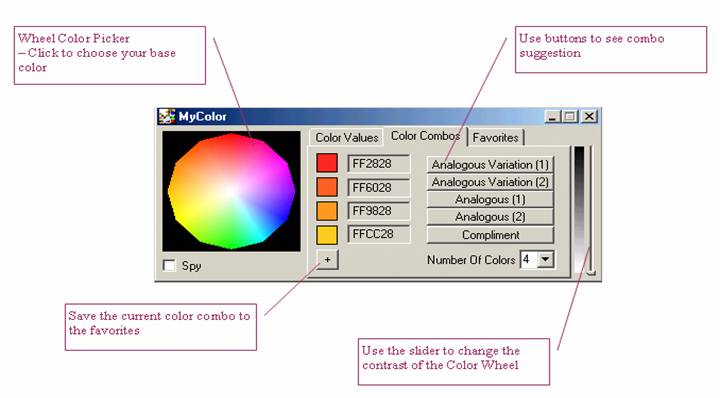
The “Color Combo” Tab
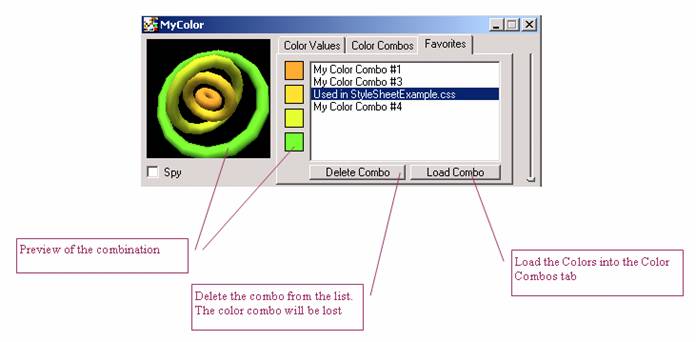
The “Favorites” Tab
Trouble Shooting
Problem: unable to see the color cube.
Solution: The color quality of your display properties has to be set at 16-bit color or better.
Problem: For any other problem
Solution: Close the program and open it again. That should do the trick.
Note: It is possible to open only one instance of the MyColor.
Email: [email protected]