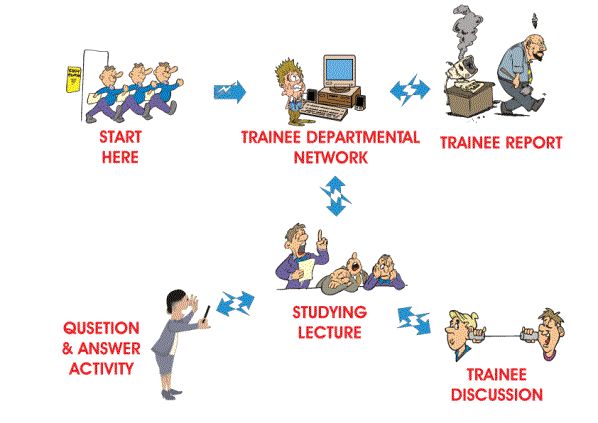
The course map illustrates how the course works as below.
- Chat room :
- Course bulletin board :
- E-mail :
-Links :
-Calendar :
-A room for online chat to contack with tutors and friends. It open 24 hours and especially, tutors will online every Friday at 9.00 - 11-00 a.m. (notice* GMT+6:30)
-Let tutors and friends know your accomplished tasks. Learn from others activities and discuses together.
-Register new e-mail for your account to get private e-mail to communicate tutors and friends directly.
-Learn with other external site with Links of Learn English Online
-Don't forget to follow the schedule and events with calendar tool.
-A personal computer running Windows operating system, and
Microsoftword.
-Working knowledge of basic word processor skills: to
create new files, copy them, etc.
-Sufficient skill with Windows to
create a new folder
-A web browser
-A conection to the Internet,
either through modem or through a direct LAN/ISP connection
If there is anything in this list that you do not have, then you won't be able to complete the course. Let your tutor know, they may able to help.
Fax: +95-1-591383
Minimum requirements
To ensure that your web experience is the best possible, you will need to be aware of the following before beginning this course:
1. Netscape Navigator or Microsoft's Internet Explorer are
the two web browsers that will give you the best results for viewing this
site. You can download these browsers for free.
2. Make sure your
screen resolution is set properly, 800 X 600 or better 1024 X 768.
Hardware
Requirements
A processor with at least 150 MHz clock
speed
At least 32 Mb RAM
SVGA compatible monitor. Minimum 800 X 600
resolution, 16 bit color
Video card
Audio card
28.8 baud modem or
better
Mac users should have OS 7.5 or higher
PC users should have
Windows 95 or higher
Software
Requirements
Navigator (Minimum requirement is version
4.0).
Microsoft Internet Explorer (Minimum requirement is version
4.0)
Acrobat Reader
Useful links
Internet Explorer -
http://www.microsoft.com/ie/
Netscape Navigator -
http://www.netscape.com/
Acrobat Reader -
http://www.adobe.com/acrobat/
Radio Spectrum Management New Zealand http://www.med.govt.nz/rsm/
Radio Spectrum Management Handbook http://www.ksc.nasa.gov/procurement/ustdc/docs/khb25701.pdf
International Telecommunication Union Telecommunications http://www.itu.int/ITU-D/bdtint/BASMS/basms.pdf
Access problems
If you face access problems, you should flush the browser’s cache as
follows:
Options / Temporary Internet Files / Delete files. When you
click on the Delete Files button, it takes several seconds while the
command is executed. Then return to the browser window and refresh your
screen.
For Netscape Navigator (6.0) go to Edit / Preferences / Advanced /
Cache, then click on the two buttons ‘Clear Memory Cache’, and ‘Clear Disk
Cache’. Then return to the browser window and refresh your screen.
Welcome to this course, it is mainly intended to spectrum management
officials from all radio department in Myanmar to know principle
of radio frequency allocation in the Union of Myanmar. The aim of this
course is to provide national allocation inline with those of
international allocation. And for those who apply for frequency in
national usage should know what are the procedure.
Course map
Before you attend the course you first look at by what service are
divided by definition in chart
and it will help
you to know the course .
Work in a group
It's
better to work in groups or in close collaboration with someone else There
are two reasons for asking you to work in groups. First, you will find it
easier when you come to fit more detail. It's a big task, and if you can
work in a team, you will have people to talk with and to exchange ideas,
bring working experience into the activities. When you come to write
reports or make presentations, having several people working together will
produce a better result, and faster.
The second reason for working in
groups is that, in the nature of making your Plan, you will need to make
contact with other people within your organisation. You must be able to
convince them that what you are doing is worthwhile, for otherwise they
may not co-operate with your demands for information. This is all part of
the team working style. You have probably worked this way already and will
know how beneficial it can be for problem solving. Some of you, however,
may have to work separated from your fellow students. You will keep in
touch using email and the listserver. There are activities on this later
in this section.

