This
site can be best viewed at 1024×768 resolution in IE 5.0 or above.


Ringtone
Help
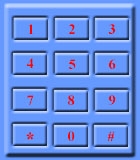
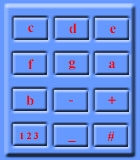
The picture below shows how the buttons of your phone relate to the notes to input :-
Original Keys |
Used as |
Working of Buttons:
- The buttons labelled c to b add a note of that letter.
- The - and + buttons decrease and increase the length of the note. Range is from 32 (shortest) to 1 (longest).
- The 123 button changes the octave of the note.
- The _ button adds a rest.
- The #button toggles the whether the note is sharpened (not for e or b).
- To make a dotted note, hold down the lettered button. (This adds on half the length again).
- Use the left and right arrow buttons to scroll through the notes.
- Use the clear button to delete the note to the left of the cursor.
Meaning of Notes:
- The note 16e2 means that the note is e, it is 16 in length and is octave 2. To enter this note, press the e button (the 3 button) then use the - or + buttons to change the length to 16. Then use the 123 button to select octave 2.
- The note 2.#a1 means that the note is #a, it is 2. in length and is octave 1. To enter this note, press and hold down the a button (the 6 button) then use the - or + buttons to change the length to 2. Press the # button to make it sharp and use the 123 button to select octave 1.
- The note 4- means a rest of length 4. To insert a rest, press the _ button (the 0 button) and change the length using the - and + buttons.
Changing Tempo:
- To change the tempo, press the Options button and select Tempo from
the list. Select the specified tempo in this menu.
How to enter a ringtone:
Ringtones are provided in two ways either it will be of the form 1(i.e. 8e2 8d2) or form 2(i.e. 38, 2, 3, 2,)
- For form 1: Use the above method.
- For form 2: Just press the key told(i.e. just press 3 then 8 then 2 then 3 and so on.)

Hindi Movies Pop Music Punjabi Music Remix TV ADs Ericsson Tones
Help on how to enter the downloaded ringtones in your NOKIA Handset