

|
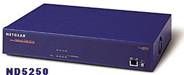
NETGEAR ND 5250 |
|
Upgrading a Netgear ND520 with a large drive and Clarkconnect Linux. |



|
Details of upgrading my Netgear ND520 (ND508 similar) with a Seagate 250GB drive using Clarkconnect 3.2 Home. Noted here hopefully for the benefit or inspiration of someone else considering doing something similar. |
|
I successfully upgraded my Netgear ND520 to a ND5250 with a Seagate 250GB drive using Clarkconnect 3.2 Home (Linux distro). I also upgraded the limited 16Mb 128 pin memory stick with a stick of 128Mb PC100 sdram I had as a redundant upgrade leftover. The background to why I did this was I wanted to try a NAS device on my home network. I had previously bought a Netgear SC101 Storage Central NAS box from a online PC supplier that comes supplied without a HDD but unfortunately the SC101 was not compatible with the drive I wanted to use (SC101 requires ATA-6 spec 133 IDE drive and mine was ATA-5 spec 100 - Model IBM IC35L080AVVA 80Gb ). It would have had fairly limited functionality being XP compatible exclusively and had no features such as an FTP server so I sold it on EBay to recover my investment and replaced it bought a Netgear ND520 from EBay. The before turn of the century device worked but the administration of the drive was password secured so I could not update the software which I needed to do because I could only access the storage volume with a Knoppix Linux machine and common with the rest of the world I predominantly use XP. Netgear tech help support could not help as the ND520 is long out of production. The Netgear box did however have some functionality so I did not want to write over the existing 20Gb HDD straight away as it still was of limited use so my first upgrade attempt was with an ancient 2.1 GB Seagate IDE drive which I connected as a master drive to an old Pentium 1 PC. The Seagate 2.1Gb was the only working drive of four purchased (two similarly sized Western Digital drives and an old Samsung drive all duff) for the princely sum of £2 at a car boot sale. I bought a Realtek rtl8139b nic card off EBay for another couple of pounds and fitted this in one of the Pentium PCI slots to ensure that the appropriate Linux drivers for the Netgear ND520 NIC would be loaded on the initial install. I then loaded Clarkconnect in standalone mode on the drive using pretty well most the default settings. I rebooted the Pentium 1 with the Clarkconnect installed drive and modified the /etc/grub.conf file with the text editor ‘nano’ by deleting the line which referenced the start up flash screen and set the boot time out to 0 seconds (default 5 secs). This drive was transferred to the Netgear ND520 unit which booted fine with the 2GB drive so I progressed to a 80GB IBM drive removed from my main XP PC. I had backed up all my relevant data and intended to use the 80Gb drive in the Netgear ND520 to make it a ND580 J. The ND520 bios is limited to 32GB hard drive capacity and hangs with anything larger. It turns out that the 32GB jumper on an IBM drive physically limits the drive to 32GB rather than just ‘reporting’ itself to the bios as such so whilst Linux can normally use the entire volume available regardless of jumper setting, the IBM 32Gb jumper is in fact a physical drive limitation. I tried every combination to get the full 80Gb capacity including formatting it at 80Gb then fitting the 32Gb jumper but ran out of patience and knowledge. The 80Gb IBM drive booted and ran Clarkconnect limited at 32GB without any problem I took a gamble and bought a brand shiny new 250Gb Seagate drive and repeated the process again. The jumper on the Seagate drive only limits what the drive reports to the BIOS rather than ‘hard’ limiting the drives capacity. This is common with most other drive manufacturers such as Western Digital and Maxtor but I chose the Seagate because of its legendary reliability. The Pentium machine (which booted fine from the 80GB IBM drive) refused to boot with the 250GB Seagate drive unless I set the 32GB jumper on the drive and used ‘setmax’ to limit the drive capacity. This also limited the formatted capacity within Clarkconnect too. I got around this by setting the Pentium 1 BIOS without any hard drives assigned at all. When booting from the Clarkconnect boot CD on the Pentium 1 machine, the drive was recognised by the Linux installation routine and all went well even though ignored by the BIOS. I completed the Clarkconnect install, then transferred the drive to the Netgear with the 32GB jumper fitted and ………..BINGO! a fully operational 250Gb NAS. Note that I could not boot the Pentium machine with the 250Gb drive because of the BIOS hanging problem when fitted with the drive but I did try it in a Pentium III machine and it booted fine but went into a hardware recognition mode. I never permitted any changes to the Clarkconnect hardware configuration, but edited the etc/grub.conf as before and moved it to the Netgear ND520. I could not achieve this with the IBM 80Gb drive as the jumper physically limited the drive to 32Gb. With the system up and running, my XP PC’s could not see the NAS until I set the file sharing to ‘share’ in Clarkconnect webconfig. I have used the FTP functionality and continue to learn about other functions within Clarkconnect and linux in general. The Netgear box was quite noisy due to the internal cooling fans. There are two 40mm 5volt case fans and a 50mm common garden variety 12v CPU fan. I wired the two case fans in series to reduce their operational speed and as long the box is in an open location (not inside a tight fitting shelf) then it runs cool and reasonably silent. If you mess with the cooling fans then make sure you keep all the fans blowing air out of the case as the intake air draws across the power supply section of the case to provide cooling. I intend fitting a resistor to the CPU fan but to slow it down a bit too but have not got round to it yet. I tried running the CPU fan off the 5v supply on the motherboard but it refused to spin up. Another idea was to remove all the fans and replace them with an Akasa ‘gold’ silent 80mm fan. I was going to blank of the existing 40mm fan openings and cut a hole in the top of the Netgear case to install the fan to draw air from over the power supply part of the Netgear box but when my Seagate 250Gb delivery was dispatched from the supplier they had none of the Akasa fans left in stock. Overall, I am very happy with the Netgear Clarkconnect NAS and it performs fine. I have it hooked up to my Belkin Router with a patch cable and can access it from all over the house on any wireless XP PC. I fitted the original Netgear 20 Gb drive to my main PC and used the 80Gb in a portable firewire / USB disk case as a back up drive. (backup to a backup – a touch of paranoia maybe?). I can also access the Netgear Clarkconnect NAS with my Netgem iPlayer and FTP serve stream video and mp3 to my TV / surround sound system but that is another story. So far I have used it to back up disk images of all my families PC’s (2 x desktops and 2 x Laptops) and also stored loads of video and mp3 files on it. Next I need to learn a little more about configuring the ProFTPD FTP server as I would like to add password protection to the FTP files. As the Netgear ND5250 is keyboardless then I will need to access the operating system with a SSH terminal program from another PC. I will try Linux first with WIKI or X11forwarding and if that does not work for me then I will try an XP PC with Putty. Basically a quest purely for the benefit of achieving knowledge and I had 30 minutes to note it down possibly for the benefit or inspiration of someone else considering doing similar. I could have bought a preconfigured Buffalo or similar NAS drive for a little greater financial outlay but far less effort but would have gained far less personal satisfaction and reward. I found lots of information at the forums at http://newbie.valar.co.uk / and this page http://www.longview.eclipse.co.uk/netgear/ gave me the original idea of upgrading the ND520. Obviously the Clarkconnect website is invaluable and the software is simply fantastic. If you have any comments, questions or genuine catch free, unconditional offers of tremendous wealth then you can mail the author:- mwojciechowski at postmaster.co.uk Notes and disclaimer:- Always disconnect the mains power lead before removing the ND520 / 508 cover as the power supply section has naked terminals that will more than surprise you if you touch them (you may wet yourself, burn a hole in the carpet you are standing on or even possibly be given the ability to hold your breath indefinatelly). Also be very aware that the all the above details are not recommendations. They are simply my experiences. You are welcome to copy anything on this page and use it as you wish but would appreciate if you could provide links or mirror back to this page from any respectable sites. |