Inkjet Image Transfer Tile Coaster
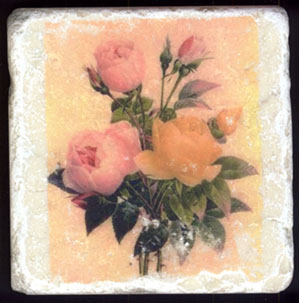
This image transfer technique uses inket printed images and Golden's Fluid Matte Medium. It's a quick and easy way to create beautiful objects. I hope you enjoy making your tiles as much as I do! You can either make coasters with them, or you can get creative and cover table tops and other surfaces, create tiles for �backsplashes� in your home, or use larger tiles to create table trivets or wall hangings! You can also use this method to transfer images to other hard surfaces--Domino tiles being one of my favorites!
Materials
- Tumbled stone or marbled 4"x4" tiles, smooth top surface
- Great White Photo and Imaging Paper, Matte (now sold as Hammermill Jetprint Photo & Imaging Paper, Matte)
- Golden Fluid Matte Medium
- Hard acrylic brayer
- Color or B&W images (I used clip art)
- Inkjet printer (I used HP inkjet printer; may have varied success with Epson printers using DuraBrite inks)
- Freezer paper or waxed paper
- Think cork and adhesive (Xyron, white glue)
How To
- Print out the images you want to transfer onto the Great White Photo paper. This paper is a clay coated matte paper, not as thick as cardstock but much thicker than regular copy paper. It works exceptionally well for image transfers, and can be found at most office supply stores for $11 - $13 for a box of 100 sheets. Use the �best� print quality your printer has, and make sure to print any images with text or writing as a mirror image�otherwise, the text and image will be backwards when you transfer your image to your surface.
- Cut out the image you want transferred exactly as you would like it�no borders. When cutting out, you can also include a small �tab� to help you hold the image as you move it or you can add a tab using regular Scotch tape. Try to make the tab out of the �white space� around your image, or it�s likely to transfer too�the matte medium tends to seep under the tab.
- Place the image face up onto a piece of freezer paper or waxed paper (slick side up for the freezer paper). Spread some fluid matte medium with your fingers all over the image, covering the edges but NOT covering the tab. You want a wet image�it shouldn�t be so thin that it begins to get dry spots, and you want it to cover somewhat evenly across the image.
- Now, pick up your image using the tab and place it face down on your tile. Discard the used freezer paper.
- Cover your image and tile with a clean piece of freezer paper (or waxed paper) with the slick side facing the tile, and roll the brayer over it back and forth, up and down, and diagonally. Do this for 30 seconds or so, or until the image is flattened completely. You want to use some pressure when brayering to adhere the paper to the tile.
- Remove the freezer paper and immediately lift the image by the tab�do it quickly. Voila! Your image has transferred! (If some of the paper has stuck to the image, please see the Tips and Tricks for solutions!)
- Take a wet paper towel or baby wipe, and remove the excess matte medium that oozed out from the sides of the image. You can also soften the edges of your image by carefully removing some of the image using your wet towel. Be careful not to remove too much!
- Let the image dry completely (24 hours), sign your work if you desire, and seal it with three (light) coats of varnish or sealer.
- Cut your cork slightly smaller than the tile and adhere to the back of the tile by putting the cork through a Xyron machine or gluing the cork using strong white glue.
- Tip: If you brayered it too long or didn�t use enough medium, you will find that some of the paper stuck to the image. That�s OKAY. You have two choices�let it dry completely and remove the paper, or remove the paper now. To remove the paper immediately, GENTLY use your finger to roll the edge of the paper, then grab the edge and carefully peel off the paper. If you do this while the image is still wet, the paper SHOULD easily come off, but you do take the chance of upsetting (and ruining) your image. This may add to the �antique� look of your tile.
Sign Guestbook
View Current Guestbook
View Archived Guestbook
© 1999-2004 by Margaret Donnelly