
KEYBOARD SHORTCUTS
Borrowing
from William Shakespeare... "To mouse or not to mouse? That is the
question." 
Mice have been a popular choice for years as pointing devices and most users have been relying on the mouse for their daily computing tasks (heck, that includes me... I can't live without my trusty old mouse poking beside my keyboard). Although their primary function is to "point-and-click," their use have expanded from selecting typed text to activating commands.
Mice
are good, but sometimes, keyboard action is better... and faster too. So,
before you reach for the mouse to click that File > Save command, try using
its keyboard equivalent: 
|
Cursor Movement and Text Selection |
|
|
[CTRL] + Left/Right Arrow Key |
Move to the word on the left/right side |
|
[CTRL] + Up/Down Arrow Key |
Move to the previous/next paragraph |
|
[SHIFT+CTRL] + Left/Right Arrow Key |
Select the word on the left/right side |
|
[SHIFT+CTRL] + Up/Down Arrow Key |
Select previous/next paragraph |
|
Editing |
|
| [CTRL] + C | Copy selection to the clipboard |
| [CTRL] + X | Move selection to the clipboard |
| [CTRL] + V | Paste selection from the clipboard |
| [CTRL] + A | Select everything |
| [CTRL] + Z | Undo last mistake |
| [CTRL] + F | Find text |
| [CTRL] + H | Search and replace text |
|
Common Keyboard Shortcuts |
|
| [CTRL] + O | Open file |
| [CTRL] + S | Save file |
| [ALT] + [F4] | Exit program |
| [ALT] + [TAB] | Switch to the next open application |
| [SHIFT] + [ALT] + [TAB] | Switch to the previous open application |
| [ALT] + [ENTER] | Open the file's property dialog box |
|
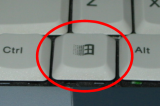
Windows Key-specific Shortcuts
|
|
| [WINKEY] + E | Start Windows Explorer |
| [WINKEY] + F | Look for files |
| [WINKEY] + M | Minimize all open windows |
| [WINKEY] + [SHIFT] + M | Restore all minimized windows |
| [WINKEY] + R | Open the Run Program dialog box |
| [WINKEY] + [F1] | Windows help |
| [WINKEY] + [PAUSE/BREAK] | Open the System Properties dialog box |
| Previous Page | Main Page |