

HOW DO I DELETE THE CACHE?
The
question is, why should you clear the cache in the first place? Hmm... why
do you clean the yard? why do you wash the dishes? Same reason here... for
maintenance and to avoid too much clutter. Well, actually, it is necessary
to clear the cache every now and then especially if you begin to get cryptic
error messages  from your browser, or if you are getting low on disk space, or you just want to
start fresh.
from your browser, or if you are getting low on disk space, or you just want to
start fresh.
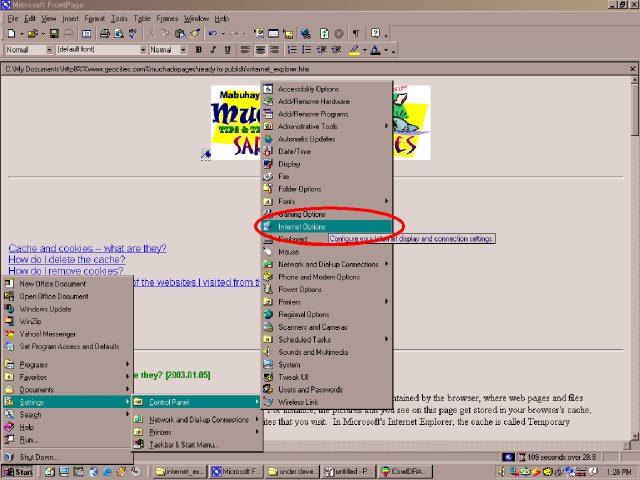
It's easy to clean up the cache. Click Start > Settings > Control Panel > Internet Options.
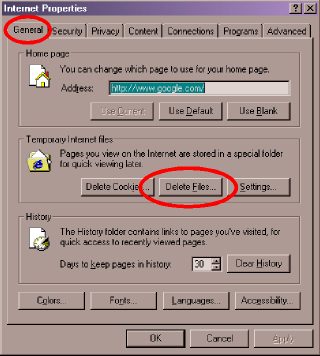
The Internet Properties dialog box will appear. In the [GENERAL] tab, click the [DELETE FILES...] button.
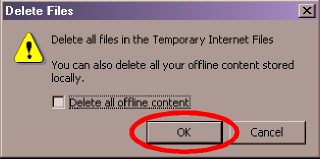
A confirmation box will appear next. Click the [OK] button.
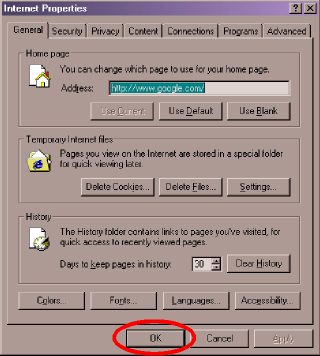
Click the next [OK] button to close the Internet Properties dialog box.
Please note that deleting the cache means you delete the web pages, sounds, pictures, and other files that were stored in the cache. So revisiting those websites you have visited before means another session of downloading all the related files from the website. Also note that deleting the cache does not remove cookies.
| Previous Page | Main Page |