

CACHE AND COOKIES -- WHAT ARE THEY?
What is a cache? Simply put, a cache is a location in your computer's hard disk drive, maintained by the browser, where web pages and files (such as graphics and sounds) get stored as you view them. For instance, the pictures that you see on this page get stored in your browser's cache, and so is the text that you're reading right now and other websites that you visit. In Microsoft's Internet Explorer, the cache is called Temporary Internet Files.
So, why is the cache important? Probably the best way to illustrate the importance of the cache is by an actual example. The page that you are viewing now contain several pictures and this text. Probably, as you are reading this, the page is still downloading, and, depending on your internet connection speed, it takes time to download all the files necessary to view this page. Let's say that you're done with this page and went off to another website. Later on, you return to this page. Since the contents of this page were already stored in your browser's cache, you don't have to download everything all over again. The browser will just check if there are any changes from this website and compares it to your local copy. Since there are no changes, it will just load the contents from the cache. This speeds up the display of pages you frequently visit or have already seen, because the browser can open them from its cache instead of from the web.
Now
how about cookies? I'm getting hungry! Cookies aren't food -- well,
at least not in this sense! 
Cookies are small text files put by the website in your browser's cache. What do they do? Well, websites use cookies in different ways, but perhaps the most common use of a cookie is storing user preferences so that each website can look different for each visitor. This is often referred to as customization.
A perfect example of customization is Google's website. If you open Google, by default, it will display messages in English. A search will return 10 results per page, each result can be written in any language. But what if you want Google to display messages in, say, French, results written only in, say, English and French? and 50 results per page instead of the default?
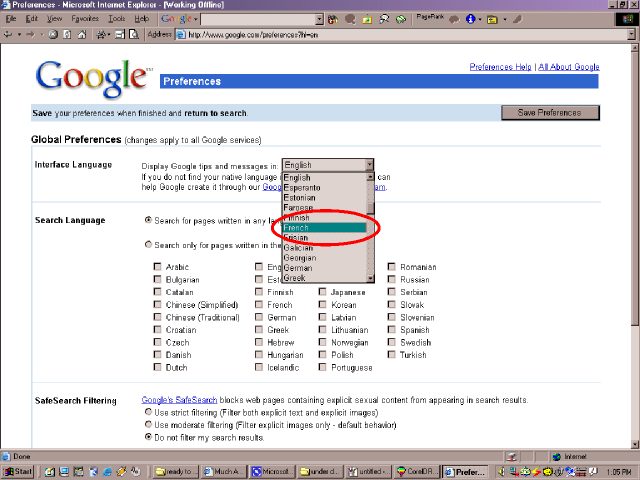
Ahh, that's were cookies come in. If you set those preferences in Google, the site will send you a cookie (which gets stored in your browser's cache) containing whatever preferences you have set. The next time you do a search in Google, it will remember the preferences (because of the cookie) and will display the search results based on what you told it to do.
| Previous Page | Main Page |