

I CAN'T VIEW PROFILES... WHAT GIVES?
Here's the scenario... you tried viewing a user's profile when Windows gave you a file association error message. What happened? Simply put, Internet Explorer lost "focus," meaning, it is no longer the default browser that runs whenever you surf the web (and in this particular case, whenever you try to view a user's profile). You may have installed another browser on top of IE and it "stole" focus from IE. To put IE back to its senses, follow this procedure:
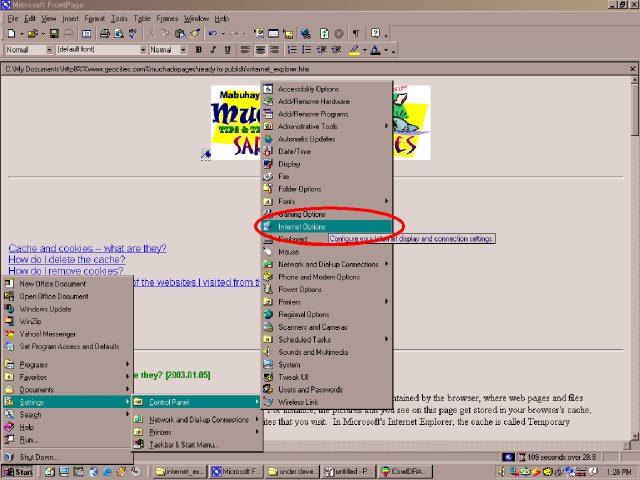
Click Start > Settings > Control Panel > Internet Options.
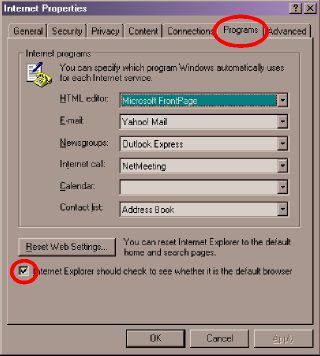
The Internet Properties dialog box will appear. In the [PROGRAMS] tab, make sure there is a check mark beside the item "Internet Explorer should check whether it is the default browser."
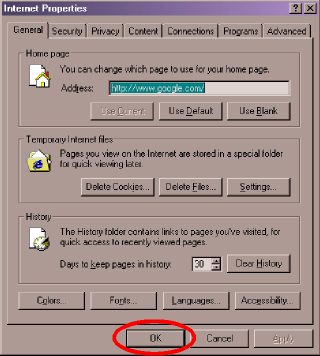
Click the next [OK] button to close the Internet Properties dialog box.
Try viewing profiles. This action should start Internet Explorer. If you are prompted to let IE be the default browser, do it. You should be able to view profiles again.
If you still can't view profiles, download this free program for the fix.
On
the other hand, if you want to maintain your other browser as the default, just manually
(you read it right...  m-a-n-u-a-l-l-y) load the other person's profile in your browser by typing the
following in the address bar:
m-a-n-u-a-l-l-y) load the other person's profile in your browser by typing the
following in the address bar:
http://profiles.yahoo.com/<id>
Replace the <id> with the Yahoo! ID of the other user. So, for example, if you want to see the profile of juan_dela_cruz, just type:
http://profiles.yahoo.com/juan_dela_cruz
in the address bar and press the [ENTER] key.
| Previous Page | Main Page |