

GRRR!!! THIS PERSON IS ANNOYING! HOW DO I PUT HIM/HER ON PERMANENT IGNORE?
Have
you ever been in the following situation? You enter a room and started chatting.
 You
noticed someone annoying you (or the room),
You
noticed someone annoying you (or the room),  and decided to put him/her on ignore. So, you selected his/her name and
clicked the [IGNORE]
button. *Poof*
and decided to put him/her on ignore. So, you selected his/her name and
clicked the [IGNORE]
button. *Poof*  no more annoying posts from him/her. So, you resumed your usual
socialization with the people in the room. After some time, you said your
goodbyes
no more annoying posts from him/her. So, you resumed your usual
socialization with the people in the room. After some time, you said your
goodbyes  to
everybody you know and exit the room. You disconnected from Yahoo!
Messenger. Later, you logged in again and entered the chat room. You
noticed the person your ignored earlier, but this time, he/she is no longer on
ignore!
to
everybody you know and exit the room. You disconnected from Yahoo!
Messenger. Later, you logged in again and entered the chat room. You
noticed the person your ignored earlier, but this time, he/she is no longer on
ignore!  "Bu... Bu... But... I just put that person on iggy a while ago!"
  you said. "Do I always have to put him/her on ignore every time I see
his/her name in the chat room?" Frustrating, huh?
you said. "Do I always have to put him/her on ignore every time I see
his/her name in the chat room?" Frustrating, huh?
There are two ways of putting someone on ignore. The situation described above is called a temporary ignore. To ignore permanently, you just follow these steps.
Double-click the person's name on the user list so a PM (private message) box will show up on the screen like the one below.
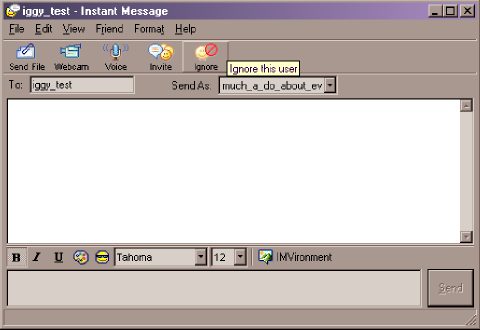
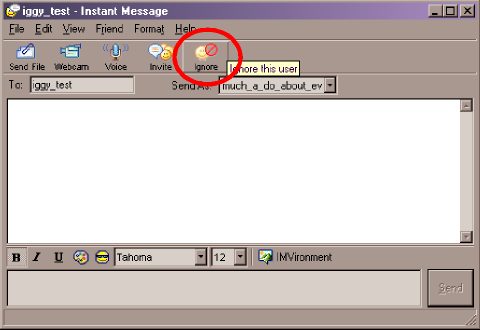
Don't type anything in the PM box. Just click the [IGNORE] button...
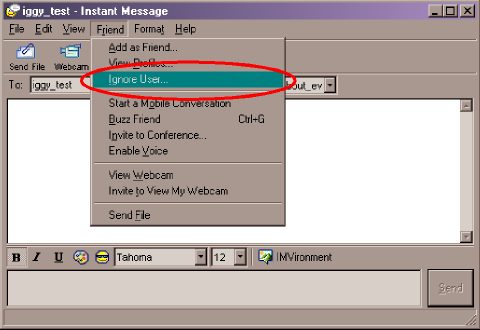
...or click on Friend > Ignore User... from the menu.
Either way, a confirmation box will appear.
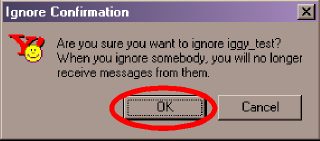
Click the [OK] button. The user is now on permanent ignore. So, even if you disconnect and reconnect later, the person is still ignored.
| Previous Page | Main Page |