

I HAVE A GREAT SONG TO SHARE WITH MY FELLOW ROOMIES. HOW DO I PLAY IT IN THE ROOM?
Ahhh...
so you wanna play some tunes in the room eh? Simple enough  Here's how:
Note: the procedure described here assumes that you use a headset when listening to chat. If you have speakers and want to play music in the room, all you have to do is point the microphone toward one of the speakers and start playing the song. If, on the other hand, you don't have a microphone, just follow these steps.
Do
you see the loudspeaker icon by the system tray?  Double-click it. As an alternative, you can click Start > Settings >
Control Panel > Sounds and Multimedia.
Double-click it. As an alternative, you can click Start > Settings >
Control Panel > Sounds and Multimedia.
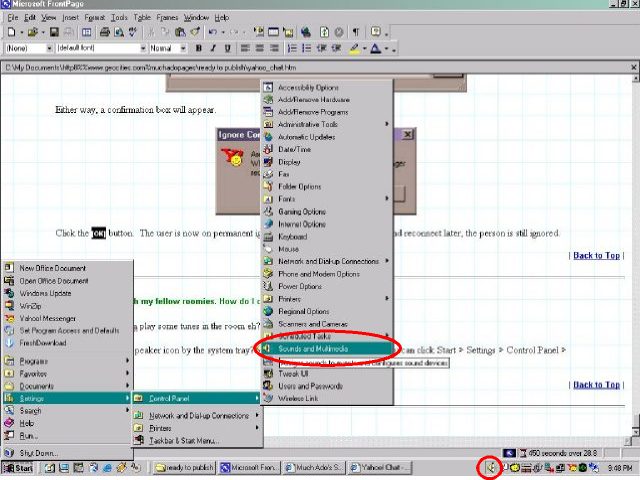
Either way, the Volume Control properties dialog box will appear:
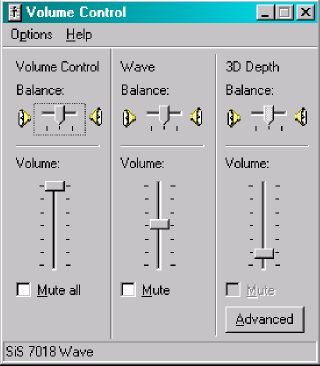
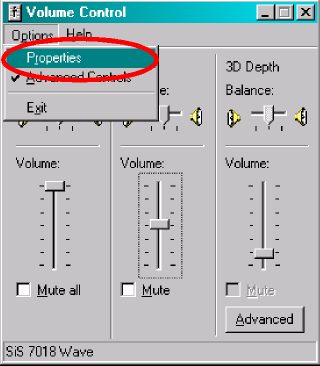
Of course, the dialog box you are seeing above may or may not look like the one that is set-up in your computer. But nevertheless, select Options > Properties.
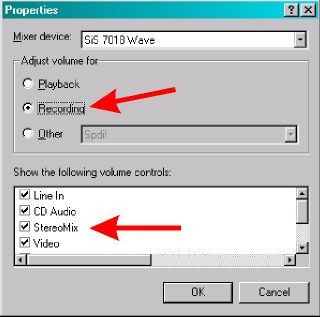
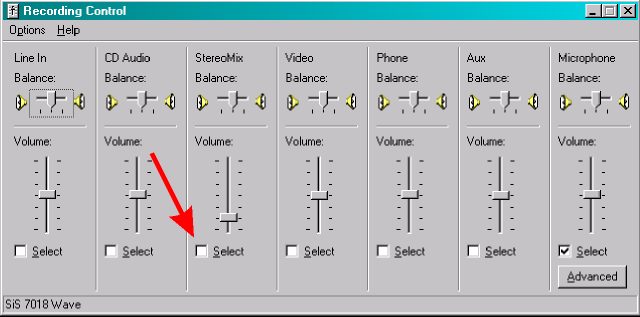
In the next dialog box, make sure that Adjust volume for Recording is selected and the item StereoMix is checked (again, depending on your sound card, StereoMix may have a different name. So, if in doubt, check all the items in that section). Then, click the [OK] button.
Note that the Volume Control properties box changes to Recording Control. By default, the Microphone is selected. Change the default device by clicking the box under StereoMix.
Basically,
that's it. Click on Hands Free in Yahoo! Messenger, power up your favorite
media player and play that song of yours. Have fun!
| Previous Page | Main Page |