

I CAN HEAR MY
OWN VOICE ECHOING FROM MY SPEAKERS
HOW DO I GET RID OF IT?
Step One
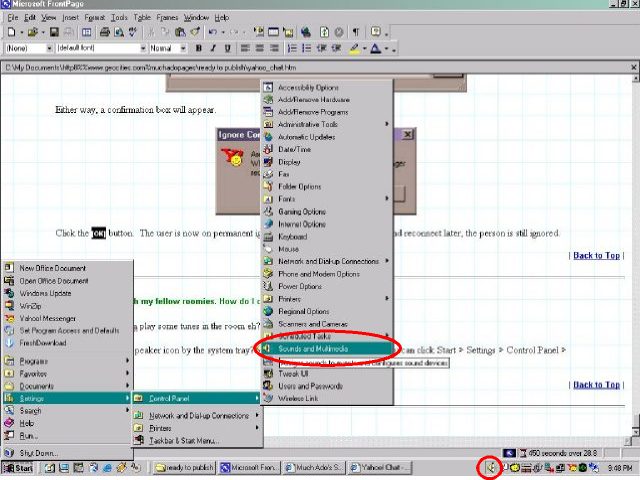
On the system tray, double-click the loudspeaker icon. Alternatively, you can also click START > SETTINGS > CONTROL PANEL > SOUNDS AND MULTIMEDIA
Step Two
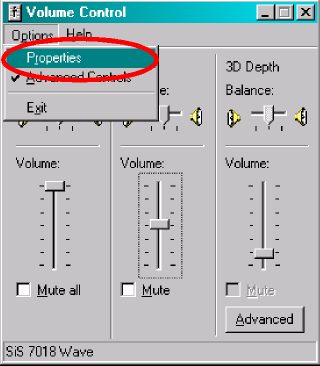
The Volume Control dialog box will show up. If you see a mixer device called "Microphone," click here to jump to Step Four. Otherwise, click OPTIONS > PROPERTIES
Step Three
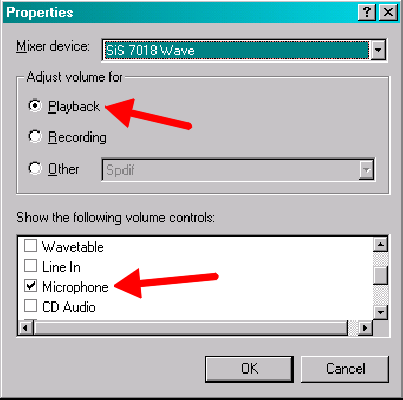
Make sure you have the Microphone Volume Control checked for Playback. Once that's done, click the OK button.
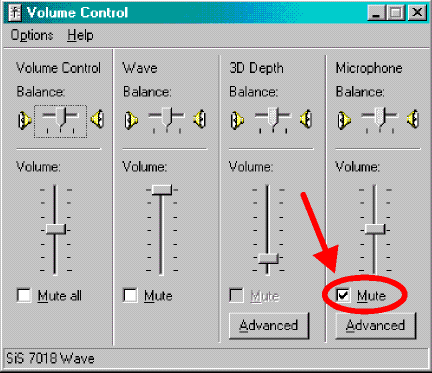
Put a check mark in the box beside the option labeled Mute under the Microphone mixer device and click the [X] button to close it.
That's all there is to it. You won't hear any more feedback from now on.
| Previous Page | Main Page |