

CONNECTING TO THE COMPUTER
Before making a purchase, you should take into consideration how you are going to transfer the photographs you will take from your camera to the computer. There are two ways of doing this: either buy an external card reader or use the supplied cable to transfer them.
There are at least two advantages of using an external card reader vis-a-vis transferring images through the cable. First, there is no need to install the camera drivers/software since you don't need them in the first place. (Unless, of course, if the digicam came with photo editing software that you need, then probably you have to install them. But as far as drivers are concerned, you don't have to install.) Second, it is faster if you transfer the images using the card reader especially if there are many of them. Since Windows detects the card reader as an external drive, you open it just like how you open your C drive. And since it acts like a big floppy disk drive, you can actually transfer any file from your computer to the memory card as easily as copy and paste.
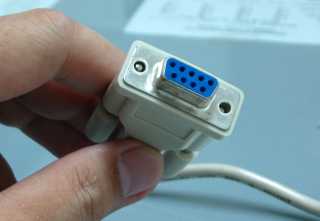
| COMMON TYPES OF INTERFACES | |
 |
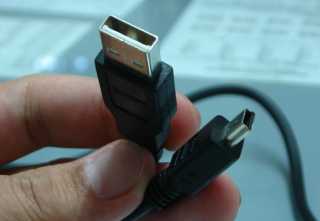 |
| RS-232 SERIAL CONNECTION | USB CONNECTION |
On the other hand, if you don't have a card reader or don't plan on buying one, just use the supplied cable that comes with the camera. Usually, consumer digicams come with either a Serial or a USB cable connection. The serial interface is pretty standard in all personal computers, so you won't have any problems if by chance the digicam you are about to buy comes with a serial cable. But, keep in mind that transferring images using serial cable is S-L-O-W. So, the other alternative is get a digicam that uses USB as it's method of transferring images via cable. It's faster than serial cable (very fast) and is pretty much a standard in all new computers.
| Previous Page | Main Page |