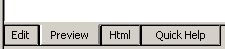
When you are editing a web page, you can click tabs to switch views of "Edit",
"Preview", "Html" and "Quick Help".
Edit--Edit the page content in WYSIWYG fashion, just like Word, or any other
WYSIWYG Editor.
Preview--Preview your page as it will appear when viewed by a web visitor.
In most case the application will add the content to the template to generate
the page.
Html--Write Html directly if you understand it. You don't need to be bothered
with it if you don't understand Html.
Quick Help--Read some short help notes when you get started.