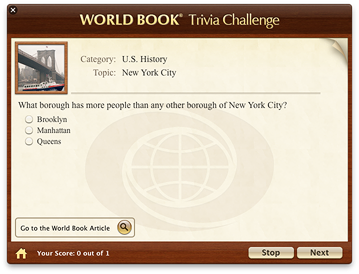
Answering questions
After starting a quiz, you'll see a question and several possible answers. Select the answer you think is correct and click Next. A message tells you whether your answer is correct or incorrect. If it is incorrect, the correct answer is given. If you don't select any of the answers and click Next, a message containing the correct answer appears. Click Next again to move on to the following question.
At the bottom of the World Book Trivia Challenge window you can see the number of questions you have answered correctly and the total number of questions you have answered in the quiz. At the end of the quiz, your final score is displayed.
If you want to interrupt the quiz at any time, click the Stop button. Your current score will be displayed. To go back to the list of topic categories, click the Home button.
To get additional information on the current question, click the Go to the World Book Article button.
|
| Answering a question |