Motherboard
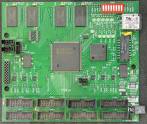
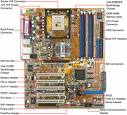
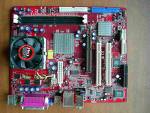
A motherboard is the central or primary circuit board making up a complex electronic system, such as a modern computer. It is also known as a mainboard, baseboard, system board, or, on
Apple computers, a logic board, and is sometimes abbreviated as mobo.Most after-market
motherboards produced today are designed for so-called IBM-compatible computers, which
hold over % of the personal computer market today.Motherboards for IBM-compatible
computers are specifically covered in the PC motherboard article.
The basic purpose of the motherboard, like a backplane, is to provide the electrical and
logical connections by which the other components of the system communicate.A typical
desktop computer is built with the microprocessor, main memory, and other essential
components on the motherboard. Other components such as external storage, controllers for
video display and sound, and peripheral devices are typically attached to the motherboard via
edge connectors and cables, although in modern computers it is increasingly common to
integrate these "peripherals" into the motherboard.
Components and functions
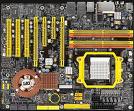
The motherboard of a typical desktop consists of a large PCB. It holds electronic components
and interconnects, as well as physical connectors sockets, slots, and headers into which other
computer components may be inserted or attached.
Most motherboards include, at a minimum: sockets or slots in which one or more
microprocessors CPUs are installed. slots into which the system's main memory is installed
typically in the form of DIMM modules containing DRAM chips. A chipset which forms an
interface between the CPU's front-side bus, main memory, and peripheral buses. Non-volatile
memory chips usually Flash ROM in modern motherboards containing the system's firmware
or BIOS. A clock generator which produces the system clock signal to synchronize the various
components. slots for expansion cards these interface to the system via the buses supported by
the chipset. power connectors and circuits, which receive electrical power from the computer
power supply and distribute it to the CPU, chipset, main memory, and expansion cards.

Integrated peripherals
With the steadily declining costs and size of integrated circuits, it is now possible to include
support for many peripherals on the motherboard. By combining many functions on one PCB,
the physical size and total cost of the system may be reduced; highly-integrated motherboards
are thus especially popular in small form factor and budget computers.
For example, the ECS RSM-M, a typical modern budget motherboard for computers based on
AMD processors, has on-board support for a very large range of peripherals: disk controllers
for a floppy disk drive, up to PATA drives, and up to SATA drives including RAID / support
integrated ATI Radeon graphics controller supporting D and D graphics, with VGA and TV
output integrated sound card supporting -channel audio and S/PDIF output fast Ethernet
network controller for / Mbit networking USB . controller supporting up to USB ports
IrDA controller for infrared data communication e.g. with an IrDA enabled Cellular Phone or
Printer temperature, voltage, and fan-speed sensors that allow software to monitor the health
of computer components.
Expansion cards to support all of these functions would have cost hundreds of dollars even a
decade ago, however as of April such highly-integrated motherboards are available for as
little as $ in the USA.
Temperature and reliability
Motherboards are generally air cooled with heat sinks often mounted on larger chips, such as
the northbridge, in modern motherboards. Passive cooling was sufficient for many desktop
computer CPUs until the late s; since then, most have required CPU fans mounted on their
heatsinks, due to rising clock speeds and power consumption. Most motherboards have
connectors for additional case fans as well. Newer motherboards have integrated temperature
sensors to detect motherboard and CPU temperatures, and controllable fan connectors which
the BIOS or operating system can use to regulate fan speed.
Some small form factor computers and home theater PCs designed for quiet and
energy-efficient operation boast fan-less designs. This typically requires the use of a
low-power CPU, as well as careful layout of the motherboard and other components to allow
for heat sink placement . A study found that some spurious computer crashes and general
reliability issues, ranging from screen image distortions to I/O read/write errors, can
surprisingly be attributed not to software or peripheral hardware but to aging capacitors on
PC motherboards.
Motherboards use electrolytic capacitors for voltage regulation. These capacitors age at a
temperature-dependent rate, as their water based electrolytes slowly evaporate. This can lead
to loss of capacitance and subsequent motherboard malfunctions due to voltage instabilities.
While most capacitors are rated for hours of operation at �C, their expected design life
roughly doubles for every �C below this. At �C a lifetime of years can be expected. This
appears reasonable for a computer motherboard, however many manufacturers have
delivered substandard capacitors, which significantly reduce this life expectancy. Inadequate
case cooling and elevated temperatures easily exacerbate this problem. It is possible, but
tedious and time-consuming, to find and replace broken capacitors on PC motherboards; it is
often cheaper to buy a new motherboard than to pay for such a repair.
History
Prior to the advent of the Apple II in , a computer was usually built in a case or mainframe
with components connected by a backplane consisting of a set of slots themselves connected
with wires. The CPU, memory and I/O peripherals were housed on individual PCBs or cards
which plugged into the backplane.With the arrival of the microprocessor, it became more
cost-effective to place the backplane connectors, processor and glue logic onto a single
"mother" board, with video, memory and I/O functions on "child" cards � hence the terms
"motherboard" and daughterboard. The Apple II computer featured a motherboard with
expansion slots.
During the late s and s, it became economical to move an increasing number of peripheral
functions onto the motherboard see above. In the late s, motherboards began to include single
ICs called Super I/O chips capable of supporting a set of low-speed peripherals: keyboard,
mouse, floppy disk drive, serial ports, and parallel ports. As of the early s, many motherboards
support a full range of audio, video, storage, and networking functions without the need for
any expansion cards at all; higher-end systems for D gaming and computer graphics typically
retain only the graphics card as a separate component.The early pioneers of motherboard
manufacturing were Micronics, Mylex, AMI, DTK, Hauppauge, Orchid Technology,
Elitegroup, DFI, and a number of Taiwan-based manufacturers.
It can be argued that the motherboard industry was born by IBM in with the release their
entry level Personal Computer IBM PC which was based on a motherboard. The
motherboard provided an Intel .MHz with K bytes of on-board memory, expandable to K
through the use of plug-in memory boards, eight -bit ISA expansion connectors, cassette tape
port and keyboard port. All other I/O such as the interface for K -/" floppy drives, serial and
parallel ports were provided by plug-in boards. IBM approached Digital Research about using
DR/DOS as an operating system but was rebuffed. IBM approached Microsoft and licensed
PC-DOS. Microsoft released PC-DOS . in by retaining rights to the operating system
allowing them to sell it to other manufacturers.
Software Meets Hardware: the BIOS
A computer motherboard is a piece of hardware: it is the physical circuits and interconnecting
wires that forms the backbone of a computer. It has logic circuits which can be manipulated
and controlled by the operator, the software program, and input peripherals. But in order to
begin operating from a power-off state, a motherboard must be bootstrapped or simply,
booted by an initial set of software instructions. Without this vital software, the motherboard
is rendered useless.
Most modern motherboard designs use a BIOS, stored in a EEPROM chip soldered to the
motherboard, to bootstrap the motherboard. Socketed BIOS chips are widely used, also. By
booting the motherboard, the memory, circuitry, and peripherals are tested and configured.
This process is known as a Power On Self Test or POST. Errors during POST result in
POST error codes, ranging from simple audible beeps from the speaker to complex diagnostic
messages displayed on the video monitor.
The BIOS often requires configuration settings to be stored on the motherboard. Since
configuration settings must be easily edited, these settings are often stored in non-volatile
RAM NVRAM rather than in some sort of read-only memory ROM. When a user makes
configuration changes or alters the date and time of the computer, this small NVRAM circuit
stores the data. Typically, a small, long-lasting battery e.g. a lithium coin cell CR is used to
keep the NVRAM "refreshed" for many years. Therefore, a failing battery on a motherboard
will produce the symptoms of a computer that cannot determine the correct date and time, nor
remember what hardware configuration the user has selected. The BIOS itself is unaffected by
the status of the battery.
Integrated Parts
When IBM first introduced the PC in the s, imitations were quite common. The physical parts
which made up the motherboard were trivial to acquire. However, the imitations were never
successful until the IBM, ROM ,BIOS was legally copied. To understand why copying the
BIOS was an important step, consider that the BIOS contained vital instructions which
interacted with peripherals. Without these software instructions in the BIOS, a PC would not
function properly. In most modern computer operating systems, the BIOS is bypassed for most
hardware functions, but in the s, the BIOS served many vital low-level functions.
So when Compaq Computer Corp. spent US$ million to clone the IBM BIOS using reverse
engineering, they became an elite computer manufacturer of IBM PC Clones. Phoenix
Technology soon matched their feat and began reselling BIOSes to other clone makers. It has
been noted that Microsoft was more than happy to license the operating system DOS, and
IBM was more than happy to sue companies that violated the copyright of their BIOS. But by
documenting and publicizing the reverse engineering of the BIOS, Compaq and Phoenix were
legally competing with IBM using their own copyrighted BIOS.
