Step 1. The Java Program
Enter and compile the following java program.
import java.awt.*;
import java.awt.event.*;
import javax.swing.*;

/**
 * An example program with a memory leak.
 * Every time a dialog is dismissed by a button,
 * it is never garbage collected.
 */
public class MessageTester extends JFrame
{
    private JTextField message = new JTextField( 15 );

    /**
     * Shows a the test app frame.
     */
    public static void main( String[] args )
    {
        MessageTester frame = new MessageTester();
        frame.addWindowListener(
            new WindowAdapter()
            {
                public void windowClosing( WindowEvent evt )
                {
                    System.exit( 0 );
                }
            });
        frame.setSize( 400, 200 );
        frame.setVisible( true );
    }

    /**
     * Creates and arranges a test dialog.
     */
    public MessageTester()
    {
        super( "Message Tester" );
        JButton showDialog = new JButton( "Show JOption Dialog" );

        getContentPane().setLayout( new BorderLayout() );
        getContentPane().add( new JLabel(
            "Enter a message and press the button to show a dialog.",
            JLabel.CENTER ),
            BorderLayout.CENTER );
        JPanel controlPanel = new JPanel();
        controlPanel.add( message );
        controlPanel.add( showDialog );
        getContentPane().add( controlPanel, BorderLayout.SOUTH );

        showDialog.addActionListener(
            new ActionListener()
            {
                public void actionPerformed( ActionEvent evt )
                {
                    JOptionPane.showMessageDialog( message,
                        message.getText() );
                }
            });
    }
}
|
Run the application from the console window to ensure that it is working correctly.
java
            MessageTester
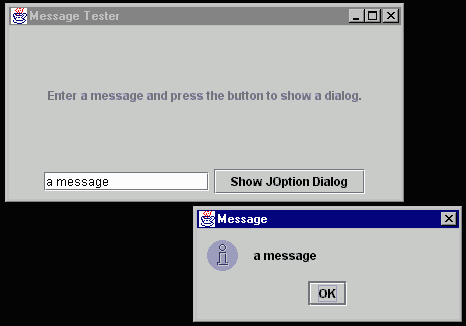
Below is a screen shot of the sample application in action. Pressing the "Show JOption Dialog" button will create and show an instance of the swing class JOptionPane. What isn't apparent is that every time the JOptionPane is dismissed by pressing the OK button, a memory leak is created (this has been fixed in 1.1.8).
Step 2. Run the application using Heap Inspector.
Now run the same application, this time using the Heap Inspector bootstrap.
inspect
            MessageTester
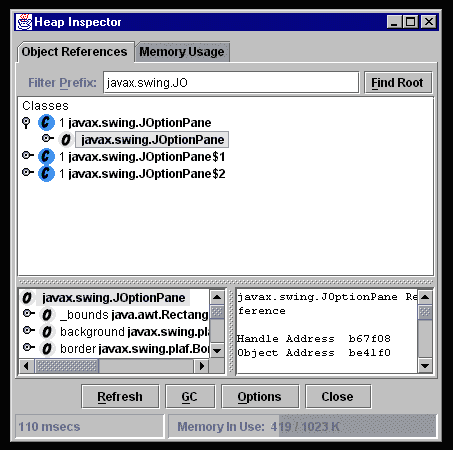
Press the 'Refresh' button to show a listing of all the objects present in the Java VM. Enter the substring 'javax.swing.JO' in the filter text field and then press 'Refresh' again. Now only instances whose class name begins with 'javax.swing.JO' will be shown in the list.
Step 3. Identify the JOptionPane's gc root.
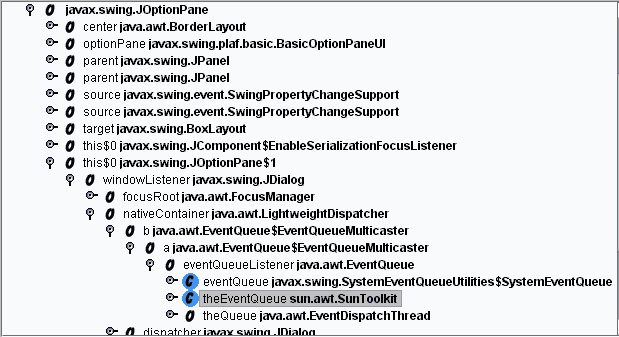
Using the MessageTester application, create and dismiss a few message dialogs. Then refresh the list again and notice that none of the JOptionPane instances are being garbage collected. Right click on one of the instance nodes in the tree. This expands the tree to show the root reference which is keeping the instance in memory. In this case, it is a static reference from the class sun.awt.SunToolkit. The reference is being kept in memory because of a bug in the class java.awt.LightweightDispatcher.
That's it. Heap Inspector can be quite useful in determining what is keeping top level application objects like javax.swing.JFrame in memory.
You can find more information on the memory leak
described above at:
http://developer.java.sun.com/developer/bugParade/bugs/4193022.html