|
Internal commands.
- DOS
stays in the internal memory of your systems unit whenever your PC is
turned on. This portion of DOS is called resident DOS. It includes the
command processor and also includes many of the DOS commands.
- The
commands that are a part of resident DOS are known as internal commands.
Because they are always in internal memory, DOS always knows where to
find them.
·
Also, it does not have to load them from disk storage into
internal memory before it can execute them. To use one of these commands, all
you ever have to do is enter the command name at the command prompt.
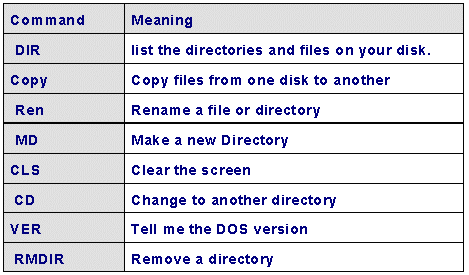
Example of internal commands are:
|
External commands.
- If
a command is not in resident DOS, it's called an external command. Each
of these commands is stored in a disk file called a command file.
·
On a MS-DOS system, the names of
command files always have an extension of COM or EXE. Usually, these command
files are stored in the DOS directory on one of the drives of your PC.
- Before
DOS can execute an external command, it must find the command file for
the command and load the command into internal memory. But not all
systems are set up so DOS is able to find its external commands.
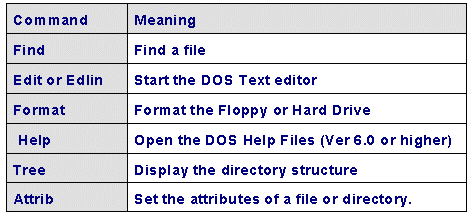
Examples of external commands are:
|