VI.
SOCIAL, ETHICAL, LEGAL, AND
HUMAN ISSUES.
Teachers
understand the
social, ethical, legal ,and human issues surrounding the use of
technology in
PK-12 schools and apply those principles in practice. Teachers:
VI-A: Model
and teach legal and ethical practice
related to technology use.
Evidience/Artifact 1
Power Point from Lesson
Reflective Statement 1
The Power Point that I choose for this artifact models and teaches
legal and ethical practice in relation to technology. In this
Power Point I used several things from a web site, and I included
references in the slide show. Through the content lesson I am
also
modeling that citing information is very important. Also when
teaching the lesson that goes along with the slide show I point out the
references and what they mean at the end. I feel that it is very
important that students no matter what age know how to cite information
in some manner so that they never get in the habit of not documenting
their work.
Evidience/Artifact 2
Newsletter
Reflective Statement 2
Another way for me as a teacher to model ethical and legal practice
related to technology is through this newsletter. In the
newsletter I used a variety of pictures from web sites. For each
of the pictures their is copyright information. I want my
students to see that I have taken the time to document the photographs
that I have used from somewhere else. I believe that if I show my
students that I am responsible when it comes to copyright information
no matter what it is I'm working on they will be more
responsible.
When creating any type of newsletter with my students I want to
document all the pictures and information I got from somewhere
else. For example if I put in a piece of art from a student I
want to document which student so that the students see the importance
of not stealing someone else's work.
Evidience/Artifact 3
North Carolina Copyright in an Electronic Environment
Reflective Statement 3
This artifact is about copyright information in an electronic
environment
provided by North Carolina. This web page will be helpful for me
as a teacher to model and teach legal and ethical uses of materials
from in an electronic environment. From this web page I can get
information about how to use materials I find in the appropriate way so
that I can model legal and ethical uses to my students. I can
also share this information with my students through their projects and
lessons so that they are aware of the fair uses of materials found in
electronic environments.
VI-B: Apply
technology resources to enable and empower
learners with diverse backgrounds, characteristics, and abilities.
Evidence/Artifact 1
Learn NC
Lesson Plan
"Kid Created" Biographies
Reflective Statement 1
This lesson from Learn NC has so many technology resources that will
reach students with diverse backgrounds, characteristics, and
abilities. Because this lesson has so many activities it will be
able to enable and empower all types of learners. In this lesson
students create biographies about their teachers. They will be
creating web pages, using word processors, digital cameras, doing
interviews using a recording method, and much more. Through this
lesson students will have opportunities to show their strong points in
one way or another. They will also be able to work on their
weaker points. Together students will learn more about their
teachers while being empowered through technology resources that
encourages them.
Evidence/Artifact 2
Using
Technology to Support Diverse Learners
Reflective Statement 2
This web site is all
about
using the technology resources in your classroom to enable and empower
the diverse learners. All the students in a classroom have
diverse backgrounds, characteristics, and abilities and I feel that it
is very important to support their needs. I would like to use
this web site to empower my diverse learners so they get all the help
they need in order to be successful. Through this web site I
think
that I will have a reference to know how to put the technology
resources available to be to the most use for the students in my
classroom.
Some classrooms have more technology resources than others for the use
of students. This web site ranges from tape recorders to
projection systems. Because of the wide range of technology items
included in this web site I feel that I could enable my diverse
learners
no matter the amount of technology resources available in my classroom.
VI-C: Identify
and use technology resources that
affirm diversity
Evidience/Artifact 1
Yahooligans
-Social Studies
Reflective Statement 1
Yahooligans is a kid friendly search engine that has a huge section of
technology resources that affirm diversity. The list of resources
goes on and on. There are so many choices that show diversity
around the world. I think that this list would be fun for
students to explore on their own and for teachers to use as resources
for showing diversity is all around us. Students and teachers can
search by country or topic. I would like to use this search
engine for a variety of lessons and activities throughout the year to
affirm diversity. I think that it is very important that student
know they live in a diversity world and that every one is unique.
This is a great technology resources for showing diversity to my
classroom in a variety of ways.
Evidience/Artifact 2
PBS
Do You Speak American?
Reflective
Statement 2
This artifact
is about all the different dialects in America. All around this
country everyone talks a little different. This web site provided
by PBS talks about what does it mean to speak American. I believe
that this is a great web site that affirms diversity around our
country. I know that each student that comes in my classroom will
have a different way of speaking because of their background. I
think through this technology resources we could have a lesson or unit
about
the diversity of how we talk as a way to introduce us to each other and
help build community in our diverse classroom. I also think that
by addressing how we communicate will make some students more
comfortable speaking in class and not be embarrassed by their
background.
VI-D: Promote
safe and healthy use of technology
resources
Evidience/Artifact 1
NC Wise Owl
Internet Safety
Reflective Statement 1
This web site through NC Wise Owl is a great resource to promote the
safe and healthy use of technology resources. The web site
focuses
on the internet but is very useful to teachers, parents, and
students. There are various links to web sites that promote safe
use of the internet.
I would like to use this web site as a resource to find safe internet
resources to use in my classroom. I would also like to share this
web site and information that I find with parents and students in my
classroom. I feel that it is very important for my students not
only to learn about the Internet and all the resources at their finger
tips but also how to use the internet safely and wisely.
Evidience/Artifact 2
Citation
Maker
Reflective Statement 2
Citation
Maker is a quick and easy way to teach students how to document their
work. Students can document everything from books to web sites
using this technology resource. I feel that it is very important
for students to know how to document other peoples work. By
helping students document their work I believe that I am promoting
safer use of technology resources. Students no matter their age
or level should not copy another persons work without giving create for
it. I think that this resource is a good place to get students
started in the right direction.
At the beginning of the year I would like to introduce my students to
citing their work. Sometimes it can be complicated to cite
materials from on the internet and other electronic resources but
through Citation Maker students can easy cite their work. Part of
promoting safe and healthy use of technology is learning how to cite
other materials in your work.
VI-E: Facilitate
equitable access to technology
resources for all students.
Evidience/Artifact 1
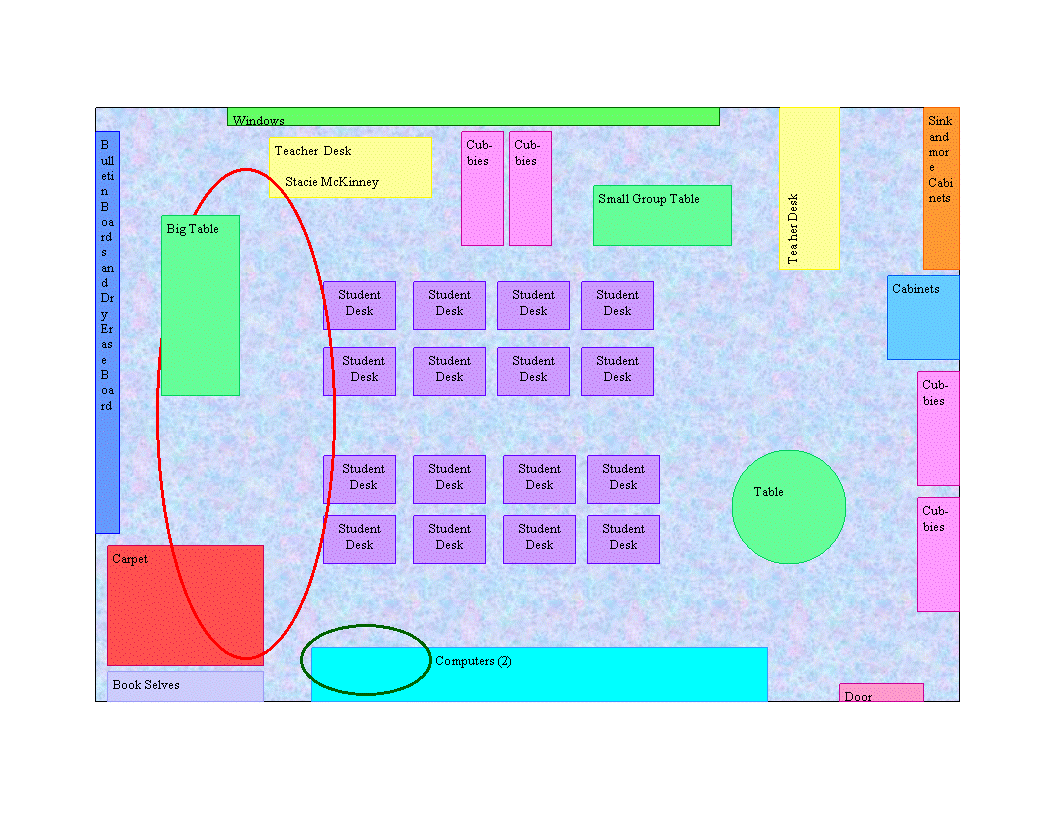
Classroom Layout
Reflective Statement 1
For this artifact I provided a layout of my classroom from Internship
I. When I have my own classroom I want to create a layout similar
to this in Microsoft Publisher. With a classroom layout like this
I can arrange and rearrange my classroom so that I can make sure that
each student has equal access to the technology resources in the
classroom. I believe that each year or more often than that I
might have to change the room around the meet the needs of each of my
students.
When laying out my classroom I can use this program to set up my
classroom so that each student has a fair chance to see, use, and reach
all the
technology resources that are available in the classroom.
Evidience/Artifact 2
Schedule For Technology Use
Example
Reflective Statement 2
Throughout the day there will be time for students to use our
technology resources independently. When the students have a
chance to use the technology resources I want each of them to have a
chance to use the technology resources in a fair and just way. So
I created an example of a schedule that I want to use in my
classroom. Every week I want to give the students time to sign up
for the resource they want to use and the time chunk they want to use
it in. Before they sign up I will put in the times that I will be
giving instruction and times that we will not be in the
classroom. I believe that having a schedule like this one will
give each student an opportunity to use the technology resources.
Page Author: Stacie McKinney [Back]