Setting
Keyboard to Type International Characters
on a
Apple Macintosh Platform
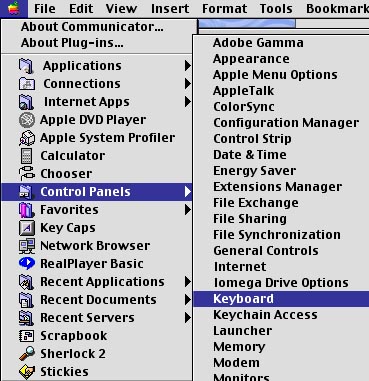
Step 1
Open the Control Panel window from the Apple menu and click Keyboard.
Step 2
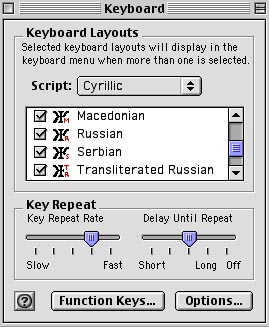
In the Keyboard Control Panel window, select Cyrillic under Script and activate the desired version (or several versions) of the Cyrillic script.
If you do not have Cyrillic scripts available under the Script list you need to install them by activating the Keyboard extension.
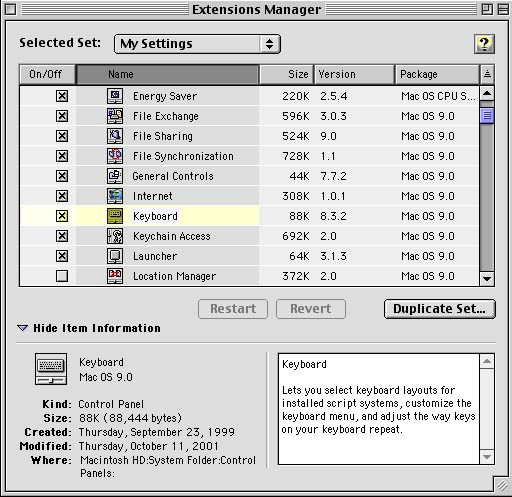
Step 3
Under Control Panel - Extensions Manager, you can activate the Keyboard extension which will enable your keyboard to type other characters beside those of the default character settings (such as US English in Macintosh computers sold in the US).
Keyboard extensions provide
six Cyrillic keyboard character sets. Keyboard extensions are a
part of Macintosh operating system and they can be activated or deactivated
by the user.
If six provided Cyrillic keyboard extensions are not enough, you should
download additional Cyrillic keyboard extensions from the Apple
Macintosh Web site.
When Keyboard extension is activated you need to restart your Macintosh computer in order to start using the activated keyboard scripts within application documents.