| Welcome To the AOL Troubleshooting Site |
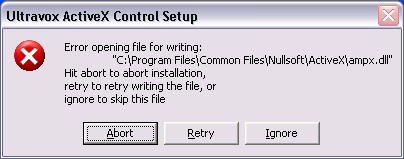
| Here are the instructions to fix Radio@AOL and to stop Radio@AOL from loading when you first sign in: To fix the Ultravox Codec: 1. Press CTRL + K on your keyboard. A go to keyword screen should pop up. 2. Type in "Radio DIL", without the quotes. Click "Go". 3. The UltraVox AAC Codecs should install by themselves. (The download takes about a minute. NOTE: If you get the error message below, you must manually delete the directory located at C:\Program Files\Common Files\Nullsoft. Please note you must delete the ENTIRE directory. If you use Windows XP and you have MSN Messenger, a TMN Networks technician can do this for you. Just add "[email protected]" to your buddy list, and our techs will be able to perform "Remote Assistance" on your computer!! To stop AOL from starting Radio at logon: 1. Follow the steps above. 2. Launch Radio@AOL and click "Radio Settings". 3. Click on the Start Up Setting tab, and uncheck the "Make Radio@AOL my startup setting. You have completed the steps nessacary to fix Radio@AOL. Congratulations!! This article was written by TMN Networks. To visit TMN Networks, go to http://www.geocities.com/tmnworld Copyright (C) 2004 TMN Networks. All rights reserved. Portions Copyright (C) 1992-2004 AOL Inc., a division of Time Warner. All rights reserved. Unauthorized copying of any content is strictly prohibited and may be subject to procecusion to the fullest extent of the law. |
 |