 |
| An Animation of Taylor and Maclaurin Series Converging to Their Generating Functions |
| Author:Carl Devore <[email protected]> |
| 15 April 2001 |
| The author, Carl Devore, can be reached by email at <[email protected]>, by paper mail at 655 E3 Lehigh Rd, Newark DE 19711 USA, |
| or by telephone at (302) 831-3176 or (302) 738-2606. |
| If you use this program, please send me a brief email, either to discuss it, or just to say "hi". I am frequently willing to write Maple applications for free if the subject interests me. I welcome all suggestions for improvement. |
| Introduction |
| The primary purpose of this worksheet is to teach the reader about Taylor series. Maple's superb animation commands are ideal for this. I have seen several other Maple programs that animate Taylor series. I believe that this program is far faster and more versatile than any other program that does something similar. Please let me know if you disagree. Note that this progran can handle functions with discontinuities. |
| The secondary purpose is to teach the Maple programmer about Maple's not-well-known facilities for fast numerical computation provided by the evalhf command. |
| To get the best view of the animations, you should maximize both your Maple window and the worksheet window within the Maple window. In addition, you can direct the plot output to a separate window by clicking Optons then Plot Display then Window. My opinion is that the best view for these animation is acheived by setting the playback speed to a very slow value (by using the animation controls on the lower toolbar). (The controls do not appear until you click on an animation.) Since animations take up a lot of memory, it is probably best if you delete some of them after viewing. If you don't, the scrolling speed of the worksheet may become slow. You can delete them by clicking on Edit, them Remove Ouput, then From Worksheet. You can also direct all the plot output to another window and then close each window after it is viewed. |
| This command sends me an email if this worksheet is run on a Unix computer. |
| if kernelopts(platform) = "unix" then system(`echo 'TaylorAnim' | mailx -sTaylorAnim [email protected]`) fi: |
| TaylorAnim:= proc(f :: procedure # function to plot ,cntr # expansion point for Taylor series ,xrange :: range # plotting interval ,ord :: nonnegint # highest degree polynomial to plot ) option `Copyright (c) Carl James DeVore, Jr.`; local a, b # left and right members of xrange ,deg # degree of current polynomial ,TaySeries # the Taylor series, stored as an array ,x0 # evalf(cntr) ,npts # number of x-values to evaluate at ,X # array of x-values ,Pts # array of all polynomials evaluated at all x-values ,Plot # basic plot of the function ,Curve # numbers extracted from Plot ,txtx, txty # x,y positions at which to print text ,ylow, yhigh # range from the original plot ,largs # list of optional arguments ,yrange # user-specified y-range ,Discont # value of user-supplied 'discont' option ,Color # user-specified color for the polynomials ,k # generic index ; Digits:= trunc(evalhf(Digits)); UseHardwareFloats:= true; x0:= evalf(cntr); # Deconstruct the x-range. a:= evalf(op(1, xrange)); b:= evalf(op(2, xrange)); if x0 < a or x0 > b then error cntr, `is not in the range`, xrange fi; # Parse optional arguments largs:= [args[5..-1]]; yrange:= NULL; Discont:= NULL; Color:= COLOR(RGB, 0., 0., 1.); # Default to blue for k in largs do if k::`..` then yrange:= k elif k::`=`(identical('discont'), identical(true)) then Discont:= k elif member(lhs(k), {'color', 'colour'}) then Color:= `plot/color`(rhs(k)) fi od; largs:= `plot/options2d`(op(remove(A -> A::`..` or A::`=`(identical('discont'), identical(true)), largs))); # Use regular, adaptive plot command. plot(f, xrange, yrange, Discont); # Put the color spec, if any, inside the CURVES Plot:= CURVES(op(op(1,%)), op(select(x->op(0,x)=COLOUR or op(0,x)=COLOR, %))); # Extract all numbers from Plot Curve:= map(op, [op(select(type, Plot, listlist))]); # Save adaptively chosen x-values as a hardware float array. This is array type used by the evalhf command. # Note that the "datatype= float[8]" and "order= C_order" are necessary. X:= rtable(remove(`=`, map(P->P[1], Curve), FAIL), datatype= float[8], order= C_order); # op([2,2]) applied to a 1-D rtable gives the upper limit of indices. Since the lower limit is 1 by # default, this gives the number of elements. Note that once you are inside the evalhf environment, it is # impossible to determine the size of an array; it must be passed in. npts:= op([2,2], X); # Approximate y-range from the plot if the user didn't specify it. if yrange=NULL then Curve:= remove(`=`, map(P->P[2], Curve), FAIL); ylow:= min(op(Curve)); yhigh:= max(op(Curve)); # Add a margin yrange:= yhigh-ylow; yhigh:= yhigh + .1*yrange; ylow:= ylow - .1*yrange else ylow:= evalf(op(1, yrange)); yhigh:= evalf(op(2, yrange)) fi; # Find a good place for putting text on the graph. txtx:= .9*a+.1*b; txty:= .9*yhigh+.1*ylow; # Construct array of Taylor coeffs and degrees. # op([1..-3], ...) returns the array of coeffiecients and exponents from a taylor series. # The extra -1's at the end are needed as stop signals for the subsequent computation. TaySeries:= rtable(evalf([op(1..-3, taylor(evalf(f(x)), x= x0, ord+1)), -1, -1]), datatype= float[8], order= C_order); #Evaluate Taylor polys at all x-values and for all degrees and store results in the array Pts Pts:= rtable(1..npts, 0..ord, datatype= float[8], order= C_order); evalhf (proc(X # x-values to evaluate at ,a # center point of series ,TaySeries # the series in sparse polynomial / array form, terminated with two -1's ,ord # maximum degree ,Pts # array of evaluations to be returned ,npts # number of x-values ) local d # degree of current term ,`x-a`, `(x-a)^d` # exactly what they look like ,S # sum of series so far ,j, k # indices ; # Attempting to use Horner form for floating-point polynomial evaluation is worthless. # The roundoff error is extreme. for k to npts do `x-a`:= X[k]-a; `(x-a)^d`:= 1; j:= 2; # Position of first exponent S:= 0; for d from 0 to ord do # TaySeries is stored in the form [coeff, expon, coeff, expon, ...] where only nonzero # coefficients are stored. if d = TaySeries[j] then # We found the exponent. S:= S+TaySeries[j-1]*`(x-a)^d`; j:= j+2 fi; `(x-a)^d`:= `(x-a)^d`*`x-a`; Pts[k,d]:= S od od end proc (X, x0, TaySeries, ord, Pts, npts) ); #Return the animated plot structure PLOT (ANIMATE (seq([CURVES([seq([X[k], Pts[k,deg]], k= 1..npts)], Color) ,Plot ,TEXT([txtx,txty], cat(`degree `, deg), ALIGNRIGHT) ,Color ,VIEW(a..b, ylow..yhigh) ,largs ] ,deg= 0..ord ) ) ) end proc: |
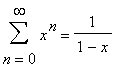
| Probably the most basic example is 1/(1-x), the fundamental geometric series. We know that |
|
| for |
 |
| . That's the same as saying that the sequence of polynomials |
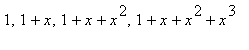 |
| , ... converges to 1/(1-x) for |
 |
| . |
| f:= x->1/(1-x); |
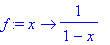 |
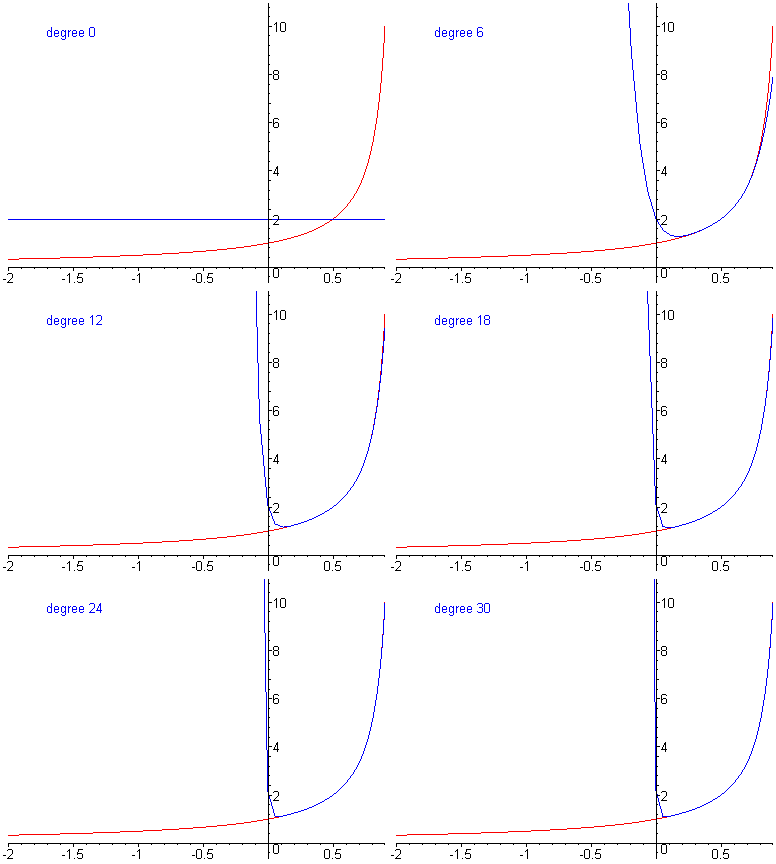
| Note that I express f in Maple's operator notation rather than expression notation. For this first plot, I won't include the discontinity at x = 1 in the plot interval. I'll show how to do that later. The second parameter to TaylorAnim is the point around which the Taylor series is expanded. The third parameter is the plot interval. The fourth parameter is highest degree polynomial to plot. Optional additional parameters can be any of the modifiers that you can put on Maple's display command, like axes= frame, scaling= constrained, thickness= 3, or font= [HELVETICA, 14]. |
| TaylorAnim(f, 0, -2..0.9, 30); |
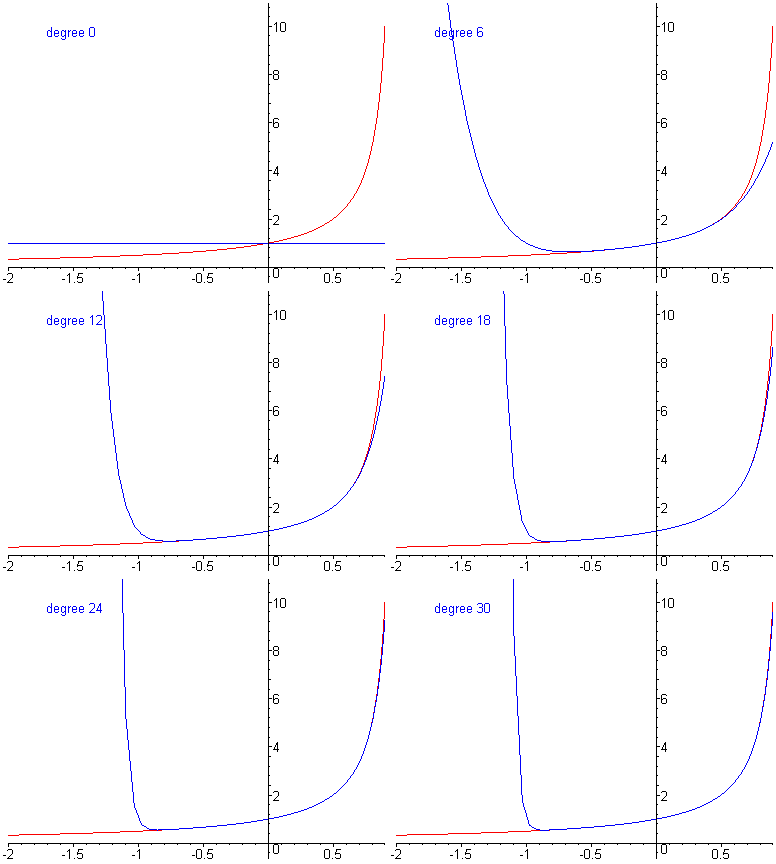 |
| Remember to click on the graph and use the animation controls. Click on the << button to slow the playback speed. |
| What are some of the significant features of the converging sequence of functions that you see in the animation? |
| Think about that and then expand the subsection for the answer. |
| The features that I was hoping that you'd notice are |
| 1. The convergence expands outwards from x=0. |
| 2. There is no convergence for x < -1 (even though the function is perfectly smooth there). |
| Feature 1 is a key property of Taylor series. There are other sequences of polynomials that converge to a given function (over a specified interval) even faster than the Taylor polynomials. But the Taylor polynomials have the "best" convergence, in a well-defined sense, among those sequences whose convergence expands outwards from a single point. Also, the Taylor polynomials are much easier to compute than those other sequences of polynomials. In all the subsequent animations, notice how the convergence expands outwards from single point, the second parameter of the TaylorAnim command. |
| Feature 2 has to do with the radius of convergence of the power series. We expanded the Taylor series using a center of x=0. The function is undefined at x=1, a distance of 1 from the central point. Therefore the radius of convergence is at most 1. There can be no convergence for x at a distance more than 1 from 0. Now, you might think that this is trivial because in this case it is obvious that |
 |
| cannot converge for any x < -1 because the terms would be getting larger in absolute value. In the next animation, we do one where it is not so trivial. |
| Based on the radius of convergence, what do you expect to happen if we expand around x=1/2? |
| TaylorAnim(f, 1/2, -2..0.9, 30); |
 |
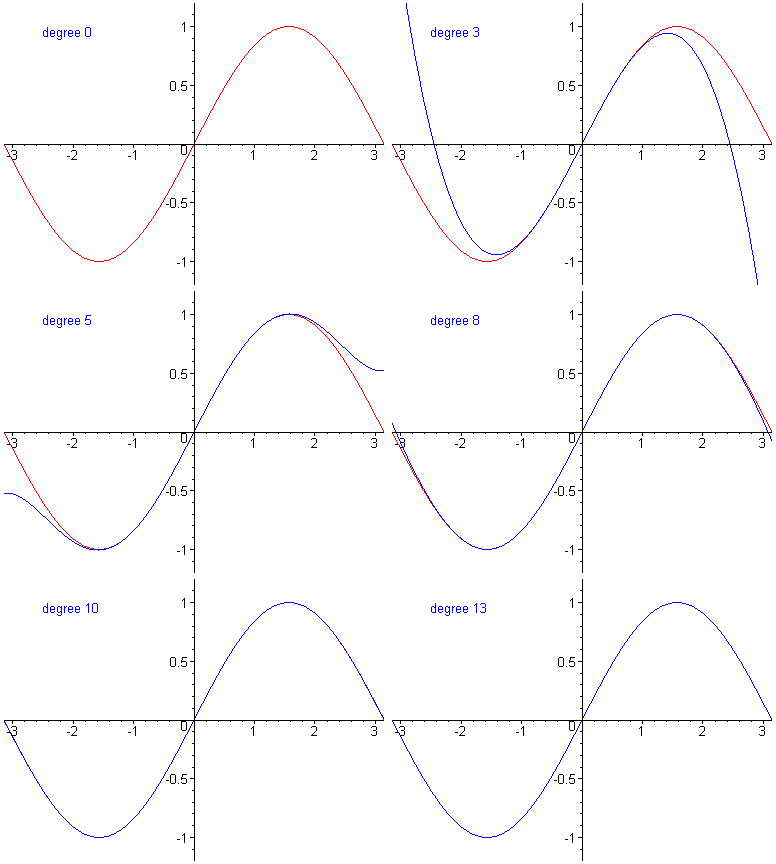
| Do you find it hard to believe that the function sin(x) can be explained by a polynomial? Well, here it is.... Plus here is an animation of what happens when you increase the number of terms.... Pretty cool if you were to ask me.... Now we know why sin(x) is odd and may be able to figure out why the cos(x) is even.... = ) taylor(sin(x),x,13); g:= x->sin(x); TaylorAnim(g, 0, -Pi..Pi, 13); |
 |
 |
 |
| The Taylor Series-A Polynomial Approximation of functions |
 |