Never used
folders before?
Don't worry,
it is easy as this:
- Close down your sims
game. Never try to do this while the game is running.
- Double click on "My
Computer" which brings up a new window.
- Double click on "C"
which brings up a new window.
- Double click on the folder
called "Program Files"
- Double click on the folder
called "Maxis"
- The same for the folder
called "The Sims"
- The same for "GameData"
- Then "UserObjects"
- Can you see what's happening?
Where I say something like C:\Program Files\Maxis\The Sims\GameData\UserObjects
each time there is a forward-slash symbol \ this means there is a new folder
of that name inside the previous folder. This is actually a set of instructions
called a "Path" and is like a postal address.
How do I create a new
folder?
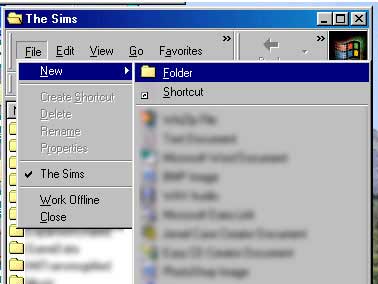
You can see in the image
below that I have the "The Sims" window open, but you can do this
in any window. Click on File, then New, then Folder. Give your new folder a
name which is easy to see what it contains - for example, "SpareStuff".
The path to this folder will then be C:\Program Files\Maxis\The Sims\SpareStuff