Fotoze ScreenSaver Frequently Asked Questions (FAQ)
To which folders are the Fotoze
ScreenSaver supporting files installed?
The executable file, Fotoze ScreenSaver.scr, is installed in the Windows root folder (usually Windows or WINNT). The help files are installed in the help folder in the Windows root folder (usually Windows\Help or WINNT\Help). Visual Basic supporting files are installed to various Windows folders, such as the Windows root folder, system folder, and system32 folder, etc.
Is there a limit to the number of
images that can be displayed?
No limit has yet been established. However, it is recommended that you have 500 or fewer images in a folder from which the screen saver pulls images. I have used the screen saver successfully with folders containing over 2000 images. With such a high number of images in one folder, it will take a minute or two for the screen saver to cycle through the folder counting the number of images and loading the file names into memory, so you may notice a delay when the screen saver activates or when you access the Fotoze ScreenSaver Options window.
What image types can the screen saver display?
The screen saver recognizes and displays images with the following file extensions:
.bmp .gif .jpg .jpeg .wmf .emf .ico
Can I launch the screen saver as a stand alone
application that doesn’t consume the entire screen and use it as a slide show?
No, not at this time. Look for this feature in future versions.Deselecting the options, Hide mouse pointer and Screen saver always on top will give you some flexibility in using the screen saver as a slide show presenter, but it was not designed to be used in that manner.
Is there a version available for Apple computers
or Linux?
No. The screen saver only runs on 32 bit Windows operating systems on Intel compatible computers.
Can the screen saver display images from
subfolders of the folder I have chosen?
No, not at this time. Look for this feature in future versions.
Will the splash screen image of you and your dog
always display each time the screen saver starts?
No, it no longer appears after the fifth time the screen saver activates.
Will the screen saver resize images too large
for my monitor or screen?
Yes, it resizes images too large to fit the screen in proportion to the original size.
Can I set the screen saver to display images
using a network path?
Yes. The preferred method is to map the network
path as a mapped drive, then choose the drive from the list of available
drives. You can also type in a network path starting with the double slashes
and click the Apply button. For example: \\computerb\pictures
Why do I see only a black screen or a picture of
you and your dog?
The screen saver options are pointing at a non-existent folder, can no longer reach the images in the folder, or there are no images in the folder. Verify that the folder or images were not deleted. If you are using Windows NT, verify that the permissions on the folder are not restricting the application from reading images from the folder.
Why do I see a black screen with the text Image
# 0 of –1?
If you see Image # 0 of –1 then screen saver options are pointing at a non-existent folder, can no longer reach the images in the folder, or there are no images in the folder. Verify that the folder or images were not deleted. If you are using Windows NT, verify that the permissions on the folder are not restricting the application from reading images from the folder.
Why does the Options window pause when appearing
on the screen?
You probably have more than several hundred images in your designated folder. It is recommended that you have 500 or fewer images in a folder from which the screen saver pulls images. I have used the screen saver successfully with folders containing over 2000 images. With such a high number of images in one folder, it will take a minute or two for the screen saver to cycle through the folder counting the number of images and loading the file names into memory, so you may notice a delay when the screen saver activates or when you access the Fotoze ScreenSaver Options window.
Why does the screen saver take so long to
display the first image?
You probably have more than several hundred images in your designated folder. It is recommended that you have 500 or fewer images in a folder from which the screen saver pulls images. I have used the screen saver successfully with folders containing over 2000 images. With such a high number of images in one folder, it will take a minute or two for the screen saver to cycle through the folder counting the number of images and loading the file names into memory, so you may notice a delay when the screen saver activates or when you access the Fotoze ScreenSaver Options window.
How can I download pictures from newsgroups on
the Internet?
There is an excellent shareware application that I highly recommend buying that will allow you to download all the nudie pictures you ever wanted. Visit http://www.news-grabber.com. NewsGrabber is only one of three shareware applications that I ever thought were worth buying. I bought a copy for myself. You can then use Fotoze ScreenSaver to display all your pictures.
How can I view all of my pictures in thumbnail
format or view them quickly?
There is an excellent shareware application that I highly recommend buying that will allow you to quickly view pictures of any format, view them as thumbnail images, and even view them as a slide show. Visit http://www.acdsystems.com. ACDSee is only one of three shareware applications that I ever thought were worth buying. I bought a copy for myself.
Can Fotoze ScreenSaver play a wave or midi music
file while it is running?
No, not at this time. Look for this feature in future versions.
How can I learn more about photos, screen
savers, and Fotoze ScreenSaver?
Join the email discussion list! Use this forum to submit your own questions and suggestions for others to see, or answer questions already submitted. See the section labeled Email Discussion List
Is there a forum available for discussing Fotoze
ScreenSaver with others using the application?
Yes. Join the email discussion list! Use this forum to submit your own questions and suggestions for others to see, or answer questions already submitted. See the section labeled Email Discussion List
Are there other screen savers that display
images?
Yes. I have not found any free ones that display your own pictures, but there may be some out there. Search the following web sites for more information: http://www.download.com, http://www.screensaver.com, and more. Search www.yahoo.com for the word “screen savers” and you will get lots of results.
How can I use Fotoze ScreenSaver to display
pictures from a webcam or digital camera?
Some cameras, such as QuickCam, include software that allows the camera to snap automated snap shots at predetermined intervals and save them to a designated folder. Just point Fotoze ScreenSaver to that folder. At the current time, Fotoze ScreenSaver does not refresh the list of images to display until it is restarted, therefore pictures taken while the screen saver is running will not be displayed until the screen saver stops and restarts at some point. Other software capable of taking automated snap shots is WebCam32. WebCam32 is only one of three shareware applications that I ever thought were worth buying. I bought a copy for myself.
How can I make Fotoze ScreenSaver the default screen
saver on Windows NT 4 or 2000 when nobody is logged in?
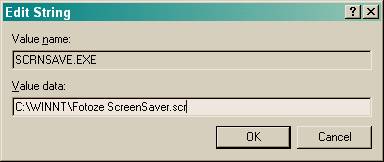
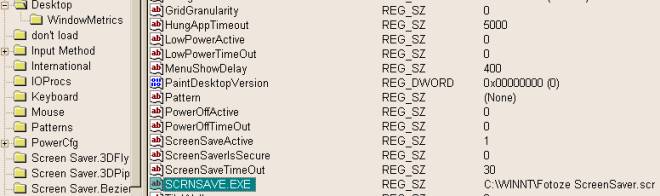
Add the path to the Fotoze ScreenSaver executable, Fotoze ScreenSaver.scr, to the following registry key in the Windows registry: HKEY_USERS/.DEFAULT/Control Panel/Desktop/SCRNSAVE.EXE
Change the key’s value from logon.scr to fotoze screensaver.scr. To change the time allotted before the screen saver activates, change the key, ScreenSaveTimeOut to a different number of seconds. The default is 900 seconds. To access the registry editor, click Start, Run and type: regedit