|
::script
in action::
|
> RECENTLY, MICROSOFT HAS RELEASED A NEW IE PATCH AND A NEW MSN MESSENGER REVISION THAT MAY AVOIDS MY MESSENGER SCRIPT TO SHOW FRIENDLY NAMES. I APOLOGISE FOR THIS INCONVENIENCE, I'M WORKING TO CORRECT THAT ISSUE AND ONCE I HAVE FINISHED, I'LL NOTIFY YOU. SO, IF YOU ARE INTERESTED ON MY NOTIFICATION, E-MAIL ME. FOR MORE INFORMATION ABOUT THE SECURITY PATCH GO TO MESSENGER OFFICIAL SITE OR CLICK HERE. :: a few words of LarrySoft :: > i've always been following too close how MSN Messenger has evolved (one of the most popular chat applications) and, based on the MSN portal along with some web sites i've visited (suggested by The Bee) i have got all the information that may allow us to include most of the MSN Messenger functionality inside our web pages > i want to emphasize that all the scripts i'm offering you are based on the original code from the Microsoft Network portal. what i did was to give an easy way to include the MSN Messenger interface on a web page having some control about the feel and look |
;)
::messenger script requirements::
@ Microsoft Internet Explorer 5.0+ (VBScript of course)
@ MSN Messenger
@ Windows 95/98/2000
::what do we have?::
messenger script has 3 sections of code:
;)
::1:: an <SCRIPT> block that defines some initial values
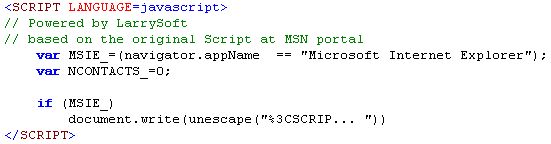
>>> number of online contacts _
use the NCONTACTS_ JavaScript variable to set the maximun number of listed buddies. set values less than 1 to view all buddies
::2:: an <STYLE> block to get a custom look and feel over the buddy list
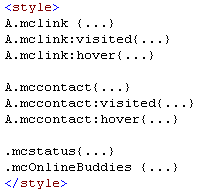
i've created a class called mclink to control the style of any particular link in the buddies' list, View all... for instance. notice that you can take over on 3 possible states
>>> styles for online contacts_
there is a second class called mccontact aimed to define the style of each buddy on the list
>>> styles for informational messages_
finally we have two more clasess. the first one called mcstatus that can be used to define styles over informational messages such as No buddies online, You have an empty buddy list, etc. the last one is called mcOnlineBuddies and is aimed to define styles over the main title of the buddy list.
::3:: the last part, and i think the plumbing of it, is the buddy list. this is another <SCRIPT> block that can be placed wherever you want according with your design and layout. the only thing you have to do is placing it!
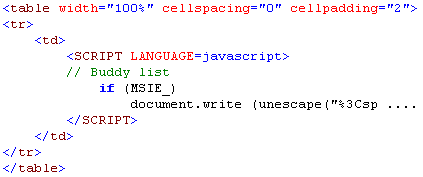
undoubtedly no... since we're working with a Miscrosoft technology, it depends on some ActiveX features that other browsers don't support but if you check my script, you can realize that there is a special validation i use to prevent launching messenger script on an inappropriate browser depending on the MSIE_ JavaScript variable (you can use your own)
::i m p o r t a n t::
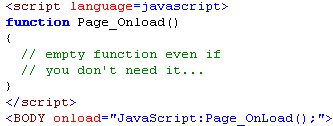
when you use messenger script the ONLOAD event handler is not available; so, to solve that problem you must define an event handler called Page_Onload either you use VBScript or JavaScript (case sensitive name for this language), messenger script automatically launches this handler once the page is completely loaded
the key point here is that even if you wont use the Page_Onload handler, you must define it, if you don't, messenger script should start experiencing refreshing problems, not a big deal but a bad performance situation
here you have a piece of code that i use to implement the onload handler
well, there are so many ways, one of these could be getting the source code of this page and start a single Copy/Paste process, or if you want, check this raw page that only has the messenger script implementation, then copy its source code
:: get in touch ::
i've tested this script so many times but as you know i'm a single human being so i'd really appreciate if you send me your suggestions or comments about messenger script at [email protected]
hope my work helps you to improve your web pages...
LarrySoft

::N
e w S::
new microsoft patch avoids friendly names for being
caught, and protects contact list, see
more .
::related
cool sites::
::stdsolutions::
wackyb.co.nz
Messenger Plus!
www.mess.be
::visitor number::