iMODE
and WAP RESEARCH DOCUMENT
Date
Started : April 13, 2004
Updated
: April 16, 2004
Wireless
Application Protocol (WAP)
WAP Definition
- A
secure specification that allows users to access information instantly via
handheld wireless devices such as mobile phones, pagers, two-way radios,
smartphones and communicators.
- It
is a protocol that has successfully established a de facto standard for the
way in which wireless technology is used for Internet access.
WAP technology has been optimized for information delivery to
thin-client devices, such as mobile phones.
- Mobile
services powered by Nokia and WAP have been widely accepted by users.
By 2004, the number of WAP users in Western Europe is estimated to
grow to well over 200M.
- XHTML
is the markup language used in WAP version 2.
WAP version 1 used WML.
- Wireless
Markup Language (WML) is the WAP equivalent to HTML.
It is a markup language that is based on XML (eXtensible Markup
Language). The official WML
specification is developed and maintained by the WAP Forum, an industry-wide
consortium founded by Nokia, Phone.com, Motorola and Ericsson.
- WMLScript
is the WAP corollary to the JavaScript scripting language that was
popularized by Netscape Communications.
WMLScript is a client-only scripting platform used in combination
with WML to provide client side procedural logic.
Like WML, WMLScript is compiled via a WAP gateway into binary form to
provide intelligence to mobile clients.
- WML
and WMLScript are collectively known as WAE, Wireless Application
Environment.
- XHTML
MP (eXtensible Hyper Text Markup Language Mobile Profile) is specified in
WAP 2.0 and is yet another step in the evolution towards 3G mobile services.
XHTML gives consumers access to more content in full color that looks
great and easy to navigate. Together
with increased speed offered by GPRS, mobile services are becoming much more
appealing and much more closer to the look and feel of the fixed Internet.
- XHTML,
according to the W3C (World Wide Web Consortium) is the first major change
to HTML since HTML 4.0 was released in 1997. W3C recommends that XHTML is used for all future web
development for desktops as well as all other devices, including mobile
handsets.
- XHTML
enabled Nokia Phones
-
Nokia N-Gage
-
Nokia 3100
-
Nokia 3200
-
Nokia 3300
-
Nokia 3650
-
Nokia 3660
-
Nokia 5140
-
Nokia 6220
-
Nokia 6230
-
Nokia 6810
-
Nokia 6820
-
Nokia 7200
-
Nokia 7250i
-
Nokia 7600
-
Nokia 7610
-
Nokia 7700
-
Nokia 9500
|
WAP Images
- The WAP specifications allow for the use of a graphics format called WBMP. It
is a 1 bit (either black or white) version of the BMP format. Consequently, all
graphics must, in order to be compliant to the specifications, be converted into
wbmp.
- When
using WBMP, there are some guidelines to be observed. An image should not be
larger than 150 x 150 pixels. Bear in mind that the WAP device screen is
very limited. For instance the Nokia
7110 screen is 96 pixels (width) by 65 pixels (height), so 150 by 150
pixels would look enormous, and take up more than the entire screen. All graphics are limited to a size of 1461
bytes, because of WAP phone memory limitations. Be sure to include the <alt> option in the
tag to accommodate WAP devices that do
not display images.
- The easiest way to get an image into the WBMP format is to create it as a GIF or
JPG (it can be in color if you want) and then visit Teraflops.com (there are
other image converters on the net) to convert it
into a monochrome (black and white) WBMP image which you can then include on
your site.Images in WML are inserted using the <img> tag, just
like in HTML:
<img src="logo.wbmp"
alt="Logo" />
Source
: http://www.thewirelessfaq.com/7.1.asp
(as of 2003)
WAP File Size
Based on the Nokia's recent emulator (Nokia Mobile Internet Toolkit,
Version 4 May 2003), the following are the page file sizes to be used for each
series:
| Series |
Phones |
Bytes |
| series 30 |
3350/3510/6310/8310/8910 |
2.8K |
| series 40 |
5100/3100/6600/7210/7250 |
5.6K |
| series 60 |
6650 |
10K |
iMODE
iMODE Definition
-
iMODE
is NTT DoCoMo's mobile internet access system. "imode" is also a
trademark and/or service mark owned by NTT DoCoMo. The "i" in
"iMODE" stands for information, internet, etc.
-
iMODE,
in contrast to WAP, has not been developed by a consortium, but by a single
company, NTT DoCoMo. It follows a different approach to enable users to
access IP-based services through their wireless device. As i-MODE is based
on packet data transmission technology, a device using this technology is
constantly online. Users ``are charged only for how much information they
retrieve, not how many minutes they are using it for.
- The
i-mode service itself uses "i-mode-compatible HTML," also known as
iHTML. iHTML is based on and extends cHTML.
cHTML
-
cHTML
is defined in the W3C specification as Compact HTML for Small
Information Appliances. The specification was written by Tomihisa
Kamada, from Access Company, a small Tokyo company that designs software to
connect consumer-electronics devices with the Internet. It was the HTML
microbrowser developed by Access that NTT DoCoMo used to launch the i-mode
service. NTT DoCoMo used its leverage with handset manufacturers to develop
appropriate handsets for the microbrowser.
- cHTML,
short for compact HTML, (sometimes
also called iHTML), is a subset of HTML for small information devices, such
as smartphones and PDA’s. cHTML
is essentially a pared down version of regular HTML over the Internet.
- It
is the markup language that is used for iMODE services.
It does not support Cascading Style Sheets and it does not need to be
well-formed, which means that it can produce inconsistent results from
browser to browser.
- cHTML
was created by Japan-based Access Company, Ltd for use in iMODE devices, and
was accepted by W3CM in 1998.
- XHTML
Mobile Profile is similar to cHTML with a few exceptions.
XHTML is a W3C standard widely accepted throughout the industry while
cHTML is a proprietary standard developed for iMODE.
Unlike cHTML, XHTML Mobile Profile supports cascading Style Sheets.
Technically, cHTML does not need to be well formed, which means it
can produce inconsistent results from browser to browser, and lacks the
header and DTD, which gives XHTML much of its power.
- cHTML
does not support the following :
-
JPEG images
-
Tables
-
Image maps
-
Multiple character fonts and styles
-
Background image
-
Frames
-
Style Sheets
-
<INPUT>
buffers larger than 512 bytes
-
<SELECT>
buffers larger than 4096 bytes
|
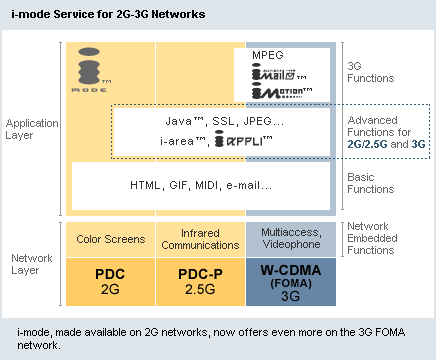
iMODE Images
iMODE
browsers support images in the GIF Format. Version 3 of iMODE HTML supports the
following features:
-
Non-interlaced
GIF
-
Interlaced
GIF
-
Transparent
GIF
-
Animation
GIF
-
JPEG
files (for 2G/2.5G and 3G)
-
The
file size of iMODE images is restricted by the cache size of the handset
that will view the page. The default size for many is 5KB, however
others have the ability to expand that amount to 8 KB, 10 KB, or even 15 KB.
However, unless one is creating dynamic applications that check the user
agent string for the specific cache size of the handset making a request,
you should stick to 5KB as a maximum.
-
The
5 KB limit is for your entire iMODE page - including the document and
images together. Therefore, it is essential to reduce all iMODE images to
the smallest possible size.
-
Screen
size determines the size of images that you can use.
|
|
Phone Model
|
Remarks
|
|
MITSUBISHI
|
|
M341i
|
128*160--262000 colors
|
GPRS, DOJA
|
|
M21i
|
128*141--4096 colors
|
(Java not supported)
|
|
M320
|
128*141--4096 colors
|
-GPRS, WAP, OTA
(can be: gif, png, jpg)
-Exen v2
|
|
NEC
|
|
N21i
|
120*160--256 colors
|
WAP, HTML
|
|
N22i
|
120*160--4096 colors
|
GPRS, WAP, HTML
|
|
N341i
|
80*106--4096 colors
|
GPRS, WAP, HTML
iRDA
|
|
NOKIA
|
|
3650
|
176*208--4096 colors
|
GPRS, WAP, HTML
iRDA, Bluetooth
Java: supported
|
|
SIEMENS
|
|
S55
|
101*80--256 colors
|
GPRS, WAP, HTML
Bluetooth
Java: supported
|
|
TOSHIBA
|
|
TS21i
|
128*121--256 colors
|
GPRS, WAP, HTML
|
|
Source
: http://alabang.anxa.com/anxa/suzanneanxa/staging_site/mobile/mobilephones.html
|
Judging by the range of screen
sizes and color support, you should develop iMODE graphics with the following
specifications:
- Images
should be created to display correctly in all screen dimensions. Generally,
the maximum dimension for an image is a width of 90 pixels and a height of
100 pixels.
- The
iMODE browser will scale a larger image to fit the display. However, this
may result in a loss of quality because the pixels in the image must be
adjusted to fit the screen.
- Images
with a color greater than the screen's depth will result in a loss of
quality for the viewer. You should reduce the color to the lowest acceptable
for all images.
Animated GIF (iMODE compatible HTML 2.0
and later)
- Each animation GIF can consist of up to five frames.
- A maximum of four animation GIF files can be placed on the screen. The first file to download and appear on the screen will
start playing first.
- An animation can be played up to 16 times, depending on the terminal.
(When assigning a number above 16, the maximum frequency for that specific
terminal will be set)
- The delay attribute makes it possible to set the interval between each frame of an animation GIF file in 1/100 second
increments. Some models may be unable to reflect the interval adjustment with accuracy, however relative values will be maintained.
The value of the delay attribute is based on a relative scale.
(For example, a delay of 3 will be three times longer than a delay of 1.)
- Files can be composed with software for personal
computers.
- Each frame of an animation GIF file must be the same size and occupy the same coordinates on the screen.
Source
: http://www.nttdocomo.co.jp/english/p_s/i/tag/anime.html#anime
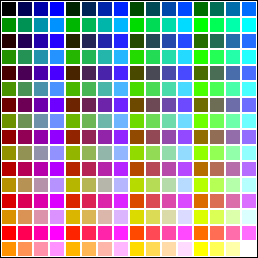
Color Palette
(i-mode compatible HTML 2.0 and later)
-
Models with color display capabilities can show color
designations assigned to GIF files, text, background and hyperlink text.
-
Models with color display capabilities can use a
256-color palette.
-
Actual color reproduction may differ from model to
model.
-
Colors are designated using the #RRGGBB format. (RR,
GG and BB represent red, green and blue, respectively. The shade of each
color is set using a hexadecimal value between 00 and FF.)
-
The following 16 standard colors can be designated by
color names, as well as by hexadecimal values.
Source
: http://www.nttdocomo.co.jp/english/p_s/i/tag/anime.html#anime
| Black="#000000" |
Gray="#808080" |
Maroon="#800000" |
Purple="#800080" |
|
Green="#008000"
|
Olive="#808000"
|
Navy="#000080"
|
Teal="#008080"
|
|
Silver="#C0C0C0"
|
White="#FFFFFF"
|
Red="#FF0000"
|
Fuchsia="#FF00FF"
|
|
Lime="#00FF00"
|
Yellow="#FFFF00"
|
Blue="#0000FF"
|
Aqua="#00FFFF"
|
|
Automatic image size reduction
- When an image has a width (including a value set
using the width attribute) that is greater than the screen, the size of
the image is automatically reduced to fit the screen.
- No horizontal scrolling is possible.
Source
: http://www.nttdocomo.co.jp/english/p_s/i/tag/anime.html#anime
Flash (Movies)
- Macromedia has created a new profile of the Flash
player called Macromedia Flash Lite designed for consumer mobile devices,
including phones for the i-mode service by NTT DoCoMo. This format is
designed to run optimally on devices with limited memory, processor speed,
and display area.
- The iMODE phone screen size is one of the most
important factors to keep in mind when developing Flash Lite movies for
iMODE phones. Generally, content looks better scaling up, rather than
scaling down, so it is best to create content from the smallest screen area.
- There is a prescribed limit on how a large a web page
can be, whether it includes Flash Lite movies or not. For 505i phones, this
limit is 20KB. This limit applies to an iMODE page's HTML, SWF content, and
all graphic images combines. Web pages larger than this limit cannot be
downloaded to an iMODE phone and no error message appears. This limitation
also applies to Flash Lite movies played directly in the browser without
embedded in an iMODE compatible HTML file.
Source
: http://download.macromedia.com/pub/documentation/en/flash/mx2004/fl_docomo_author_guidelines.pdf
OTHER SOURCES :