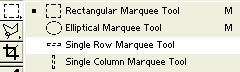
Open up Photoshop and open the image you want the line strech to be on. If theres not alot of room on the side you want the line strech copy it and paste it into a big canvas.
And click where you want the line strech to begin.
Then on your keyboard go CTRL + T
Now you'll have a little square in the middle of your line which isn't dotted anymore. Click
on the line and drag down as far as you want to go.
 Line Stretch