 |
 |
|
IP Packet Parsing Utility |
|
|
|
|
IP Packet Parsing Utility |
| <<Home | ||||||||||||||||||||||||||||||||||||||||||||||
 |
*Naveed Ahmed, **Muktiar Unar, *Noman Ahmed *Post Graduate Student Institute of Information Technology, Mehran University of Science and Technology 0221-783833 **Professor Institute of Information Technology, Mehran University of Science and Technology 0221-772279
|
|||||||||||||||||||||||||||||||||||||||||||||
Heart patients
 |
||||||||||||||||||||||||||||||||||||||||||||||
 |
||||||||||||||||||||||||||||||||||||||||||||||
|
1.0 Abstract
Today the Networks grow in the scale along many dimensions, among those one of the dimensions is to analyze Network Traffic and to predict the traffic for future Networks. The fastest growth of data communication Networks over the past decades has resulted in the development of various Network utilities which perform Network evaluation in different domains. In this paper we present a Internet packet parsing utility. The purpose of our intended utility is to capture and dissemble the packets flowing through a Local Area Network. The Internet packet parsing utility presently only extracts TCP (Transmission Control Protocol) packets. The execution mode of the packet parsing utility is absolutely at Run time. It efficiently extracts packets using the RFC (Request for Comments) standards. The packet parsing utility is developed to be operational on the platform of windows NT/2000.
Keywords Packet Capturing, Packet Parsing, Promiscuous, Network evaluation.
2.0 Introduction
In order to evaluate a Network performance from different angles, we need to concentrate on developing Network utilities which accurately measure the Network along the optimization scale of resources. The idea of developing a utility for Network analysis is not a new one but work is in place to capture the network stats form various angle. The utility presented in this paper is a step towards that. The Utilities developed like Packet Boy [], TCPDump [], IP Scanner [] and others [] are all based on the IP structure. The developed utilities focus more on fetching IP addresses, evaluating them. Our Intended utility carries the work and is based on MAC address technology. Which is the last layer very close to the Hardware it self. Our intention was to translate every packet and show to the user not only the IP addresses but the entire packet. As we know the Network resources are composed of servers, workstations, switches etc. To monitor resources for optimal performance we need to look closely at frames that travel on the Network from node to node as they are the mode of communication among devices with the network spectrum. To occupy Network resource optimization, there is a need of development of tools which accurately read these frames. Once we are able to analyze the Network frames we will be able to built Network utilities which will perform the performance evaluation task for Computer Networks. The idea of developing a packet parsing utility is the result of above-mentioned goals. The concept was to enable the Network scientists and Engineers to correctly evaluate the Network frames. Presently the Packet Parsing utility only works on Ethernet LANs. It captures Ethernet packets in a promiscuous mode and extracts the packets using the RFC standards. It detects all type of frames traveling on to the LAN but the paring operation is performed only on IP (Internet Protocol) packets. The steps are in place to extend the functionality of packet parsing utility so that it performs parsing on all the other protocols carried inside the IP protocol. In the following section we have defined the technique used to capture packets.
3.0 Technique use to achieve packet Capturing To develop a Packet parsing utility we need to first understand the mechanism of packet capturing under Windows NT/2000 [5].
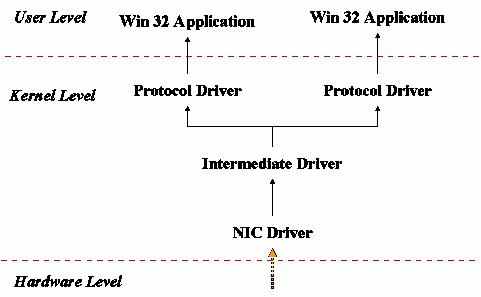
Figure 1 Windows NT/2000 Network Model The windows NT/2000 Network architecture [11-13] used for capturing frames from the network is defined in figure No 1. It contains three levels which are user, kernel and hardware. The application resides at the user level; the user level is used by the application to request services. The kernel level is responsible to serve the application by providing the services it has requested. It is implemented as protocol driver in the Windows Network architecture. The kernel uses the Intermediate driver to communicate with the Network Interface Driver (NIC) as shown in the figure No 1. The hardware level contains the Network Hardware.
The Network Interface Card Captures packets using the NIC Driver and serves the packets to the protocol driver, which interacts with the Application and places the packets in the application buffer. Once the packets are placed in the buffer, the next job of the Internet packet parsing utility is to extract all the fields of the Internet packets (IP) and display them to the user in a readable form. The header of the IP packet contains all the information relevant to the fields of the IP packet. For this purpose our application buffer only saves the header of the packet.
4.0 Technique used for Packet Parsing
The captured packet is in HEXA format and we very well know that it is an Ethernet packet. Inside the Ethernet packet there exists an Internet Protocol (IP) packet. The Internet Protocol (IP) provides a frame for encapsulating other protocols like TCP and UDP. The IP Header of the packet contains all the necessary information required to identify the Protocol carried inside the IP packet. The IP Header format is defined in the Figure No 2.
Figure No 2 The Intenet Packet Format
In order to accurately dissemble the IP Packet. We need to understand the individual fields of the IP Packet. The field description is demonstrated in table No 1.
Field Description of IP Packet
Table 1 Description of the IP packet fields
Now in order to extract the information defined in table No 1, we need to covert the packet defined in HEXA format into the BYTE format because all the fields of the IP packet are defined by the RFC []. The BYTE data type is defined in Microsoft Visual C++ environment; the packet saved in the HEXA format is converted into BYTE format and saved in the BYTE defined buffer. The conversion is a long process as it takes each bit of the packets to be converted into BYTE by comparing it to the equivalent numbers defined in the BYTE fields. The conversion process is slow as compared with the process of packet capturing. In order to make this entire process quick, we have used a feature called multithreading.
Figure 3 Thread Structure of Utility
The multithreading allows a single work to be divided into threads. Each individual threads runs under the work space of the process and share all the resources allocated to a single process. This powerful mechanism is utilized in the development of the Internet packet parsing utility. The execution of the Internet packet parsing utility is a single process, under which we have created three threads as shown in the Figure 3. Each of the thread has a separate function. The Packet Capturing thread captures packets. The Conversion thread converts the packets placed in the application buffer to the human readable format. The display thread has the responsibility of putting the packet contents on the screen.
5.0 Results and Discussions
The Screen snapshot of the IP Packet Parsing utility is shown in figure no 2; the information in the IP packet is extracted using the field structure defined in section 3.0. The snapshot begins with phrase “Packet Receive Successful”, followed by the header length in bytes is displayed. The Next the snapshot shows the packet captured in HEXA format along with the translation of some of the bits at the right corner of the screen.
The IP packet is encapsulated in an Ethernet Packet. We need to extract first the Ethernet packet. The general format of Ethernet packet is shown in the Figure 5.
Figure 4 Ethernet Packet Format After the packet the utility performs its work and breaks it into the fields and brings it in a human readable form. First the destination host address known as the MAC address is displayed which displays the destination node to which the packet is to travel, followed by the source destination address which demonstrates the source that has generated the packet, followed by the Ethernet type field for the IP packets the Ethernet type field must be 0X800, which is shown in the Figure 5. Up till now what we have discussed is the Ethernet header fields. Once it comes out to be IP packet in the type field of the Ethernet header the next step is to treat this packet as an IP packet and translate it to with the information provided in section 3.0.
As shown in Figure the first OCTET of the IP packet tells us about the version and the Header correct option. The first 4 bits tell us the version of the IP Presently utilized and the other 4 bits tell us about the Internet Header Field that is if the header is correct or not. The next OCTET tells us about the Type of Service as shown in the table 2. As shown in the screen capture of the packet parsing utility that the Type of Service comes out to be Normal which is the case usually while packets are send.
Type of Service Options Available with IP
Table 2 Type of Service Description Next the Total Length ………………………
Figure 5 Snapshot of Packet Captured
6.0 Conclusion
This paper has presented an IP Packet Parsing Utility, which captures packets form the Network and translate them into a human readable form. The application domain of IP Packet Parsing Utility lies with the Engineers/Students. Engineers they will be particularly interested in understanding the Network traffic from every corner for example Source and Destination MAC addresses, no of IP packets within the spectrum including IP address computation, Type of Service, Packet Length, Header length and other statistics that are encapsulated in the transferred packet. Students will be more interested in knowing what packet contains. In the Future enhancement of IP Packet Parsing utility, we will work to enhance its translation spectrum and the utility will be able to extract not only the IP Packet but also ARP (Address Resolution Protocol) packets.
|
||||||||||||||||||||||||||||||||||||||||||||||
| <<Home | ||||||||||||||||||||||||||||||||||||||||||||||
|
||||||