Look Ma, No Wires !
by: Judith Sinnard, David Schoen and Mike Walker
Imagine being able to connect your notebook computer to your company�s LAN without having to plug in a 10baseT line. After accessing information on the LAN, you pick up your notebook and head to the library at OLLU to do some research. While in the library, you access your e-mail and respond to fellow team members. As you are leaving, you run into a team member in the school parking lot. You open your notebook and send a file to the PDA of a team member. You remember you had turned the temperature warmer in your house this morning so you decide to lower the temperature 10 degrees so it will be comfortable when you get home. All of this is done without physically connecting your computer. Sounds like a movie depicting the future, right? Well, this technology is available now!
History of Wireless
Wireless networking is not a new phenomenon. The technology has been around a number of years. NetMotion Wireless Glossary (1) states the first generation of wide area wireless (WWAN) communication systems was analog and limited to voice transfer. These systems existed in the 1970�s and 1980�s. Second generation of WWAN communications were digital and capable of voice, data, and other services. The second generation WWAN was introduced in the 1990�s. Third generation WWAN�s have high-speed data rates (144 Kbps to 2+ Mbps) and are suitable for multimedia content. NetMotion Wireless Glossary states the fourth generation WWANs are expected to be introduced around 2006 to 2010 having data rates in excess of 20 Mbps. These will be suitable for high-resolution movies and television.
IEEE 802.11 Standard
The Institute of Electrical and Electronic Engineering (IEEE) working groups develop standards relating to networks. The standard for wireless connectivity, IEEE 802.11, was approved in June 1997. Since the approval of 802.11, there have been several extensions added. In 1999, IEEE 802.11b (Wi-Fi) was introduced as the 2.4 GHz wireless local area network (WLAN) standard. The standard addresses indoor and outdoor uses and the following features:
Authentication and registration services
Management of network
Multicast services
Continuity of service within an extended area
Manufacturer interchangeability (3)
Physical Layer
At the physical layer of the OSI model, 802.11b utilizes infrared transmissions and spread spectrum technology. Infrared transmissions are used to connect several stations at one time. It is limited due to the inability to penetrate opaque objects. The spread spectrum technology was developed by the US military. By trading off bandwidth efficiency, it provides reliability, integrity, and security. This is done through direct sequencing spread spectrum (DSSS) and frequency hopping spread spectrum (FHSS). DSSS is each bit to be transmitted is manipulated by an 11-bit Barker sequence to spread the data prior to transmission. This spreading allows for three non-interfering channels in the 2.4 GHz band.(4) The DSSS resembles low power, wideband noise and is ignored by narrowband receivers. FHSS utilizes three hopping patterns. These pattern sets are situated othogonality to allow several networks to exist in the same physical space with minimum interference from the other networks. Wireless network products in the US have a minimum hop rate of 2.5 hops per second. (Regulatory bodies of other countries may require a different hop rate). The narrowband carrier used by FHSS changes frequencies in a pattern agreed upon by the transmitter and receiver. The result is a short duration impulse noise to unintended receivers.(5)
CSMA/CA
Due to collision detection being difficult in a RF transmission, IEEE 802.11 uses Carrier Sense Multiple Access/Collision Avoidance (CSMA/CA) protocols. An algorithm, clear channel assessment, measures RF energy at the antenna and calculates whether received signals are below a threshold or if a different carrier type has been received. It then notifies the MAC layer of the clear channel status.(6)
Session
To transmit data, the 802.11 requires a three way handshake. A Request to Send (RTS) frame is sent by the wireless station. The RTS frame contains, the source and destination addresses and duration of the transmission.(7) The duration of the transmission is known as the Network Allocation Vector (NAV). The NAV tells all other stations to back off for the duration of the transmission. The receiving station transmits a Clear to Send (CTS) frame containing sender address and the NAV. Should sender not receive a CTS frame, it assumes a collision occurred. The sender listens for a clear channel and transmits the RTS frame again. When the sender receives the CTS frame, it transmits the data frame. The receiving station sends an Acknowledgement (ACK) frame. (8)
Data Frame
The data frame contains header, payload (up to 2312 octets), and a 32 bit cyclic redundancy check (CRC). The information contained in the header includes the speed at which the rest of the frame will be transmitted, the length of the frame, the 48 bit MAC addresses of both the source and destination, type of information contained in the frame, the protocol version, plus the address fields of access points used for the connection. (9)
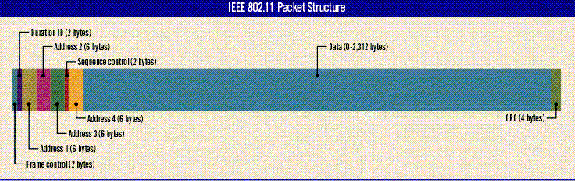
(10)
MAC Layer
The MAC layer utilizes two methods of authentication. Open authorization gives multiple clients residing within given area access without identifying the user. Shared Key authorization uses wired equivalent privacy (WEP). WEP uses RC4, a 64-bit encryption algorithm, that is the combination of a 24-bit initialization vector and a 40-bit security key. Encryption is limited to the payload of the data frame. The visible header allows other clients to listen network � aiding in its control and management.(11)
Roaming
Roaming on the 802.11 WLAN is analogous to roaming while using a cellular phone. Should the base station decide the connection is poor, it scans to find another access point. The base station sends a Reassociation Request to the new access point. The new access point may accept the Reassociation Request or reject it. Should the Reassociation Request be rejected, the base station continues to scan for a new access point. If the Reassociation Request was accepted, the access point notifies the router and the old access point of the association.(12)
It�s Coming Soon to an Espresso Bar Near You
A variety of industries have already embraced the various wireless technologies. And, as prices begin to fall we will see the technology move rapidly into more and more industries which touch our every day life. Wireless high-speed Internet access, a longtime dream of the technophile and business traveler, is finally arriving at hundreds of access points in public and private places across the United States. With a laptop computer equipped with a wireless card, anyone within a few hundred feet or so of one of these access points, or hot spots, can tap into a wireless network that is in turn connected to the Internet via a broadband connection. The user can then send e-mail or surf the Web at speeds in the megabit range, usually for a monthly or single-use fee.
By late this year, industry experts say, the hundreds of existing hot spots will become thousands as service providers and entrepreneurs install the necessary equipment -- generally, a small transceiver and a broadband connection -- in all major airport terminals, sports arenas and other business and consumer sites. (13)
Who�s Doing What?
A number of companies are starting to offer wireless mobile Internet access in public places, like airports, hotels and stores. The service can be used by laptops with wireless cards. Here are some of the companies:
AIRWAVE (www.airwave.com): Serves about 75 restaurants, bookstores and cafes in the San Francisco Bay area; a national expansion is planned.
GLOBAL DIGITAL MEDIA (www.globaldigitalmedia.com): Has kiosks and wireless access at Boston and Philadelphia airports; the company plans to be in 35 airports this year.
MOBILESTAR (www.mobilestar.com): Has about 150 hotel and airport locations, including some terminals at Dallas-Fort Worth airport; all of the Austin, Tex., airport; the American Airlines gates at John F. Kennedy airport; and member lounges in most major airports. It plans service in 5,000 Starbucks by January 2003.
SURF AND SIP (www.surfandsip.com): Serves about 50 locations in cafes and restaurants in the San Francisco Bay Area; a few are in locations like Los Angeles and Kentucky. The company plans to expand to 1,000 locations, including Seattle, Portland and San Diego, by the end of 2001.
TELIA (www.homerun.telia.com): Found at more than 100 hotels, train stations and airports in Sweden, with plans to expand to 19 European airports via SAS airline lounges and more than 300 other locations during 2001. The company is currently working with SAS airlines to provide in-flight Internet access. Tests are intended to certify 802.11b as a safe protocol for airline use.
WAYPORT (www.wayport.com): Serves airports in Seattle-Tacoma, Austin and Dallas-Fort Worth, and 150 hotels (Wyndham, Four Seasons, Meristar, Hilton, Hyatt). It plans to have 1,200 installations by end of 2001. (14)
�Roaming mobile access is becoming a hot item,'' said Tim Bajarin, president of Creative Strategies, an industry consulting firm. Mr. Bajarin added that the services were particularly attractive to corporations who wanted their traveling staff to be able to keep in touch with the home office more frequently. Some companies and colleges already have wireless local area networks using the same technology so Internet and intranet access is available from anywhere within an office or around a campus. But the services for mobile professionals tend to be single access points covering one or more stores, for instance, or several meeting rooms in a hotel. This new wireless access is about ''giving you the ability to roam from one network to another and be blissfully ignorant'' of the technical intricacies, said Stephen Saltzman, general manager of Intel's wireless local area network division. ''It's the kind of thing that's such a fundamental capability that it starts feeding on itself.'' It's a vision of a seamless world of wireless access, where the business traveler or cafe habitue can keep in touch via the Web just by walking into the right spot, turning on the laptop and opening a browser. Other services are envisioned as well. The technology has been shown to work even if the laptop is moving, so drive-by access from a car may be possible. Or gas stations could have hot spots and offer ''info fueling.'' ''At the same moment you're filling up your gas tank, why wouldn't you fill up your in-box?'' said Mark Goode, chief executive of MobileStar, a leader in the field.(15)
Okay, I�m Interested�So, What Will It Cost Me?
The equipment to hook a laptop into a wireless system is becoming less expensive. Many laptop manufacturers have added or are about to add built-in support for wireless networking, and some laptops already come equipped with wireless LAN cards. Cards can also be purchased for $100 to $150. To take it a step further, wirelessly networking the home is now very doable. Once scarce, extremely expensive, and hard to configure, home wireless networking products are more plentiful, affordable, and customer-friendly than ever. The cost to link two PCs to each other and the Internet costs between $480 and $750 for equipment, depending on the technology installed. As for the connectivity, most access points are and will be commercial, run by companies that will charge for the services -- anywhere from a few dollars for a single session to $50 or more per month for unlimited use of the system. (16)
New Products and Trends
As innovation follows invention, we will soon see an increasing amount of wireless products appearing on the consumer market. The emerging wireless innovations for consumers are the darling children of multiple mergers and partnerships. Technology companies are rapidly entering into agreements with consumer/electronics companies to produce products for the home market. Whirlpool, the U.S. based appliance maker has signed agreements with Nokia, Cisco Systems and Sun Microsystems to cooperate in the development of internet-enabled networked home products. (17) Why? Manufacturers, aware that their sales of bread-and-butter consumer electronics such as home computers have begun to stagnate, want to give consumers something more to do with their PC�s, mobile phones and PDA�s. Smart-home technology may be the answer. Sales of smart-home hardware should reach $4.74 billion by 2005 according to Navin Sabharwal, an analyst with Allied Business Intelligence. (18)
Does My Toaster Really Need to Surf the Internet?
"Internet-enabled appliances" does not mean your toaster will be surfing the internet while you toil away at the office. What it does mean is that various components in your home can be integrated, then subsequently controlled from any web-capable device �--- a PC laptop, or handheld computer or mobile phone. Using wireless technology in the home to integrate separate units makes for very convenient and interesting possibilities. For example, think about:
the capability to deactivate a home security system from the office by unlocking the door to let in an appliance repairman, and monitoring his activities while he is in your home
conserving energy and lowering your utility costs by turning down the hot water heater and thermostat while gone during the day, but turning it back on before you return from work
students at MIT currently receive e-mail alerts from Maytag washers and dryers, informing them the washing or drying cycle is over.(19)
Imagination on the Home Front
What is becoming clear is that innovation in new products for the home market is only limited by your imagination --- the technology is here. Can you imagine a refrigerator that maintains an inventory: as items are consumed (throwing away the milk carton), the bar code is scanned, which enters the item onto a shopping list which will be printed out when you are ready to go to the store --- or perhaps emailed to the store directly requesting home delivery of the items? Can you imagine a closet that tracks when/where/what time/what event you last wore an item of clothing, by scanning an embedded chip in the item of clothing when you hang it up, and voice recording a short description? ---- or perhaps the scanner tracks items to be collected and sent off for the next dry cleaning visit? Or can you imagine selecting an item in a retail store and accessing your closet via a store apparatus in order to test the color chip to see if it �matches� items already hanging in your closet?
Bluetooth Technology, named for a Danish King who united a multiplicity of Viking tribes, is particularly innovative in developing products for practical personal use. Imagine your cell phone is ringing and its at the bottom of your briefcase. You can�t find it and you need to take the call. Just put on the headset, press a button on the side of it and you�re talking without having to find your phone. This is technology available now. Bluetooth is already working on an earpiece (vs. a headset) that will allow you to access any number of small Bluetooth technology devices. (20)
Wireless for Personal Use
Wireless technology has had and will continue to have an enormous impact on what was once considered"personal time." Small, convenient hand-held devices have expanded the traditional working hours into well past what was universally accepted as "quitting time." As wireless technology continues to improve, smaller, more efficient devices are emerging that allow for mobile capabilities undreamed of a decade ago.
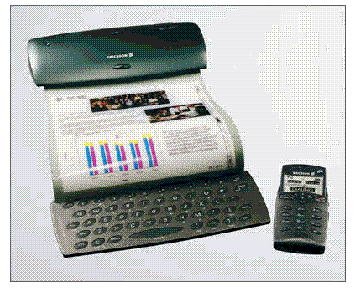
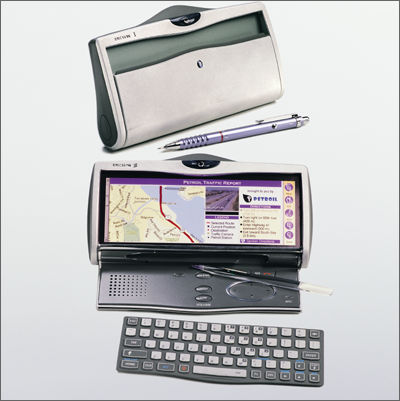
Journeying past the personal cell phone and PDA type devices, the new generation of personal applications is quite astounding in their range and scope of capabilities. Figures 1 and 2 shows two such prototype devices currently in development by a major company. (21) Notice the emphasis on portability, and ease of use, as well as increased functionality.
In Summary
For a technology taking toddler steps, this wireless medium is a prodigy child. Team 1 has no doubt that invention and innovation will continue at a blazing pace with this medium. It offers amazing convenience and capabilities for the average citizen, who neither knows or needs to know complicated software or technology for usage. The range of services and products being �imagineered� brings to mind the movies of our era that were considered science fiction -----HAL the talking computer in 2001 who �ran� everything�.. the Star Trek communications system that was activated by touching an emblem on their clothing�. Its not all science fiction any longer. Sit down and buckle up, this technology is moving (literally) at the speed of sound!
Bibliography
1. NetMotion Wireless, Inc. NetMotion Wireless Glossary. www.netmotionwireless.com/resource/glossary.shtml
2. Karve, Anita. 802.11 and Spread Spectrum, Network Magazine. 12/07/97. www.networkmagazine.com/article/NMG20000726S0001
3. Geier, Jim. Overview of the IEEE 802.11 Standard. Wireless-Nets, Ltd. April 9, 1999. www.wireless-nets.com/whitepaper_overview_80211.htm
4. Petrick, Al. What is the IEEE 802.11 WLAN Standard? Technology White Papers. ParkerVision Inc. 1999. www.d2d.com/white80211.html
5. Nations, Daniel (webmaster). Wireless Local Area Networks. Western Washington University February 7 1999. www.ac.wwu.edu/~n9649918/wlans.html
6. Nations, Daniel; et al, Ibid.
7. Karve, Anita; et al, Ibid.
8. Nations, Daniel; et al, Ibid.
9. Nations, Daniel; et al, Ibid.
10. Conover, Joel. Anatomy of IEEE 802.11b Wireless, Network Computing. August 7, 2000.
www.networkcomputing.com/1115/1115ws2.html
http://img.cmpnet.com/nc/1115/graphics/ws24.gif - Graphic address
11. Petrick, Al; et al, Ibid.
12. Nations, Daniel; et al, Ibid.
13. Fleishman, Glenn, The Web, Without Wires, Wherever. New York Times. February 22, 2001 p 1.
14. Fleishman, Glenn, Ibid.
15. Fleishman, Glenn, Ibid
16. Waring, Becky, Wireless Home Network Wars, PC World. San Francisco, April 2001. pp 42-45.
17. Ulmonen, Terho, Whirlpool Taps Nokia For Wireless Home Applicances, IDG News
Service\Scandinavian Bureau; July 06, 2000 10:28 http://www.idg.net/ec
18. Wright, Gene, Live Smarter: New Technologies Add Home Automation Capability., Gannett News
Service, 04-30-2001, pp ARC.
19. Wright, Gene; et al, Ibid.
20. Grumet, Tobey, Wireless reimagined., Popular Mechanics, 06-01, pp 34.
21. http://www.zdnet.co.uk - Web Page
http://www.zdnet.co.uk/news/specials/2000/08/road_2_3g/pic1.html - Graphics
last update: 4/26/2002
