Lesson One:
ACK! I've Just Been Paged!
NOTE: This script uses the paging format from Supermegatopia MUCK. If your page format is different, it's up to YOU to figure out how to change the code. I WILL give you everything you need to do so, however.
This code has been rigorously tested, and while I cannot say it is 100% bug free, I will say that I have yet to run into a bug.
All right, student(s), welcome to lesson one! (watermelon cantelope watermelon cantelope) Settle down, settle down, everyone take a seat. (mutter mutter mutter) Today, we will be learning how to use TRIGGERS to inform us of when we recieve a page. (groan) Hey. It'll only go downhill from here. This is the FUN lesson. (groan) It's broken down into TWO steps. So, without further ado...
STEP ONE
First, we need a trigger. Since triggers are dependent on information from the world we are connected to, we connect to the world (oh, no, not that) and page ourselves a few times to see what the various types of page look like. (NOTE: This code currently does NOT handle multipages. I think you can figure out how to do that once we're done, however.) So, assuming you're connected to SMT (or a world using the same MU* engine...)
PAGE ME


You sense that Bobo_The_Evil_Clown is looking for you in hell.


PAGE ME=:smiles inanely.


In a page-pose to you, Bobo_The_Evil_Clown smiles inanely.


PAGE ME=Sending text!


Bobo_The_Evil_Clown pages, "Sending text!" to you.
Okay, now that wasn't so hard, was it? Yes, I quite realize that there has been NO coding yet. We're getting there. We are. Our NEXT step is to pull up the TRIGGERS window in MUSHclient. Click on the button that looks like a bunch of lines, with an arrow pointing to the highlighted line. *click* Now, click on ADD trigger. The Edit Trigger window will pop up. (See figure 1-1)
WOW, there's a lot of crap in this window. It's there for a reason, but don't worry, we won't be using much of it. Briefly, here's an explanation of the stuff we WILL be using.
- Trigger -- This is the text we will be keeping an eye out for.
- Send -- We won't be using this, but if you want to set up an automatic response, you can put the text you want to send in here, and it will automatically send it to the world object.
- Label -- This is the name of the trigger. It's ONLY necessary if you're using the trigger to run a VBScript, JavaScript or PERL routine.
- Script -- The name of the subroutine you're triggering.
All of the other options are handy, but in this case, they're unnecessary. For example, if you want a routine that runs whenever someone pages you with a particular text, you would create a trigger with the text in question, make sure it's HIGHER UP in the trigger queue (I bet you were wondering what that MOVE UP button was for.), and make sure the "Keep evaluating" checkbox is CLEARED.
|
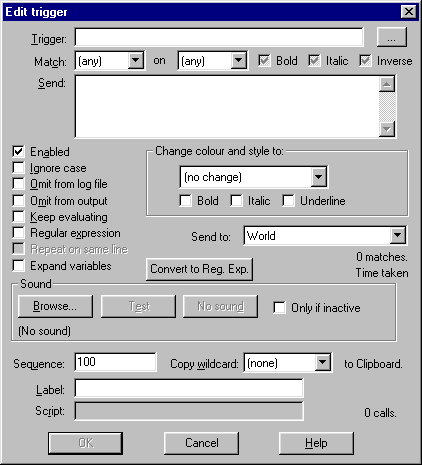
Figure 1-1 |
So, we are now ready to enter our first (of three) triggers and give it a label. So, in the TRIGGER textbox, enter:
You sense that * is looking for you in *.
We give it a label by typing BlankPage in the LABEL text box, and click on OK! (We'll be coming back to give this thing a script after we've written the script.)
Now, we add two more triggers, label them (call them GotPage and GotPagePose), and close out the triggers window. It's time to start coding.
Step B
Okay, we've got our triggers, it's time for some code. We'll be using the VBScript functions MessageBox and InputBox (and let me tell you it was a RELIEF to find out they worked in MUSHclient) to inform us of our recieved pages and get our response. First, let's work on our GotPage and GotPagePose triggers. They'll be using one routine, while GotBlankPage will be using another. (Yes, using the labels as reference, we COULD put it all in one routine, then check to see which trigger called it, but ick.)
First, I'll display the code, then comes the line-by-line analysis.
sub GotPage(arName, arOutput, arArgs)

	dim PagePerson, PageMessage, Response

        PagePerson = arArgs(1)

        PageMessage = arArgs(2)

        Response = "<CANCEL>"

        Response = InputBox("You were paged by " & PagePerson & ":" & chr(13) & "  --  " & PageMessage,"You Recieved a PAGE!")

        if Response = "<CANCEL>" or Response = "" then

                world.note "Page ignored."

        else

                world.send "page " & PagePerson & "=" & Response

        end if

end sub
Alllllllrighty then! Looks simple enough, huh? Let's see what it does. The first line is our SUBROUTINE definition. It simply states that the name of the subroutine is GotPage and that the arguments passed to it are arName, arOutput, and arArgs. (These three arguments are required whenever a script is run by a TRIGGER or ALIAS. If it's run by a MACRO, only arName is required.
Our second line defines a number of internal variables. PagePerson is the person who sent the page, PageMessage is the message or page-pose they sent, and Response is your response to them.
Now we start getting into the code itself. The arArgs argument is an array that contains the text that was in the place of the wildcards (*) in our trigger (or alias, but that's another lesson). They're in consecutive order, so assuming your MU* uses a similar page convention to SMT Muck, the first one will contain the NAME of the person paging you, and the second one will be the message or pose. Therefore our next two lines get the information out of there and put it in our local variables.
The line after that sets the default value for our response to <CANCEL> so we can identify when the user has clicked on the CANCEL button.
Next is our InputBox, which notifies us of a message and waits for a response. The usage for the InputBox function is as follows:
Local_String_Variable = InputBox(Box_Message [, Box_Caption][, Box_Default_Text])
Note that the default text is the THIRD argument passed, and therefore MUST have two commas before it, even if you don't pass a caption. In any case, the next line of the code checks to see if a response was actually made. If not, it makes a note to the user stating "page ignored." If so, it sends the response as a page to the person who paged you.
Well, that does it for messages and page-poses. Now on to the blank pages. Here comes the code.
sub GotBlankPage(arName, arOutput, arArgs)

	dim lvResponse

	lvResponse = msgbox ("You got paged by " & arArgs(1) & " who would like you to meet him/her at " & arArgs(2),vbYesNoCancel, "Page Summon Recieved!")

	if lvResponse = vbYes then

		world.send "page " & arArgs(1) & "=I'm on my way!"

	elseif lvResponse = vbNo then

		world.send "page " & arArgs(1) & "=Sorry, can't make it."

	else

		world.note "Page ignored."

	end if

end sub
You'll notice right off the bat that I didn't use the local variables PagePerson and PageMessage. There's a reason for that. The reason is that I'm lazy. I decided to leave the code as is to show you how UGLY scripting can get if you don't use meaningful variable names. And NOT because I'm lazy. Honest.
Now, you'll also notice that I used the variable prefix [lv] on my variable lvResponse. The reason I didn't do this earlier is that I forgot. Sue me. The prefix doesn't do anything, it just reminds me that this is a LOCAL VARIABLE (hence "lv") and not a GLOBAL or MODULE variable. Not that I use any global or module variables here. Or ever. I hate 'em, personally. If you want to pass information around, use ARGUMENTS, people. And I mean that in a social context, not a programming one... or is it the other way around?
</RAMBLE>AAAAnyway. I'll keep the explaining to a minimum. Suffice it to say that this subroutine uses the MessageBox function and the built-in globals vbYesNoCancel, vbYes, and vbNo.
USAGE OF MessageBox:
Result = MessageBox(Message_Text[, Buttons][, Caption])
or,
MessageBox Message_Text[, Buttons][, Caption]
Part III
SAVE your script file, close it, and open up your triggers window again. Select each of your scripts in turn, edit them, and type in the appropriate script name in the Script text box. NO arguments, NO variables, JUST the script name. Click on OK. If you get an error message, then one of two things has occurred:
- You misspelled the script name
- You forgot to link your script to your world
Well, that's it! I'll see you at lesson TWO!
Back to the Podium
Email Master B with comments