Sound | Pcitures | Animation | Engineering | HTML | JavaScript
|
Sound | Pcitures | Animation | Engineering | HTML | JavaScript |
The Document |
|
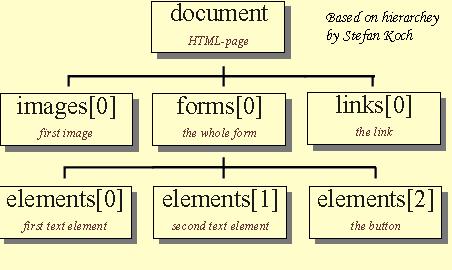
The Document Object Model (DOM) is a simple, hierarchical naming system that makes all of the objects in the page, such as images, forms, and CSS properties, accessible to scripting languages like JavaScript. It defines the logical structure of documents and the way a document is accessed and manipulated. Microsoft and Netscape both have their own versions of the DOM and have submitted them to the World Wide Web Consortium (W3C) to decide on a standard. Each browser's implementation of DHTML is different because they all use different DOMs. In earlier versions of JavaScript enabled browsers, the DOM gave access to a limited number of objects and their attributes. These included forms, frames and later images. With today�s browsers we are able to access all of the objects in the page, making the DOM very powerful tool for programmers and non-programmers alike that would like to make their web pages more interactive. In the DOM, there is an �OBJECT� that represents the page, the �DOCUMENT� object, and is used to access the page through JavaScript by referring to the object by name. All of the objects contained within the page, like forms and images branch off of the document object. Objects branch off one another in the DOM and are separated by periods.
Another factor of the Document Object Model is that the page gets its name automatically, but most of the objects in the page don't. You can create a name for an object by using the �NAME� attribute in your tags. (By Marcus Eatmon Reference: edited by Philippe Le H�garet, W3C; Lauren Wood, SoftQuad Software Inc., WG Chair; Jonathan Robie, Texcel http://www.w3.org/TR/DOM-Level-2-Core/introduction.html) |
|

JavaScript: By Marcus Eatmon
History of JavaScript |
How JavaScript Relates to Java |
The Document Object Model