
click the game configurations tab.
10
under configuration: it should be blank. click edit towards the right
11
Type in Half Life: counterstrike or just c-strike
it does not really matter unless u know what it says.
12
Under game data files:
click add towards the right
then search for your valve hammer folder or hammer folder and go into it
13
After entering the folder you will find these folders fgd,maps,prefabs,sprites,tools
Go into the fgd folder
once in the FGD folder you will see different mods folders, go into the counter-strike folder
15
double click the file halflife-cs.fgd or click it then push open
16
next we move on to
texture format:
leave it alone do not change it, [you cant anyway]
17
move on to map type:
once again you will leave it alone, and u cannot move. STEP 18 IS BELOW
configuring hammer with pictures!!!
when you first start hammer the confuguration box should come up with the wizard. close the wizard. If the config box did not appear go to Tool at the top then slide down to options
The picture below is how your configurations should look but we will still go step by step through them anyway
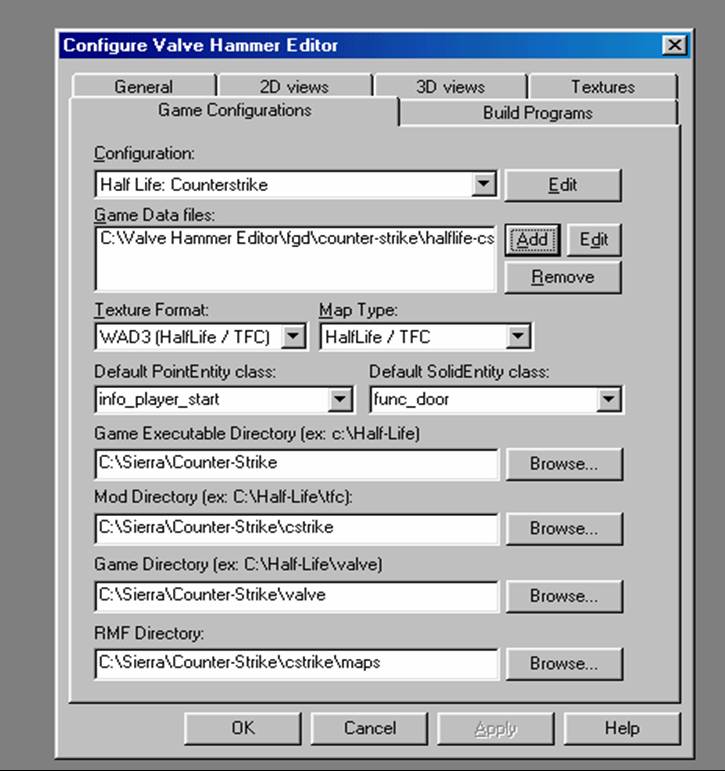
Next you move on to Default point entity class: their will be many options put it as info_player_start from the drop down menu
19
Next it Default SolidEntity class:
Select Func_door from the drop down menu
20
here is where hammer determines which program its running. So for game executable directory go to browse...
search your computer for your counter strike folder it should be in Sierra. Some people bought half life and got counterstrike as a MOD. And some people got Counterstrike as a RETAIL product If the folder after SIERRA is half Life then click left. If it is the folder Counter-strike then click right