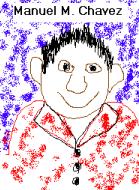
Manuel M. Chavez's Home Page
|
|
|
|
|
MANUEL M.
CHAVEZ
[email protected]
EDUCATION
Bachelor of
Science, Elementary Education. Northern Arizona University; May 2003
CERTIFICATION
Arizona Initial
Elementary Certificate, expected June 2003
TEACHING RELATED EXPERIENCE
STUDENT TEACHING.
TEACHING PRACTICUMS.
TUTORING.
ADDITIONAL QUALIFICATIONS.
PROFESSIONAL GOALS.
MARS IN THE NIGHT SKY
Author: Manuel M. Chavez
Subject: Mars in the Night Sky
Learning Level: 6th, 7th, and 8th Grade
Invitation:
Students will be asked, "How do you think the
stars were formed?" Students will be asked, "Can anyone explain the
Big Bang Theory?
Situations:
Big Bang Theory and Key Constellations activities
will take place in the classroom. Accessing the World Wide Web will
consist of using the Computer Lab. The time period for the length
of the lesson will be three one hour class periods.
Tasks:
Students will use a balloon filled with flour,
which will be popped against a black plastic background to simulate the
Big Bang of the Universe. Also, students will use Glow in the Dark
plastic stars to create star constellations on the wall. Students
will use the Internet to access different web sites to research Key Constellations.
On a clear evening, students should go outside with an adult to locate
the Key Constellations for the current season.
Interactions:
Students will work in groups of four and will
be encouraged to talk and work among themselves. Instructor will
give minimal instructions to the students. It will be up to the students
to initiate interactions by asking pertinent questions about the activities.
Standards:
Students will be able to identify “Key Constellations”
in the night sky. Students will use constellations and star magnitude
to locate Mars and other planets in the night sky. Lesson plan addresses
the Arizona State Standards in Science. Standard 1: Science
As Inquiry: students understand and use the processes of scientific investigation
and scientific ways of knowing. They are able to design, conduct,
describe and evaluate these investigations. They are able to understand
and apply concepts that unify scientific disciplines. 1SC – E1 PO2,
PO3
Standard 6: students understand the composition,
formative processes, and history of the earth, the solar system and the
universe. 6SC – E1 PO1, 6SC – E2 PO1, PO2
Assessments:
The success of the lesson will be evaluated by
the students’ ability to locate “Key Constellations” using star charts.
Lessons and assessments are written to reflect Arizona State Standards
in Science.
Tools:
Computer technology will be integrated into the
lessons by using Starry Night software to let the students access the night
sky in real time, which will enhance the students learning. Also,
students will be required to create a StoryBoard cartoon using Microsoft
Word and the Drawing Toolbar to reinforce the lesson on "Key Constellations."
Big Bang Theory:
Computer with Internet access
Starry Night software
Two nine inch balloons
One black garbage bag
One pushpin
Two tablespoons of flour
Key Constellations:
Four pieces of black construction paper
Four copies of star constellations chart
100 glow in the dark stars (Make-up four constellation
ahead of time)
One pack HANDI-TAK
One copy of The Stars H. A. Rey
One copy of Find The Constellations H.
A. Rey
One overhead projector
Project :
Students will realize that planets move across
the heavens while stars remain in a fixed position. Students will
create “Key Constellations” using Glow In The Dark Stars to help them understand
the night sky.
Procedure:
Big Bang Theory:
1. Assemble students around a desk.
2. Begin explaining the Big Bang Theory.
3. Spread out garbage bag on desk. Tell
students the bag represents the vastness of the universe.
4. Blow-up balloon and tell students that it
represents all the matter in the universe at the beginning of the universe.
(Add one tablespoon of flour to balloon before blowing up).
5. Ask for two volunteers, one to hold the balloon
and one to pop the balloon.
6. Pop the balloon and tell the students to notice
how all the matter spread out over the universe and that our solar system
is just a speck on the bag.
Key Constellations:
1. Divide the students into four groups, so that
each group will focus on one of the “Key Constellations”.
2. Pass out four copies of star constellations
and four pieces of black construction paper. (Assign students a Constellation).
3. Have students open their glowing stars package
and study their constellation, and recreate the constellation using HANDI-TAK
to stick the stars to the wall.
4. Have groups take turns naming their constellation
and then turn off the lights, so the rest of the class can see the images.
5. Cleanup and return materials to activity desk.
6. Class discussion on how stars stay in fixed
positions and that astronomers use the position of fixed stars to locate
planets. This is important as we are looking for Mars in the night
sky.
7. Class will be required to produce a StoryBoard
cartoon using Microsoft Word and the Drawing Toolbar.
URLs:
http://www.jackstargazer.com/JHSG_DNLD.html
Jack Horkhiemer explains the night sky
http://www.learnwhatsup.com/astro/
Link to star charts
http://www.mystarslive.com/
Link to star charts
http://www.wa.gov.au/perthobs/astronews.html
Newsletter from Perth Observatory
http://www.nasa.gov/
NASA space agency web site
A link to the U of A Library -
http://www.arizona.edu/shared/libraries.shtml#libraries
A link to the ASU library (main campus) -
http://www.asu.edu/lib/
A link to the NAU library at the Cline Library.
Flagstaff, AZ - http://www.nau.edu/library/
A link to articles about telecommunication crimes
- http://www.rcmp-grc.gc.ca/html/cpu-cri.htm
A link to Assistive technology in the K-12 classroom
- http://www.bcpl.lib.md.us/~adorich/index.htm
A link to articles about copyright laws -
http://www.fplc.edu/tfield/copynet.htm
A link to articles about freedom of speech via
the Internet - http://www.ciec.org/
A link to technology in the curriculum - http://edweb.gsn.org/stories.intro.html
Assistive Learning Links
http://www.schwablearning.org/
A parent's guide to helping Kids with Learning
Differences
http://www.cast.org/
A not for profit organization that uses technology
to expand opportunities for all people, including those with disabilities.
http://www.interdys.org/index.jsp
The International Dyslexia Association
http://www.usdoj.gov/crt/ada/adahom1.htm
Americans with Disabilities Act Home Page
http://www.ldonline.org/
The leading Web site on learning disabilities
Class Links
http//:www.geocites.com/Athens/Styx/2967/teaching.html
Lesson plans, general teaching sites and tools
to aid in teaching.
http://www.usgs.gov/
Excellent science lesson plans
http://www.edhelper.com/
Crosswords, Math Sheets, Reading Lessons
http://www.abcteach.com/
Printable worksheets for student teachers
http://www.ed.gov/
U.S. Department of Education.
http://www.pbs.org/kcet/publicschool/
You can explore the American Public Education
System.
http://www.edgate.com/
Internet for research.
http://www.mhln.com/
Preview textbooks and sample lesson plans.
http://www.abcteach.com/
Offers educational help for teachers, students,
and parents regarding student progress.
http://www.middleschool.net/
A web site built by teachers for teachers.
http://dnie.com/
This web site offers weekly lesson plans intended
for using newspapers and other public information periodicals for educational
purposes.
http://www.proteacher.com/
This site offers interaction for the student
and teacher. Teachers can communicate with one another to generate
ideas for their classroom in Social Study, Math etc. Parents can
voice their opinions and visit with other parents, teachers, and children.
Students can get extra help on homework.
http://www.dogpile.com
This search engine is great When you find the
right words, you can search over 300,000,000 search engines at one time.
This site has been a big help with every class that I needed to find information
quick and fast.
http://quest.arc.nasa.gov/
It has great lesson Science plans for teachers
and parents.
http://dir.lycos.com/Reference/Education/
Answers any question about education.
http://www.educationindex.com/
Annotated guide to the best links on the web
for educators.
http://wwww.google.com
Search engine
http://www.lessonplanspage.com/ScienceSSMars1IntroSolar56.htm
This is a link to an introduction for a thematic
unit showing what would be involved to colonize Mars. It is
targeted for 5th and 6th graders
http://www.lessonplanspage.com/ScienceSSMars1IntroSolar56.htm
This is a lesson plan on the most heavenly bodies
of the solar system.
Click Here To Return To Menu
Projects
Copy/Paste Assignment
Self Portrait Assignment
Newsletter Assignment
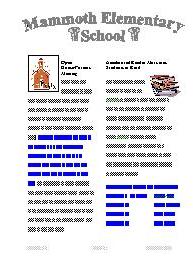
Gradebook Assignment
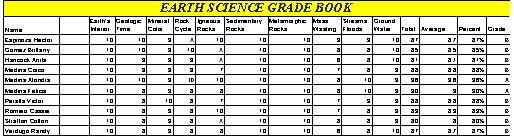
Record Database Assignment
Storyboard Assignment
PowerPoint Assignment