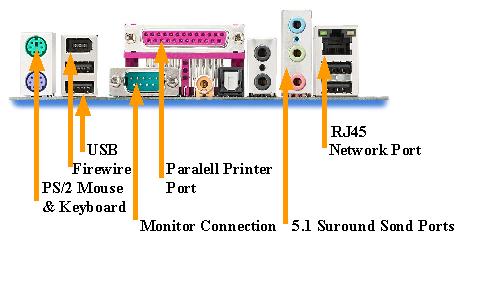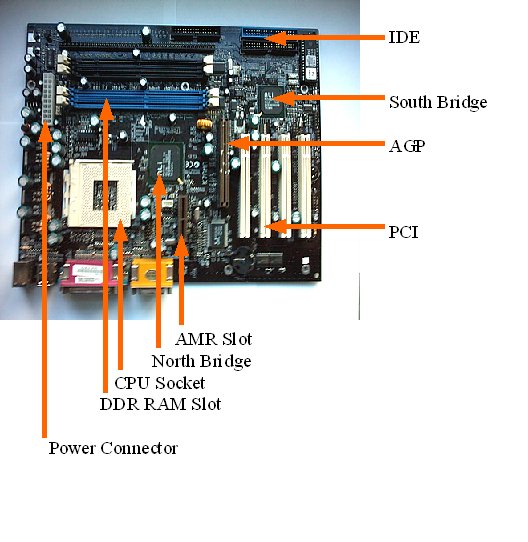
The motherboard has a clue in its name as it’s the biggest of the computer components and it's where all of the other components connect together. The motherboard contains slots for RAM, a socket for the CPU and expansion slots for the Graphics Card, Sound Card and other add on devices.
The Motherboard screws directly to the computers case and everything else connects to the Motherboard either by plugging in the PCI, ISA and USB or by wires. The lights and power switch on the front of the case are a bit fiddly. An AT power supply is switched on by an actual switch but an ATX supply has a soft power switch connected to the Motherboard. On the motherboard is a set of pins, labels and diagrams, these labels will be the same as the labels on the wires coming from the front of the case: HDD LED, POWER SW, RESET SW, SPEAKER and SUS LED which is system suspend.
A lot of Motherboards come with integrated onboard Sound and Graphics which offers both advantages and disadvantages. With the onboard sound you can switch it off in the systems BIOS and add another card to the PCI slots. But with the Graphics Card you are limited to what the motherboard can support because all new Graphics Cards use AGP (Advanced Graphics Port).
To fit the motherboard into an empty case you have to align the screw holes on the Motherboard to the screws in the case making sure that all of the ports on the Motherboard line up to the rear case holes, the screw holes on the Motherboard have metal rings around them to protect the board itself. The next step is to screw the board to the case firmly, do not over tighten as the board may get damaged.