Graphics Card
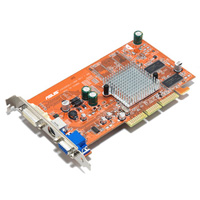
The Graphics Card is an essential part of the computer; it’s the component that sends a signal to the monitor to display a graphical representation on your computer.
There are several types of cards on the market depending on the Motherboards slot type. Some Graphics Cards are onboard which means that they are integrated into the Motherboard whilst the other types are AGP, PCI and ISA.
AGP (Accelerated Graphics Port) is the latest modern Graphics Card and there are several types of AGP slots 1X, 2X, 4X and the latest 8X. The Graphics port is split into three parts, each part being different in the model rage i.e. 2X being a different type of slot to X8.
Most new computers are supplied with AGP but older computers use PCI and even older systems still use ISA. You can run an AGP Graphics Card along side a PCI and have two monitors running simultaneously, Windows allows you to run up to nine Monitors at the same time.
To install an AGP Graphics card you need to remove the cover off the computer. Above the white PCI slots on the Motherboard there is a brown slot which is the AGP. Remove the blank backing plate off the computer case and align the card up to the Motherboards AGP slot and apply firm pressure, the card should slot into place. Next screw in the retaining screw and replace the computer case.