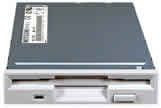
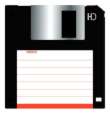
The Floppy Drive is the oldest drive and is still being fitted to computers, but because of its limited storage space it’s gradually being replaced by recordable CD’s, new machines like Dell don’t include floppy drive’s in the build.
The drive takes 3 ½ inch disks with a metal flap which when inserted into the drive is pulled to one side to allow the read/write head to access the disk inside.
Inside the case on the rear of the drive there’s a power connector and a 34 pin ribbon cable that is connected to the Motherboard. To fit the floppy drive into the computer case you need to screw it in place with four screws on the side making sure it’s correctly aligned with the front of the case. Next you need to deliver power to the floppy by means of a cable as it does not derive its power from the PCI slot (see Motherboard section); the connection can be forced to fit both ways but will only work in one position. Testing the Floppy is achieved by switching on the computer and if the floppy light remains on then the ribbon cable is the wrong way around.