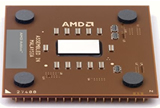
The Central Processing Unit is the brains of the computer; it works out all of the calculations and controls all of the computers hardware telling it what to do and when. The CPU only understands Binary Code which is in the form of 0s and 1s. The Processor’s speed is measured in MHz and GHz and today’s modern PCs are equipped with faster and faster processors.
There are only two main brands of CPU, Intel and AMD. AMD is the cheaper of the two and is good value for money. You are restricted to what type and speed CPU you can have due to motherboards limitation and CPU socket type.
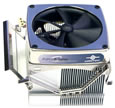
The CPU produces a lot of heat, so the chip is surrounded by Ceramic. On top of the chip is a metal heatsink and a fan.The heatsink and fan draw away the heat from the chip and then a system fan blows the warm air out the back of the computer. Below is a picture of a heat sink and fan.
To fit a CPU you need to lift the bar on the CPU socket, the CPU having hundreds of pins on the bottom only locates one way into the socket. Forcing the connection is an indication that it’s being fitted the wrong way or that one of the pins on the processor is bent. Only gentle pressure is needed and the CPU should engage easily. Next you need to place the heat sink and fan over the CPU, these being held in place by a metal bar that clips into place either side of the CPU. The power wire comming from the CPU fan has three wires a red, black and a yellow and two locating pins on the side of the connection so it'll only connect the right way. On the Motherboard next to the CPU socket are three pins labeld CPU this is where the connection inserts.