 Personal organisers have become part of
personal computing and every 'suite' offers you something of the
kind. Now if you're constantly wired to the Web, you can try out
the free online calendar provided at When.com, a division AOL. At
the time of registering, which is free, you have to indicate your
country (if outside the US) and time zone. After that you get
your personal calendar. Today figures as the default day but you
can click on a particular date and time to enter your
appointments or the important event of that day. You can save
this and then recall it at any time. Though there is provision
for entering events, trade shows, holidays, movies etc already
listed in the site by merely clicking on them, these pertain to
US happenings. But then, you can physically add your own event
and get reminded about it wherever you are -- so long as you're
connected.
Personal organisers have become part of
personal computing and every 'suite' offers you something of the
kind. Now if you're constantly wired to the Web, you can try out
the free online calendar provided at When.com, a division AOL. At
the time of registering, which is free, you have to indicate your
country (if outside the US) and time zone. After that you get
your personal calendar. Today figures as the default day but you
can click on a particular date and time to enter your
appointments or the important event of that day. You can save
this and then recall it at any time. Though there is provision
for entering events, trade shows, holidays, movies etc already
listed in the site by merely clicking on them, these pertain to
US happenings. But then, you can physically add your own event
and get reminded about it wherever you are -- so long as you're
connected.East Diary
 EasyDiary is very much like the above site
with the major difference being that it is 'made in India.'
Launched by the Pune-based Ruksun Software Technology, this free
interactive calendar on the Web lets you conveniently schedule
appointments or meetings, set yourself reminders, create a to-do
list, update your address book, maintain a scribble pad and more.
You can personalise your schedule to be viewed by day, week or
month. You can schedule events, appointments, meetings and create
reminders for yourself. You can get items displayed on your
desktop by date, time or priority. Then you can interact with
others on the Web who don't even have to be members of EasyDiary,
though membership does allow more versatility. For Indians, this
utility scores over the US one as the events listing is about
happenings in India. EasyDiary is also WAP-enabled and can be
customised for your Palm Pilot.
EasyDiary is very much like the above site
with the major difference being that it is 'made in India.'
Launched by the Pune-based Ruksun Software Technology, this free
interactive calendar on the Web lets you conveniently schedule
appointments or meetings, set yourself reminders, create a to-do
list, update your address book, maintain a scribble pad and more.
You can personalise your schedule to be viewed by day, week or
month. You can schedule events, appointments, meetings and create
reminders for yourself. You can get items displayed on your
desktop by date, time or priority. Then you can interact with
others on the Web who don't even have to be members of EasyDiary,
though membership does allow more versatility. For Indians, this
utility scores over the US one as the events listing is about
happenings in India. EasyDiary is also WAP-enabled and can be
customised for your Palm Pilot.Anniversary
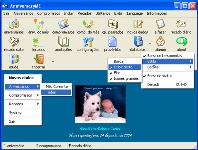 Both the above programs need constant
Net access to be useful. Now if you want a reminder-cum-memo
program right on your desktop, you must download the 3.87MB
Anniversary DE utility developed by my friend Marcelo Zeri of
Maze Info, Brazil. This nifty programme not only allows you to
record anniversaries and appointments but also to remind you of
them as soon as you boot up your PC. After installation, a
friendly screen bids you the time of day and inspires you with a
proverb. The pop-up reminder screen also tells you the age of the
person and his day of birth. An additional utility called 'Alarmy'
lets you set an alarm, with a message, on your computer. Other
features include annotations, notes, and a message for a
particular day which pops out at you right at boot-up. So go
ahead and surprise friends and relatives by greeting them on
their birthdays. And catch the astonishment they evince of just
how you manage to remember!
Both the above programs need constant
Net access to be useful. Now if you want a reminder-cum-memo
program right on your desktop, you must download the 3.87MB
Anniversary DE utility developed by my friend Marcelo Zeri of
Maze Info, Brazil. This nifty programme not only allows you to
record anniversaries and appointments but also to remind you of
them as soon as you boot up your PC. After installation, a
friendly screen bids you the time of day and inspires you with a
proverb. The pop-up reminder screen also tells you the age of the
person and his day of birth. An additional utility called 'Alarmy'
lets you set an alarm, with a message, on your computer. Other
features include annotations, notes, and a message for a
particular day which pops out at you right at boot-up. So go
ahead and surprise friends and relatives by greeting them on
their birthdays. And catch the astonishment they evince of just
how you manage to remember!uTOK
 Here's a utility which will let you not
just be a passive spectator to a site, but actively participate
in it. When I say participate, I do not mean sending an e-mail,
but actually getting your stuff on the Website. And I dont mean
hacking, either. If you have something to say about a site, the
uTOK program lets you post your ‘notes’ right on this
site. All you do is download the free 1.47MB program from this
site, get a registration and start posting notes. You can also
read notes posted by other users, who appear in a small window on
your desktop. uTOK gives you the opportunity to actually interact
with these persons to share knowledge, exchange information and
express opinions. A special 'Private' Notes mechanism allows you
to post notes that only users you choose will be able to read.
Though the site itself remains unchanged, the notes can be viewed
by other uTOK users. So go ahead and make uTOK your browsing
companion.
Here's a utility which will let you not
just be a passive spectator to a site, but actively participate
in it. When I say participate, I do not mean sending an e-mail,
but actually getting your stuff on the Website. And I dont mean
hacking, either. If you have something to say about a site, the
uTOK program lets you post your ‘notes’ right on this
site. All you do is download the free 1.47MB program from this
site, get a registration and start posting notes. You can also
read notes posted by other users, who appear in a small window on
your desktop. uTOK gives you the opportunity to actually interact
with these persons to share knowledge, exchange information and
express opinions. A special 'Private' Notes mechanism allows you
to post notes that only users you choose will be able to read.
Though the site itself remains unchanged, the notes can be viewed
by other uTOK users. So go ahead and make uTOK your browsing
companion. My Docs Online
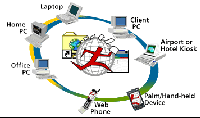 Earlier, if you wanted to view your
documents on a device other than our own personal machine, your
only choice was things like floppies which can often let you down
by getting corrupted. My Docs Online now lets you access your
files anywhere in the world, provided you can get an Internet
connection. There is no download involved here. You just have to
register to acquire 20MB space to upload your files, no matter
what format they are in. You just drag and drop files onto the
Web Folders desktop icon to transfer them to your My Docs Online
virtual drive. The site is WAP-enabled so you can even download
them on appropriate hand-held devices. You can even send your
files to friends and business associates through e-mail.
Corporates can benefit from the Enterprise Edition to make files
accessible to employees across the enterprise.
Earlier, if you wanted to view your
documents on a device other than our own personal machine, your
only choice was things like floppies which can often let you down
by getting corrupted. My Docs Online now lets you access your
files anywhere in the world, provided you can get an Internet
connection. There is no download involved here. You just have to
register to acquire 20MB space to upload your files, no matter
what format they are in. You just drag and drop files onto the
Web Folders desktop icon to transfer them to your My Docs Online
virtual drive. The site is WAP-enabled so you can even download
them on appropriate hand-held devices. You can even send your
files to friends and business associates through e-mail.
Corporates can benefit from the Enterprise Edition to make files
accessible to employees across the enterprise.Gator
 If somebody tells you how dreary it is
filling up those online forms, now you can just tell him, "I've
got Gator." With Gator, you don't have to fill in the same
data everytime you register for some online service, as the
program does it for you in a jiffy. Once you download Gator, the
old green-back will sit staring at you from your taskbar. If you
access a site which is Gator-friendly -- most of the leading ones
are -- and come to a form-filling juncture, the creature will
automatically spring your details up in a form and do the filling
for you. For other sites, you simply drag and drop the info in
the appropriate columns. Gator even remembers login names,
passwords and account numbers. All this information is encrypted
on your machine and all that you send to the Gator Website is
your first name, e-mail and pin code.
If somebody tells you how dreary it is
filling up those online forms, now you can just tell him, "I've
got Gator." With Gator, you don't have to fill in the same
data everytime you register for some online service, as the
program does it for you in a jiffy. Once you download Gator, the
old green-back will sit staring at you from your taskbar. If you
access a site which is Gator-friendly -- most of the leading ones
are -- and come to a form-filling juncture, the creature will
automatically spring your details up in a form and do the filling
for you. For other sites, you simply drag and drop the info in
the appropriate columns. Gator even remembers login names,
passwords and account numbers. All this information is encrypted
on your machine and all that you send to the Gator Website is
your first name, e-mail and pin code.