|
The picture to the below shows how the buttons
of your phone relate to the notes to input.
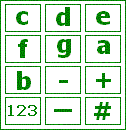
*The buttons labelled
c -
b
add a note of that letter.
*The
- and
+ buttons decrease and increase the length of
the note. Range is from 32 (shortest) to 1 (longest).
*The 123 button changes the octave of the note.
*The
_
button adds a rest.
*The
#button
toggles the whether the note is sharpened (not for e or b).
*To make a dotted note, hold down the lettered
button. (This adds on half the length again).
*Use the left and right arrow buttons to scroll
through the notes.
*Use the clear button to delete the note to the
left of the cursor.
The note
16e2
means that the note is
e, it is
16
in length and is octave
2. To enter this note, press the
e button (the 3 button) then use the
- or
+
buttons to change the length to
16. Then use the
123
button to select octave
2.
The note
2.#a1
means that the note is
#a, it is
2.
in length and is octave
1. To enter this note, press and hold down
the a button (the 6 button) then use the
- or
+
buttons to change the length to
2. Press the
#
button to make it sharp and use the
123
button to select octave
1.
The note
4-
means a rest of length
4. To insert a rest, press the
_
button (the 0 button) and change the length using the
- and
+
buttons.
To change the tempo, press the Options button
and select Tempo from the list. Select the specified tempo in this menu. |
