SC443 Computer Game Programming
Assignment #03: Where Great Minds Collide
Assignment 3 is about collision detection, and I have decided to create a maze. If we didn't used collision detection when we made a maze it would be too easy to find a way out, hehe. The maze I have created consist of 21 walls, all og them with their own bounding box. I have used the tutorial "Bounding Box Collision Detection" from http://www.ultimategameprogramming.com/ as basis for my code.
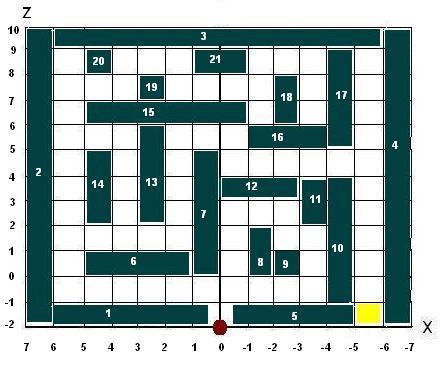
To begin with, I designed the maze,
so I knew where the walls was going to be and to easy the job of placing the
wall and their bounding box, (figure 1). Without a plan and a good design it's
easy to loose the big picture.
I've put numbers on all the walls so it's easy too keep track of them. And on
the figure, you can see that the coordinate system is righthanded, but seen from
another angle than usally. So the drawing also helped me not getting confused
^..^
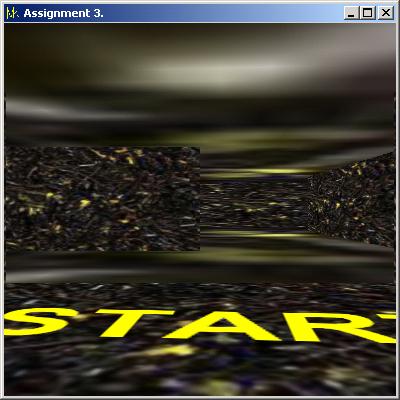
We all know a maze, so there's nothing much to explain about that, but you are the red dot and have to find your way through the maze till you get to the yellow area (in the game you will not see that, it will just say start and goal, so you don't end up walking the same way out as you came in). I made the walls, floor and roof moving so it's more interesting walking around, and it might be a bit confusing too, witch is good..
The Bounding boxes are calculated by using the max and min for the walls, testing if the "testingpoint" (you/ the camera) are in between these numberes, and if they are, we have collision and you will not be able to move further. Actually, we are not using the point of the camera, but the view-vector so we are testing a bit in front of the point, othervise we would not be able to move when a collision occurs.
Keys to be used:
[UP] Arrow = moving forward.
[DOWN] Arrow = moving back.
[LEFT] Arrow = Turn left.
[RIGHT] Arrow = Turn right.
A & D = strafing left and right accordingly.
The assignment handed out can be
seen here.
Source code and .exe file can be found here. (The
exe-file is the one called Maze with the icon MK).
A thanks to the creaters of the tutorials used for this
assignment.