|

~*~Mystique~*~
*~* Mystique *~*
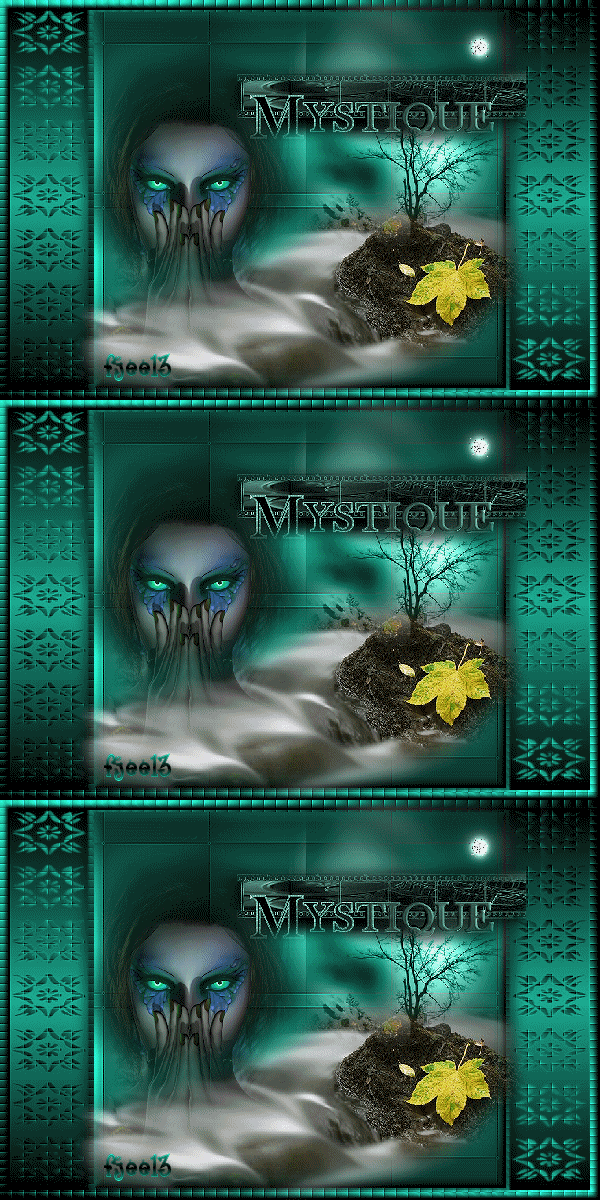
This tutorial was written for PSP 9.
A good knowledge of PSP is required.
MATERIALS NEEDED:
4 tubes of Yvonne or yourself.
1 tube-blok.
1 mask.
Everything is included in the zip.
Colorize your tube if you want to use your own.
Download the supplies here
METHOD:
Open your tubes and minimize it.
Save the mask in your mask folder.
Open a new transparent image, size 600-400 pixels.
Choose colors from your tube and make a gradient.
Yvonne used: #1DAB91 and black.
Foreground color = dark.
background = black.
Style - Linear
Angle -
45
Repeats - 1
Fill the canvas with the gradient..
Effects --> Texture Effects --> Mosaic Glass, with these settings:
50-50-83-0-0-13.
Sharpen 1x.
Selections --> Select All.
Selections --> Modify by 10.
Selections --> Invert.
Effects -- 3D Effects --> Inner Bevel, with these settings:
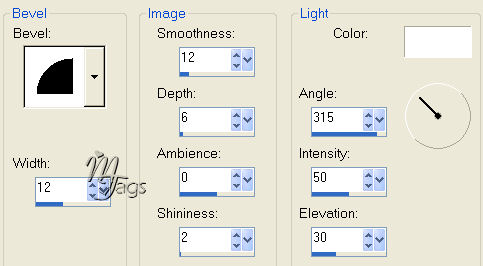
Invert the selection again.
Add a new raster layer.
Fill with the gradient, but change the
Angle to 0
Repeats - 1.
Keep selected.
Apply the 'doublefloral'- mask.
Merge Group.
Sharpen 1x.
Deselect.
Copy and paste the 'groen blok'-tube as a new layer.
Don't shift it anywhere.
Apply a drop shadow:
3-10-45-15.
Repeat with -3 and -10.
Merge all layers.
Copy and paste the 'de rocks in the mist'- tube.
Shift it to the bottom as seen in the example.
Copy and paste the 'mistique eyes'- tube.
Arrange it as seen in the example.
Copy and paste the 'green'-tube.
Drag it above the 'de rocks' tube.
Change the Blend mode of this layer to
'Luminance (Legacy).
Copy and paste the 'mistique' green' tube.
Position it in the top right corner.
The moon of the previous tube should still be visible.
Merge all layers.
Add your name.
You're finished ! :-)
Resize to 400 pixels in width.
Have fun !!
Back to Index
Click on the banner
to go to Yvonne's Dutch Tutorials
Yvonne Email
***
Updated 13th May 2007
�Magstags2005 - 2007
Home | Filter
links |
Email
|