|

Perfume
Yvonne's original Dutch tutorial can be viewed
here
***
The
tutorial can be done in any version of
PSP. An average knowledge of
PSP is required.
This tutorial was done in PSP 8
***
MATERIALS NEEDED:
6 tubes
1 gradient
1 Font
supplied by Yvonne
Download here
***
METHOD.
Open a new transparent canvas, size 500-500.
Make a gradient: Radial 45 / 3
with the colors #824C63 and #B9A3AE.
Fill the canvas with the gradient.
Effects --> 3D Effects --> Artictic Effects --> Enamel,
with these settings:
100-100-125- Angle 73.
Open the tube 'big corner' and paste as a
new layer onto the canvas.
Leave it as it is.
Duplicate this layer.
Resize to 63% (Resize all layers = not checked!)
Mirror.
Drag it to the top left corner.
Some of the first layer should still be visible.
Duplicate the mirrored layer, flip it, mirror it again
and drag it into the bottom right corner.
Set the opacity of both these layer on 70%.
Activate the Big corner layer and drag it to
the top in the Layers palette.
Merge all layers
(Layers --> Merge--> Merge All).
Copy the tube 'purple flower' and
paste as a new layer onto the canvas.
Position it to the top left.
Copy the tube 'eye' and
paste as a new layer onto the canvas.
Position it in the top right.
Copy the tube 'witte clematis'.
Paste it as a new image 210-210.
Apply a drop shadow with these settings:
3-3-40-15, color white.
Sharpen 1x.
Add a new raster layer.
Fill with the gradient.
Drag this layer below the flower layer.
Add a 3 pixel border and fill with the
'mqc mandy'- gradient.
Radial, Angle 0, Repeats 1.
Apply the standard metallic inner bevel.
Sharpen 1x.
Deselect.
Add a 3 pixel border.
Select and fill with the ' mandy' -gradient.
Add a 3 pixel border.
Select, fill with the ' mandy' - gradient
and apply the metallic inner bevel.
Copy the flower tag.
Activate your first image and copy.
Paste as a new layer onto the canvas.
Drag it to the right corner.
Duplicate this layer and resize to 63%.
Drag it below the first flower and position it
somewhat to the left of the first.
Duplicate the resized layer.
Resize this layer again to 63%.
Drag this layer below the other layers
(in the Layers palette)
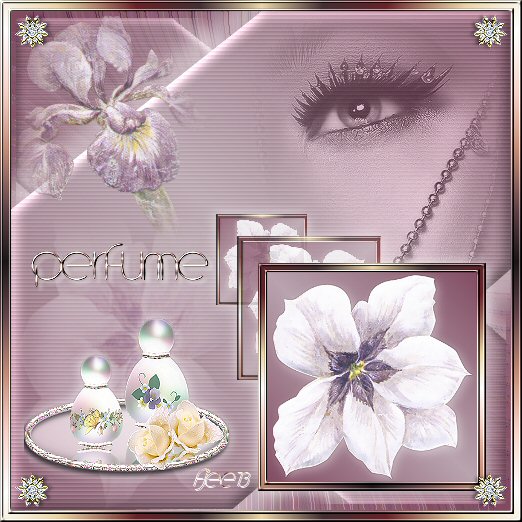
See the example tag.
Merge the bottom 3 layers and
apply the same drop shadow as before.
Repeat the drop shadow but with
V & H on minus 3.
Activate the tube ' witte clematis' again.
Mirror and copy.
Draw a selection in the bottom corner of the canvas
with the Selection Tool - with feather on 33.
Add a new raster layer.
Paste the tube into the selection.
Reduce the opacity of this layer to 68 %
in the Layers palette.
Change the blend mode of the layer to 'Soft Light'.
Copy the tube 'perfumebottles' and
paste as a new layer onto the canvas.
Drag it to the bottom left.
Merge all layers.
Add a 3 pixel border.
Select and fill with the 'mandy'-gradient.
Apply the metallic inner bevel (standard)
Add a 5 pixel border.
Select and fill with the gradient,
and apply the same inner bevel.
Copy the tube 'rondje corner' (round corner)
Paste it onto the canvas and apply it to all 4 corners.
The tag is finished :-)
Back to Index
Click on the banner
to go to Yvonne's Dutch Tutorials
Yvonne's tutorials is available on Lisa's website.
You
can email Lisa if you have any enquiries.
Yvonne Email
***

Updated 13th May 2007
�Magstags2005 - 2007
Home | Filter
links |
Email
|