|

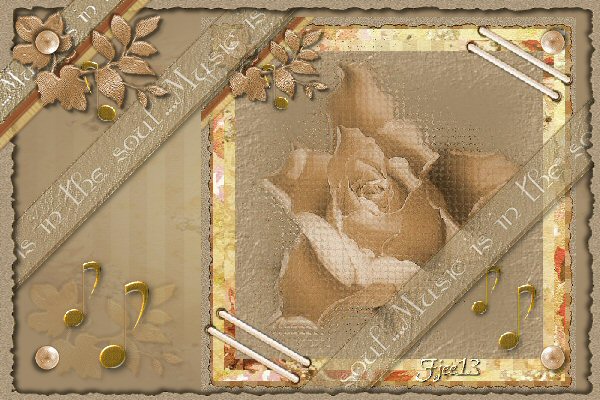
Music Scrap
***
The
tutorial can be done in any version of
PSP. An average knowledge of
PSP is required.
This tutorial was done in PSP 8
***
MATERIALS NEEDED:
15 tubes supplied by Yvonne
Download here
***
METHOD.
Open a new transparent canvas, size 500-500.
Open the ' ruitjes' image.
Find the ' ruitjes' pattern now
in the color palette.
Fill the canvas with the pattern.
Selections --> Select All
Selections --> Modify --> Contract by 15.
Add a new raster layer.
Open the 'bloemen' jpg.
Find it in the patterns window
of the color palette.
Fill the layer with the flower pattern.
Deselect.
Selections --> Select All
Selections --> Modify --> Contract by 30.
Add a new raster layer.
Fill the layer with the 'bloemen streepjes'
( striped flower) pattern.
Deselect.
Selections --> Select All
Selections --> Modify --> Contract by 45.
Add a new raster layer.
Fill the selection with the 'bruin' jpg pattern.
Copy the tube 'bruin randje' (brown border) and
paste as a new layer onto the canvas.
Leave it as it is.
Merge all layers
(Layers --> Merge--> Merge All).
Copy the tube 'fade' and
paste as a new layer onto the canvas.
Copy the tube 'mmcc' and
paste as a new layer onto the canvas.
Duplicate this layer and activate the first tube layer.
Apply Effects --> Texture Effects -->
Mosaic Glass - standard settings.
Activate the copy layer of the tube
and reduce the opacity of the layer to 70%
in the Layers palette.
Copy the tube 'muzieknoot' (music note) and
paste as a new layer onto the canvas.
Duplicate this layer.
Resize this layer to 75 %.
Leave it as it is.
Copy the corner tube, and
paste as a new layer onto the canvas.
Drag it to the top left corner.
Copy the tube 'ribbon2'.
and paste as a new layer onto the canvas.
Drag it to the top right corner.
Duplicate the layer.
Mirror and Flip.
It will be down in the bottom corner now.
Merge all layers.
Open a new transparent canvas, size 600-400.
Fill with the color #A08969.
Add a new raster layer.
Selections --> Select All.
Copy the striped flower image.
Paste into the selection on the bigger canvas.
Apply the 20-20 mask with 'Invert' not checked.
Merge the masked layer and
reduce the opacity of this layer to 40%.
Copy the tube 'music ribbon' and
paste as a new layer onto the canvas.
Drag it to the top and leave a little space open
at the top.
Apply a drop shadow: 3-3-61-6.
Duplicate this layer and drag it to the bottom.
Position the music tube where you prefer it.
Merge the 2 music tubes layers.
Rotate the image 45 degrees to the left
( 'all layers ' = NOT CHECKED! :-)
Add a new raster layer.
Selections --> Select All.
Copy the tube 'bruin randje' (brown border)
and paste into the selection.
Reduce the first image size to 75%.
Copy and paste as a new layer onto the bigger canvas.
Drag this layer below the other two
layers in the Layers palette.
Position it in the bottom right corner.
Activate the music ribbon layer.
Set the opacity on 60%.
Merge all layers.
Copy the tube 'blaate' and
paste as a new layer onto the canvas.
Drag it to the bottom left.
Opacity on 40%.
Blend mode on 'Soft Light'.
Copy the tube 'muzieknoot' and
paste as a new layer onto the canvas.
Drag it to the bottom left corner.
Duplicate this layer and reduce to 75 %.
Drag it to the top left, above the other note.
Copy the tube 'perle' and
paste as a new layer onto the canvas.
Position onto the other pearl.
Duplicate and mirror the pearl.
Position them in all the other corners.
Merge all layers.
Add your name and the scrap is finished :-)!
Back to Index
Click on the banner
to go to Yvonne's Dutch Tutorials
Yvonne Email
***
Updated 13th May 2007
�Magstags2005 - 2007
Home |
Filter links |
PSP Goodies
|