|

Love You
***
The
tutorial can be done in any version of
PSP. An average knowledge of
PSP is required.
This tutorial was done in PSP 8
***
MATERIALS NEEDED:
9 tubes supplied by Yvonne
Download here
METHOD.
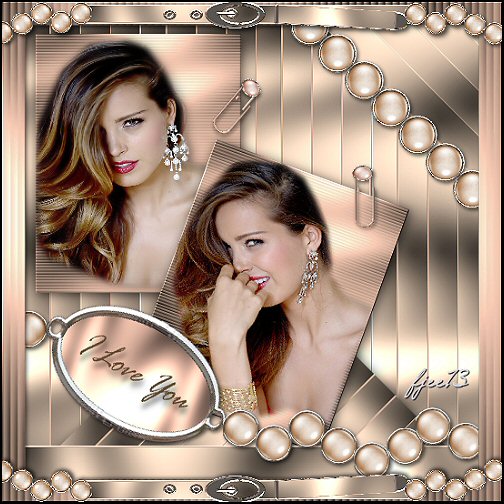
Open a new transparent canvas, size 500-500.
Copy the 'Background1' image and
paste as a new layer onto the canvas.
Duplicate this layer.
Rotate 45 degrees - 'all layers' NOT CHECKED.
Drag this layer to the bottom so that
it covers the other layer to the right and left.
Apply a drop shadow with these settings: 2-2-60-17.
Copy 'background2' and
paste as a new layer onto the canvas.
Drag it to the top right corner.
Leave a small space at the top and the left.
Copy the tube 'face1' and
paste as a new layer onto the canvas.
Position her on the background.
Merge these two layers and apply a drop shadow.
Copy 'background 2' again and
paste as a new layer onto the canvas again.
Copy the tube 'face2' and
paste as a new layer onto the canvas.
Drag it onto the background.
Merge these two layers.
Rotate 20 degrees to the right, 'all layers' = NOT CHECKED.
Sharpen 1x.
Apply the same drop shadow.
Copy the tube 'clip' and
paste as a new layer onto the canvas.
Drag it onto image 2.
Duplicate this layer and rotate it 40 degrees to the right.
Drag this one onto the first image.
Copy the tube 'lint' and
paste as a new layer onto the canvas.
Drag it to the bottom.
Duplicate this layer.
Rotate 45 degrees to the right.
Position it in the top right corner.
Duplicate and drag this layer into the corner
so that it fills the corner nicely.
It can even be as many as 4x.
Copy the tube 'iloveyou' and
paste as a new layer onto the canvas.
Drag it to the bottom.
Copy the tube 'bolletjes' and
paste as a new layer onto the canvas.
Position it in the top right of the canvas.
Merge all layers
(Layers --> Merge--> Merge All).
Add a 25 pixels border.
Copy the tube 'frame' and
paste as a new layer onto the canvas.
Add a 2 pixel black border.
Add your name.
The tag is finished! ;-)
Back to Index
Click on the banner
to go to Yvonne's Dutch Tutorials
Yvonne's tutorials is available on Lisa's website.
Yvonne Email
***

Updated 13th May 2007
�Magstags2005 - 2007
Home | Filter
links |
Email
|