|

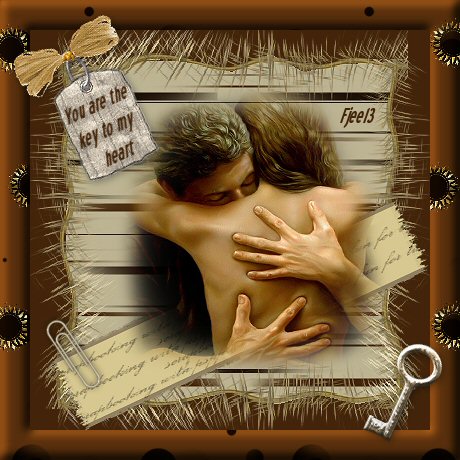
Key To My Heart
***
The
tutorial can be done in any version of
PSP. An average knowledge of
PSP is required.
This tutorial was done in PSP 8
***
MATERIALS NEEDED:
2 tubes.
scrap kit
supplied by Yvonne
Download here
***
METHOD.
Open a new transparent canvas, size 400-400.
Copy from the scrap set 'lijn 2'(line 2) and
paste as a new layer onto the canvas.
Make a border with it by applying it to
all 4 corners.
Merge all 4 layers.
Copy 'back3' and
paste as a new layer onto the canvas.
Drag this layer below the border layer in the Layers palette.
Use the lasso tool to remove the excess.
Follow the border carefully with the lasso for this purpose.
If you removed too much, you can set the
layer opacity to 70% in the Layers palette.
Sharpen 1x.
Merge the 2 layers.
Add a new raster layer.
Fill with the color #43240A.
Drag it below the first layer
in the Layers palette.
Activate the top layer again.
Copy the tube 'image' and
paste as a new layer onto the canvas.
Copy the 'band' from the scrap set and
paste as a new layer onto the canvas.
Rotate it 25 degrees to the left.
Sharpen 1x.
Drag the man/woman layer to the top.
Position it as seen in the example tag.
Copy the paperclip and
paste as a new layer onto the canvas.
Mirror this layer and position it
right on the edge of the band.
Merge all layers.
Copy the tube 'label' from the scrap set and
paste as a new layer onto the canvas.
Rotate 25 degrees to the left and sharpen 1x.
Apply a drop shadow: 2-2-34-11.
Copy the 'font' ( text) image and
paste as a new layer onto the canvas.
Drag it onto the label.
Merge all layers
(Layers --> Merge--> Merge All).
Copy the images in the scrap set 'back2' and
paste as a new layer onto the canvas.
Find the pattern in the patterns of the color palette.
Change the scale to 80.
Add a 30 pixel border.
Select and fill with the pattern.
Apply Effects --> 3D Effects --> Inner Bevel,
with these settings: Bevel 2, 10-40-4-0-10-315-50-35.
Repeat one more time.
Copy the tube 'sleutel' (key) and
paste as a new layer onto the canvas.
Rotate this layer (only) with 25 degrees to the right.
Sharpen 1x.
Drag it to the bottom right corner.
Copy the tube 'strik' (bow) and
paste as a new layer onto the canvas.
Rotate 25 degrees to the left and position it onto the label.
Remove the excess raffia.
Merge all layers.
Copy the 'zongoud' from the scrap set image and
paste as a new layer onto the canvas.
Resize to 50%.
Drag the little 'sunlets' onto the black dots (balls) on the borders of the
canvas as seen in the example.
Shift them so that some of the sunlets are cut off
at the edges.
Add your name and your tag is finished! :)
Back to Index
Click on the banner
to go to Yvonne's Dutch Tutorials
Yvonne Email
***
Updated 13th May 2007
�Magstags2005 - 2007
Home | Filter
links |
Email
|