|

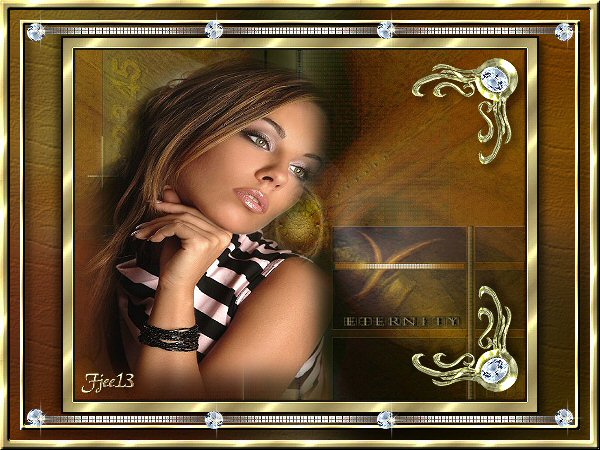
Eternity
***
The
tutorial can be done in any version of
PSP. An average knowledge of
PSP is required.
This tutorial was done in PSP 8
***
MATERIALS NEEDED:
3 tubes
1 background
supplied by Yvonne
Download here
***
METHOD.
Open a new transparent canvas, size 450-350.
Selections --> Select All.
Copy the 'achtergrond' (background) image
and paste into the selection.
Copy the tube 'jennifer' and
paste as a new layer onto the canvas.
Shift it a little to the left.
Apply a drop shadow: 5-5-50-10.
Copy the tube 'corner' and
paste as a new layer onto the canvas.
Drag to the top right corner.
Duplicate this layer and flip.
Merge all layers
(Layers --> Merge--> Merge All).
Add a 2 pixel black border.
Add a 10 pixel white border.
Select and fill with a gold pattern.
Sharpen 3x.
Add a 2 pixel black border.
Minimize this image for now.
Open a new transparent image, size 450-350.
Selections --> Select All.
Copy your background and paste into the selection.
Apply a Gaussian blur of 15.
Effects --> Texture effect with standard settings.
Add a new raster layer.
Selections --> Select All.
Fill with the gold pattern.
Selections --> Select All
Selections --> Modify --> Contract by 10.
Press the delete key on the keyboard.
Selections --> Select All
Selections --> Invert.
Apply Effects --> 3D Effects --> Inner Bevel,
with the standard settings,
but the depth and width should be 3.
Sharpen 3x.
Add a new raster layer.
Selections --> Select All
Selections --> Modify --> Contract by 20.
Fill with the gold pattern.
Selections --> Select All
Selections --> Modify --> Contract by 5.
Press the delete key.
Deselect.
Apply the same inner bevel as before.
Sharpen 3x and apply a drop shadow.
Merge all layers.
Copy your first image and
paste as a new layer onto the canvas.
Apply the same drop shadow as before.
Repeat with V & H on minus 5.
Copy the tube 'border' and
paste as a new layer onto the canvas.
Position it at the top as seen
in the example.
Add your name.
Merge all layers.
You are finished :)
Back to Index
Click on the banner
to go to Yvonne's Dutch Tutorials
Yvonne's tutorials is available on Lisa's website.
Yvonne Email
***
Updated 13th May 2007
�Magstags2005 - 2007
Home | Filter
links |
Email
|