|
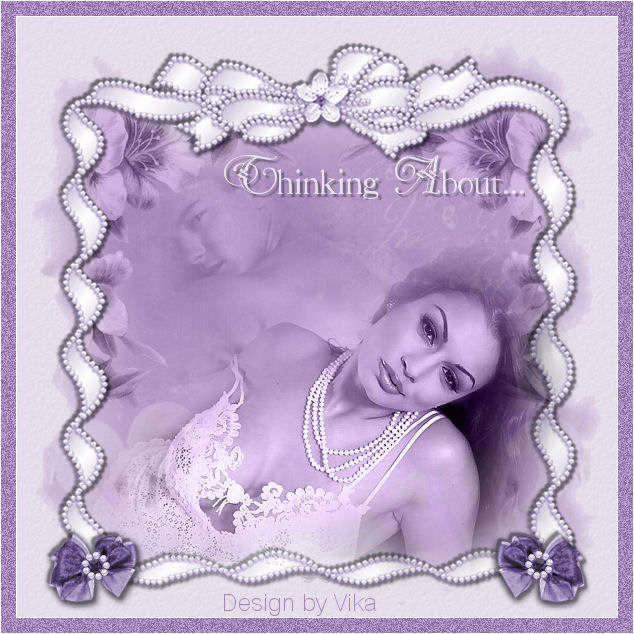
~*~ Thinking About .. ~*~
Vika's original Dutch tutorials
can be viewed
here
Terms
of
Use
None
of the
images
used
in
these
tutorials,
which is offered for download in the zip files,
nor the tutorial results may
be
used
for
any
commercial
purposes
in
any form whatsoever
!!
The
copyright
remains
with
the
original
artists
and
are
protected
by
international
copyright
laws.
Artwork used in the tutorials is used for
educational purposes only.
Copyright of the tag design remains solely with
the tutorial writer.
You cannot claim the tag design or tag results as
your own or sell it as your own.
You cannot sell the images used in the tutorials
as part of a web design or web sets or anything
else.
NOTHING CAN BE SOLD!!
Kindly report any illegal sale of the tutorial
results or material to
Maggie
Magstags
Download the supplies
here
***
FILTERS NEEDED:
DSB Flux - Bright Noise
***
Change the foreground color to # a685ba,
background color to white.
1.Open a new white canvas, size 600-600.
Add a new raster layer.
Fill with the foreground color.
2. Layers - Load/Save Mask - Load Mask From Disk:
find 'CreativeDesireMask21' and apply.
Merge the group layer in the Layers palette.
3. Activate the background layer in the Layers
palette.
Add a new raster layer.
Fill with the foreground color.
Change the layer opacity in the Layers palette to
28.
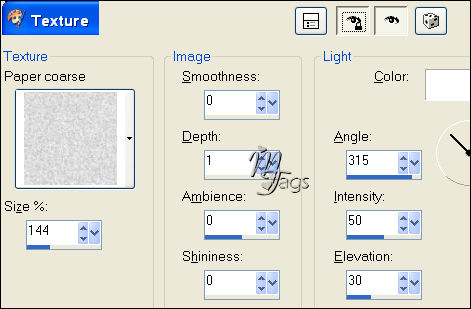
Effects - Texture Effects - Texture: Paper Coarse:
4.Layers - Merge - Merge All
5.Open tube pink elements
Activate the bottom layer in the Layers
palette(frame).
Edit - Copy
Edit - Paste as a new layer onto the canvas
Image - Resize to 110%.
'Resize all layers'= not checked.
Repeat 1x.
Adjust - Hue and Saturation - Colorize (or Shift
+L):

Effects - 3D Effects - Drop Shadow:
3 / 3/ 50 / 2 / color black.
Repeat with V& H on -3
6.Open tube Hunk 124
Edit - Copy
Edit - Paste as a new layer onto the canvas
Move it to the bottom and the left.
Change the Blend mode to Luminance(Legacy)
in the Layers palette.
Change the layer opacity in the Layers palette to
28%.
Erase the parts that falls outside the pearls.
7. Open tube Sassyillusions
Edit - Copy
Edit - Paste as a new layer onto the canvas
Change the Blend mode to Luminance(Legacy)
Move it to the bottom.
8.Open tube strikje(bow)
Edit - Copy
Edit - Paste as a new layer onto the canvas
Move it to the bottom left.
Duplicate layer
Image - Mirror
Layers - Merge - Merge Down
Repeat the same drop shadow as before.
9.Open tube parel rondje
Edit - Copy
Edit - Paste as a new layer onto the canvas
Move it onto the center of the bow.
Duplicate layer
Image - Mirror
10.Open tube Ranke
Edit - Copy
Edit - Paste as a new layer onto the canvas
Drag this layer below raster 1 in the Layers
palette.
Change the Blend mode to Luminance(Legacy)
Erase the parts outside the pearls again.
Duplicate layer
Image - Mirror
Layers - Merge - Merge Down
Change the layer opacity in the Layers palette to
63%.
You can arrange the man and woman-tubes where you
like it.
11. Layers - Merge - Merge All
12. Open tube Thinking About-Vika
Edit - Copy
Edit - Paste as a new layer onto the canvas
Position it as in the tag example.
Layer opacity on 73.
13. Image - Add Borders:
1 pixel white
15 pixel foreground color
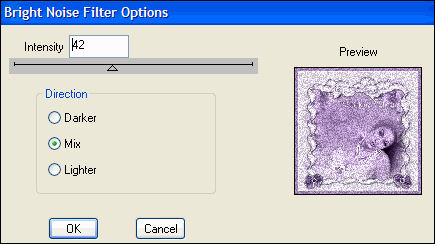
Select the border with the Magic Wand
Effects - Filter Effects - DSB Flux - Bright
Noise:
Selections - Select None
Add a 1 pixel white border.
Add your name and you are finished! :)
********************
Vika
April 2007

Email
Maggie
at Magstags
Email
Vika
Translated 30th May 2007

Website design and management by
©Magstags
Home |
Filter links |
PSP Goodies |